"Which environment did that migration just run against?"
I stared at my colleague's Slack message with the sinking feeling you get when you realize you might have just updated production instead of staging.
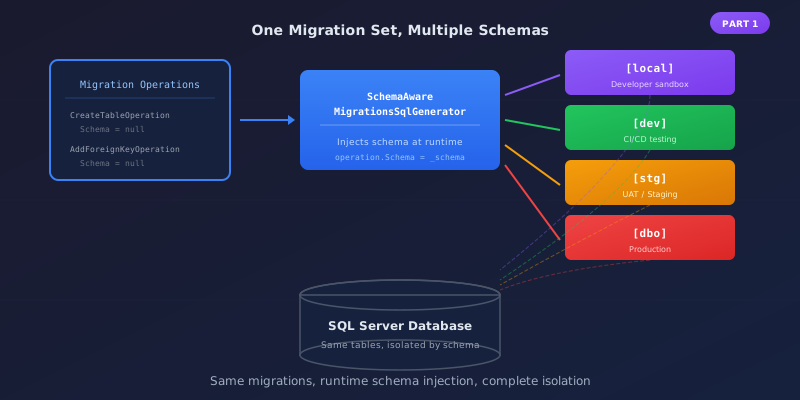
We were sharing a SQL Server, using different schemas to isolate environments: [local] for developer sandboxes, [dev] for development, [stg] for staging, and [prod] for production. It was elegant in theory—one database server, complete isolation, easy to compare data across environments.
In practice, EF Core didn't get the memo.
The Problem: Schemas Are Baked In
Here's the thing about EF Core migrations that nobody tells you upfront: the schema is determined when you generate the migration, not when you apply it.
When you run dotnet ef migrations add CreateWorkOrders, EF Core creates a migration file with operations like:
migrationBuilder.CreateTable(
    name: "WorkOrders",
    // Notice: no schema specified - defaults to dbo
    columns: table => new { ... });
No schema means dbo. Always. It doesn't matter what environment you're in when you run the migration—if the migration file says "no schema," you're getting dbo.
Why The Obvious Solutions Don't Work
Generate separate migrations per environment? Maintenance nightmare. Every schema change means updating four migration files.
Hardcode schema in the migration? Same problem, plus you have to remember to change it. Spoiler: you won't.
Use HasDefaultSchema() in OnModelCreating? This affects queries, not migrations. Your SELECT statements will target the right schema, but CREATE TABLE already happened in dbo.
I spent two days on these dead ends before finding the real solution.
The Insight: SQL Generation Is Pluggable
When you call MigrateAsync(), here's what happens:
- EF Core loads the migration classes
- Each migration's
Up()method generatesMigrationOperationobjects - A SQL generator converts those operations into actual SQL
- The SQL executes against your database
That SQL generator is a replaceable service. I can intercept operations after the migration defines them but before they become SQL, and inject the correct schema at runtime.
The Custom SQL Generator
Here's the core of it. We inherit from SqlServerMigrationsSqlGenerator and override Generate:
public class SchemaAwareMigrationsSqlGenerator : SqlServerMigrationsSqlGenerator
{
    private readonly string _schema;

    public SchemaAwareMigrationsSqlGenerator(
        MigrationsSqlGeneratorDependencies dependencies,
        ICommandBatchPreparer batchPreparer,
        IOptions<DatabaseSettings> settings)
        : base(dependencies, batchPreparer)
    {
        _schema = settings.Value.Schema;
    }

    public override IReadOnlyList<MigrationCommand> Generate(
        IReadOnlyList<MigrationOperation> operations,
        IModel? model,
        MigrationsSqlGenerationOptions options = default)
    {
        if (!string.IsNullOrEmpty(_schema) && _schema != "dbo")
        {
            foreach (var op in operations)
                ApplySchema(op);
        }

        return base.Generate(operations, model, options);
    }

    private void ApplySchema(MigrationOperation operation)
    {
        switch (operation)
        {
            case CreateTableOperation op when string.IsNullOrEmpty(op.Schema):
                op.Schema = _schema;
                // Foreign keys embedded in table creation need schema too
                foreach (var fk in op.ForeignKeys)
                {
                    if (string.IsNullOrEmpty(fk.Schema)) fk.Schema = _schema;
                    if (string.IsNullOrEmpty(fk.PrincipalSchema)) fk.PrincipalSchema = _schema;
                }
                break;

            case AddColumnOperation op when string.IsNullOrEmpty(op.Schema):
                op.Schema = _schema;
                break;

            case CreateIndexOperation op when string.IsNullOrEmpty(op.Schema):
                op.Schema = _schema;
                break;

            case AddForeignKeyOperation op when string.IsNullOrEmpty(op.Schema):
                op.Schema = _schema;
                if (string.IsNullOrEmpty(op.PrincipalSchema))
                    op.PrincipalSchema = _schema;  // This one bit me HARD
                break;

            case DropTableOperation op when string.IsNullOrEmpty(op.Schema):
                op.Schema = _schema;
                break;

            // Add cases for other operations as needed...
        }
    }
}
The PrincipalSchema on foreign keys is the gotcha that cost me hours. If you set the schema on the FK but not on the referenced table, you get:
Foreign key 'FK_AspNetRoleClaims_AspNetRoles_RoleId' references invalid table 'AspNetRoles'
Because it's looking for [dbo].AspNetRoles, which doesn't exist—your roles are in [dev].
Wiring It Up
Register the custom generator and pass the schema through:
public static DbContextOptionsBuilder UseSchemaAwareMigrations(
    this DbContextOptionsBuilder builder, string schema)
{
    builder.ReplaceService<IMigrationsSqlGenerator, SchemaAwareMigrationsSqlGenerator>();

    // Pass schema via options - your DatabaseSettings class
    builder.AddOrUpdateExtension(new SchemaOptionsExtension(schema));

    return builder;
}
Then in your DbContext setup:
optionsBuilder
    .UseSqlServer(connectionString, sql =>
    {
        // Migration history table goes in the schema too!
        sql.MigrationsHistoryTable("__EFMigrationsHistory", schema);
    })
    .UseSchemaAwareMigrations(schema);
Don't Forget the Migration History
EF Core tracks applied migrations in __EFMigrationsHistory. By default, that's in dbo. If you want true isolation, each schema needs its own history table:
sql.MigrationsHistoryTable("__EFMigrationsHistory", schema);
Otherwise you get one shared history causing "migration already applied" conflicts across environments.
SQL Scripts Need Love Too
Raw SQL in migrations (seed data, etc.) also has hardcoded schemas. I use two patterns:
Environment-specific scripts: SeedData.dev.sql and SeedData.prod.sql with schemas baked in.
Templated scripts: Use a {{SCHEMA}} placeholder:
INSERT INTO {{SCHEMA}}Roles (Id, Name) VALUES (1, 'Admin');
Replace at runtime:
var schemaPrefix = schema == "dbo" ? "" : $"[{schema}].";
return sql.Replace("{{SCHEMA}}", schemaPrefix);
HasDefaultSchema Still Matters
The SQL generator handles migrations. But for runtime queries, you still need:
protected override void OnModelCreating(ModelBuilder builder)
{
    if (!string.IsNullOrEmpty(_schema))
        builder.HasDefaultSchema(_schema);
}
Without this, your SELECT statements look for tables in the wrong schema. All environments use explicit named schemas—no special cases.
Important caveat (February 2026): Keep HasDefaultSchema() runtime-only. If called at design-time, the schema gets baked into the migration snapshot (ApplicationDbContextModelSnapshot.cs), causing PendingModelChangesWarning when running with different schemas. Pass empty schema to DatabaseSettings in DesignTimeDbContextFactory so the snapshot stays schema-less. See Part 4 for the complete solution.
Running Migrations
With all this in place:
# Local schema
$env:ASPNETCORE_ENVIRONMENT = "Local"
dotnet ef database update

# Staging schema
$env:ASPNETCORE_ENVIRONMENT = "Staging"
dotnet ef database update
Same migrations, different schemas. The SQL generator handles the transformation.
The Gotchas
Create schemas first: Custom schemas don't exist by default:
await connection.ExecuteAsync($@"
    IF NOT EXISTS (SELECT 1 FROM sys.schemas WHERE name = '{schema}')
        EXEC('CREATE SCHEMA [{schema}]')");
Test thoroughly: Run migrations against all environments and verify tables ended up in the right schemas. Check INFORMATION_SCHEMA.TABLES if something looks wrong.
The Payoff
One set of migrations. One set of seed scripts. Deployed everywhere with environment-appropriate schemas.
No more "which schema did that hit?" moments. No more maintaining four copies of every migration. No more late-night Slack messages asking if you just broke production.
Schema-Aware EF Core Migrations series:
- Schema-Aware Migrations - The custom SQL generator approach (this post)
- The MigrationsHistoryTable Bug - Why history table schema matters
- Hardening Schema Migrations - Tests that let you sleep at night
- The Model Cache Key Factory - Preventing false PendingModelChangesWarning
- The Design-Time vs Runtime Mental Model - Why schema handling is actually two systems
Note: Updated February 2026 to reflect using explicit named schemas for all environments (local, dev, stg, prod).
This pattern is also part of the Enterprise Database Patterns trilogy:
- Modern Database Testing - Real database testing with xUnit and Respawn
- Encrypted Configuration - Database-backed secrets with AES-256 encryption
- Schema-Aware Migrations - Multi-environment isolation in shared databases
Together, they give you a robust foundation for enterprise database management. The upfront complexity pays dividends every time you onboard a new developer or spin up a new environment.
And most importantly: you'll always know which schema you just migrated.


