Part 3 of the Schema-Aware EF Core Migrations series. Read Part 1 and Part 2 first.
After spending days chasing schema bugs one-by-one, we realized something uncomfortable: we had no systematic way to verify our schema configuration was correct. Each fix felt like whack-a-mole. The only way we knew something was broken was when it broke in production.
This post covers how we hardened our schema-aware migrations with tests and verification that give us actual confidence.
The Problem: Configuration Scattered Everywhere
Schema-aware migrations require configuration in multiple places:
| Location | What It Configures |
|---|---|
DesignTimeDbContextFactory |
Migrations (design-time) |
Program.cs |
Runtime DbContext |
ApplicationDbContext.OnModelCreating |
Default schema for queries |
MigrationHelper |
Seed script schema prefixes |
appsettings.{env}.json |
Schema setting per environment |
Miss any one and you get subtle failures. Our bugs came from:
- MigrationsHistoryTable not set at design time → migrations checked wrong schema
- UseSchemaAwareMigrations not registered at design time → tables created in dbo
- MigrationsHistoryTable not set at runtime → health check reported pending migrations
- MigrationHelper environment mapping wrong → seed scripts used wrong schema
Each was a different configuration point. Each required different knowledge to debug.
Strategy 1: Unit Tests for Configuration Consistency
Test that all the schema mappings agree with each other:
public class SchemaConfigurationTests
{
    [Theory]
    [InlineData("Local", "local", "local")]
    [InlineData("Development", "dev", "dev")]
    [InlineData("Staging", "stg", "stg")]
    [InlineData("Production", "prod", "prod")]
    public void AllSchemaConfigurations_AreConsistent(
        string environment,
        string expectedSchema,
        string expectedMigrationEnv)
    {
        // Arrange
        Environment.SetEnvironmentVariable("ASPNETCORE_ENVIRONMENT", environment);

        // Act - DesignTimeDbContextFactory schema
        var factory = new DesignTimeDbContextFactory();
        using var context = factory.CreateDbContext([]);

        // Assert - All configurations must agree
        Assert.Equal(expectedSchema, context.Schema);
        Assert.Equal(expectedMigrationEnv, MigrationHelper.Environment);
    }

    [Fact]
    public void RuntimeAndDesignTime_UseSameHistoryTableSchema()
    {
        // This test verifies Program.cs and DesignTimeDbContextFactory
        // are configured to look at the same migrations history table

        Environment.SetEnvironmentVariable("ASPNETCORE_ENVIRONMENT", "Staging");

        // Get design-time configuration
        var factory = new DesignTimeDbContextFactory();
        using var designTimeContext = factory.CreateDbContext([]);

        // Get runtime configuration (simulated)
        var runtimeSchema = "stg"; // From appsettings.Staging.json

        Assert.Equal(designTimeContext.Schema, runtimeSchema);
    }
}
Strategy 2: Integration Tests That Verify Actual Database State
Unit tests verify configuration logic. Integration tests verify the actual outcome:
public class SchemaMigrationIntegrationTests : IAsyncLifetime
{
    private const string TestSchema = "test_integration";
    private string _connectionString = null!;

    public async Task InitializeAsync()
    {
        _connectionString = GetTestConnectionString();

        // Run migrations against test schema
        Environment.SetEnvironmentVariable("ASPNETCORE_ENVIRONMENT", "Test");

        var factory = new DesignTimeDbContextFactory();
        using var context = factory.CreateDbContext([]);
        await context.Database.MigrateAsync();
    }

    [Fact]
    public async Task MigrationsCreateTablesInCorrectSchema()
    {
        await using var connection = new SqlConnection(_connectionString);
        await connection.OpenAsync();

        // Query actual table locations
        var tables = await connection.QueryAsync<string>(
            @"SELECT TABLE_NAME FROM INFORMATION_SCHEMA.TABLES
              WHERE TABLE_SCHEMA = @Schema AND TABLE_TYPE = 'BASE TABLE'",
            new { Schema = TestSchema });

        var tableList = tables.ToList();

        // Assert all expected tables exist in correct schema
        Assert.Contains("AspNetUsers", tableList);
        Assert.Contains("AspNetRoles", tableList);
        Assert.Contains("CrewMembers", tableList);
        Assert.Contains("WorkOrders", tableList);
        Assert.Contains("__EFMigrationsHistory", tableList);
    }

    [Fact]
    public async Task NoTablesCreatedInDboSchema()
    {
        await using var connection = new SqlConnection(_connectionString);
        await connection.OpenAsync();

        // Check for orphaned tables in dbo
        var orphanedTables = await connection.QueryAsync<string>(
            @"SELECT TABLE_NAME FROM INFORMATION_SCHEMA.TABLES
              WHERE TABLE_SCHEMA = 'dbo'
              AND TABLE_NAME IN ('AspNetUsers', 'CrewMembers', 'WorkOrders')");

        Assert.Empty(orphanedTables);
    }

    [Fact]
    public async Task MigrationsHistoryInCorrectSchema()
    {
        await using var connection = new SqlConnection(_connectionString);
        await connection.OpenAsync();

        // Verify history table exists in test schema
        var historyExists = await connection.ExecuteScalarAsync<int>(
            @"SELECT COUNT(*) FROM INFORMATION_SCHEMA.TABLES
              WHERE TABLE_SCHEMA = @Schema AND TABLE_NAME = '__EFMigrationsHistory'",
            new { Schema = TestSchema });

        Assert.Equal(1, historyExists);

        // Verify migrations are recorded
        var migrationCount = await connection.ExecuteScalarAsync<int>(
            $"SELECT COUNT(*) FROM [{TestSchema}].[__EFMigrationsHistory]");

        Assert.True(migrationCount > 0, "No migrations recorded in history table");
    }

    public async Task DisposeAsync()
    {
        // Clean up test schema - SQL Server requires dropping objects first
        await using var connection = new SqlConnection(_connectionString);
        await connection.OpenAsync();

        // Drop all tables in test schema, then the schema itself
        await connection.ExecuteAsync($@"
            DECLARE @sql NVARCHAR(MAX) = '';

            -- Drop all foreign keys first
            SELECT @sql += 'ALTER TABLE [' + s.name + '].[' + t.name + '] DROP CONSTRAINT [' + f.name + '];'
            FROM sys.foreign_keys f
            JOIN sys.tables t ON f.parent_object_id = t.object_id
            JOIN sys.schemas s ON t.schema_id = s.schema_id
            WHERE s.name = '{TestSchema}';
            EXEC sp_executesql @sql;

            -- Drop all tables
            SET @sql = '';
            SELECT @sql += 'DROP TABLE [' + s.name + '].[' + t.name + '];'
            FROM sys.tables t
            JOIN sys.schemas s ON t.schema_id = s.schema_id
            WHERE s.name = '{TestSchema}';
            EXEC sp_executesql @sql;

            -- Drop schema
            IF EXISTS (SELECT 1 FROM sys.schemas WHERE name = '{TestSchema}')
                DROP SCHEMA [{TestSchema}];
        ");
    }
}
Strategy 3: CI Workflow Verification Steps
Add explicit verification after migrations in CI:
# In deploy-development.yml and deploy-staging.yml
- name: Verify schema after migrations
  if: ${{ vars.DEV_DEPLOY_ENABLED == 'true' }}
  run: |
    echo "Verifying tables exist in correct schema..."

    # Query table count in expected schema
    TABLE_COUNT=$(sqlcmd -S "$DB_SERVER" -d "$DB_NAME" -U "$DB_USER" -P "$DB_PASS" \
      -Q "SET NOCOUNT ON; SELECT COUNT(*) FROM INFORMATION_SCHEMA.TABLES WHERE TABLE_SCHEMA = '$EXPECTED_SCHEMA'" \
      -h -1)

    echo "Found $TABLE_COUNT tables in $EXPECTED_SCHEMA schema"

    if [ "$TABLE_COUNT" -lt 15 ]; then
      echo "::error::Expected at least 15 tables in $EXPECTED_SCHEMA schema, found $TABLE_COUNT"
      exit 1
    fi

    # Verify NO orphaned tables in dbo (for non-prod)
    ORPHAN_COUNT=$(sqlcmd -S "$DB_SERVER" -d "$DB_NAME" -U "$DB_USER" -P "$DB_PASS" \
      -Q "SET NOCOUNT ON; SELECT COUNT(*) FROM INFORMATION_SCHEMA.TABLES WHERE TABLE_SCHEMA = 'dbo' AND TABLE_NAME LIKE 'AspNet%'" \
      -h -1)

    if [ "$ORPHAN_COUNT" -gt 0 ]; then
      echo "::error::Found $ORPHAN_COUNT orphaned Identity tables in dbo schema"
      exit 1
    fi

    echo "Schema verification passed!"
  env:
    EXPECTED_SCHEMA: dev  # or stg for staging
Strategy 4: Enhanced Health Check with Schema Validation
Make the health check fail loudly if schema is misconfigured:
public class SchemaHealthCheck : IHealthCheck
{
    private readonly ApplicationDbContext _context;
    private readonly IOptions<DatabaseSettings> _settings;

    public async Task<HealthCheckResult> CheckHealthAsync(
        HealthCheckContext context,
        CancellationToken cancellationToken = default)
    {
        var expectedSchema = _settings.Value.Schema ?? "dbo";
        var errors = new List<string>();

        // 1. Verify migrations history table is in expected schema
        var historyTableSchema = await GetMigrationsHistorySchema(cancellationToken);
        if (historyTableSchema != expectedSchema)
        {
            errors.Add($"MigrationsHistory in '{historyTableSchema}' but expected '{expectedSchema}'");
        }

        // 2. Verify key tables exist in expected schema
        var tableCheck = await CheckTablesExist(expectedSchema, cancellationToken);
        if (!tableCheck.Success)
        {
            errors.Add(tableCheck.Error);
        }

        // 3. Verify HasDefaultSchema matches configuration
        var modelSchema = _context.Model.GetDefaultSchema();
        if (modelSchema != expectedSchema && modelSchema != null)
        {
            errors.Add($"Model default schema '{modelSchema}' doesn't match config '{expectedSchema}'");
        }

        if (errors.Any())
        {
            return HealthCheckResult.Unhealthy(
                $"Schema misconfiguration detected: {string.Join("; ", errors)}");
        }

        return HealthCheckResult.Healthy($"Schema '{expectedSchema}' verified");
    }
}
Strategy 5: Startup Validation
Fail fast on startup if schema is misconfigured:
// In Program.cs, after building the app
app.Lifetime.ApplicationStarted.Register(() =>
{
    using var scope = app.Services.CreateScope();
    var validator = scope.ServiceProvider.GetRequiredService<SchemaValidator>();

    var result = validator.ValidateSchema();
    if (!result.IsValid)
    {
        app.Logger.LogCritical("Schema validation failed: {Errors}", result.Errors);

        // In production, you might want to:
        // - Alert on-call
        // - Prevent the app from serving requests
        // - Auto-rollback deployment
    }
});
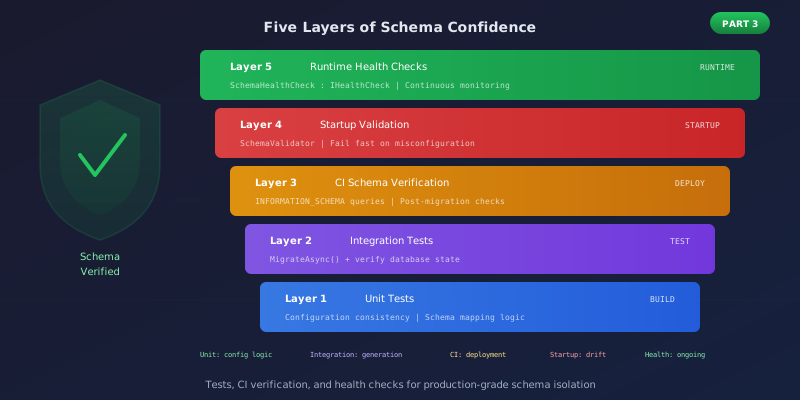
The Five Layers of Schema Confidence
After implementing these strategies, we have five layers of verification:
+---------------------------------------------------------+
| Layer 5: Runtime Health Checks                          |
|   Continuous monitoring that schema is correct          |
+---------------------------------------------------------+
| Layer 4: Startup Validation                             |
|   Fail fast if schema misconfigured                     |
+---------------------------------------------------------+
| Layer 3: CI Schema Verification                         |
|   Post-migration database queries in deployment         |
+---------------------------------------------------------+
| Layer 2: Integration Tests                              |
|   Actually run migrations, verify database state        |
+---------------------------------------------------------+
| Layer 1: Unit Tests                                     |
|   Verify configuration consistency                      |
+---------------------------------------------------------+
Each layer catches different types of failures:
- Unit tests catch configuration logic bugs
- Integration tests catch migration generation bugs
- CI verification catches deployment configuration bugs
- Startup validation catches runtime configuration drift
- Health checks catch issues that develop over time
The Checklist
Before deploying schema-aware migrations to a new environment:
- Unit tests pass for schema configuration consistency
- Integration tests verify tables in correct schema
- CI workflow includes post-migration schema verification
- Health check includes schema validation
- Startup validation is enabled
- Rollback plan documented
- Migration snapshot is schema-less (no
HasDefaultSchema()baked in) - Model cache key factory registered (for runtime schema isolation)
The Moral
Schema-aware migrations are powerful but fragile. Configuration is scattered across multiple files and multiple contexts (design-time vs runtime). Without systematic verification, you're relying on luck.
The investment in these five layers of testing might seem excessive. But the alternative is discovering schema bugs in production through user-reported errors—after tables are created in the wrong place and data is orphaned.
Sleep well. Test deeply.
Schema-Aware EF Core Migrations series:
- Schema-Aware EF Core Migrations - The custom SQL generator approach
- The MigrationsHistoryTable Bug - Why history table schema matters
- Hardening Schema Migrations - Tests that let you sleep at night (this post)
- The Model Cache Key Factory - Preventing false PendingModelChangesWarning
- The Design-Time vs Runtime Mental Model - Why schema handling is actually two systems
With the full configuration stack in place (see the complete component table in Part 2 and the snapshot fix in Part 4), you have both the implementation and the verification for production-grade multi-tenant schema isolation.


