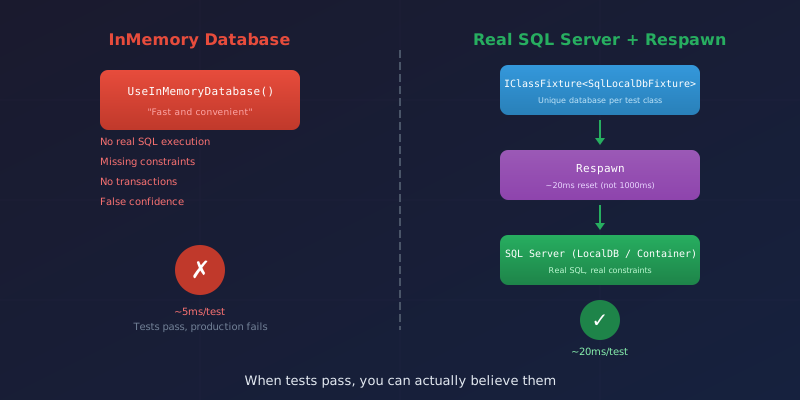
The test passed. Ship it, right?
I was feeling pretty good about my integration test coverage until I deployed to staging and watched everything catch fire. The LINQ query that worked perfectly against UseInMemoryDatabase() generated SQL that SQL Server politely refused to execute. Turns out "politely" in SQL Server means a cryptic error message and a stack trace that scrolls for days.
That's when I learned the hard way: InMemory databases lie to you. They're fast and convenient, like a friend who tells you that outfit looks great when it definitely does not.
The Lies InMemory Tells
For years, the .NET community defaulted to UseInMemoryDatabase() for integration tests. Quick setup, fast execution, what's not to love?
Plenty, as it turns out:
- LINQ translates differently: What works in memory might generate invalid SQL
- No constraints: Foreign keys? Unique indexes? InMemory just shrugs
- No transactions: Rollback behavior is simulated, not real
- Null handling: SQL Server and InMemory disagree about nulls in ways that will ruin your afternoon
The breaking point came when my team spent three hours debugging a "production bug" that was actually just our tests lying to us about how SQL Server handles null comparisons. The fix took five minutes. Finding it took three hours of questioning reality.
The Solution: Real Database, Fast Reset
The answer is embarrassingly simple: use a real SQL Server.
"But that's slow!" I hear you protest. It was, until I discovered Respawn.
Here's the magic: instead of dropping and recreating your database for each test (slow), or manually deleting rows in the right order (tedious and error-prone), Respawn analyzes your foreign key relationships once, then deletes data in dependency order in about 20 milliseconds.
Twenty. Milliseconds.
Compare that to EnsureDeleted() followed by EnsureCreated(), which takes 500-2000ms. That's the difference between a test suite that runs while you're still reaching for your coffee and one that makes you go get a refill.
The Fixture
Here's the skeleton. The fixture implements IAsyncLifetime so xUnit calls our setup and teardown methods automatically:
public class SqlServerFixture : IAsyncLifetime
{
    private readonly string _databaseName = $"Test_{Guid.NewGuid():N}";
    private readonly string _connectionString;
    private Respawner? _respawner;

    public SqlServerFixture()
    {
        // Check if we're in CI (container) or local (LocalDB)
        var ciConnection = Environment.GetEnvironmentVariable("CI_TEST_CONNECTION_STRING");

        _connectionString = !string.IsNullOrEmpty(ciConnection)
            ? new SqlConnectionStringBuilder(ciConnection) { InitialCatalog = _databaseName }.ConnectionString
            : $"Server=(localdb)\\MSSQLLocalDB;Database={_databaseName};Trusted_Connection=True;";
    }

    public async Task InitializeAsync()
    {
        // Create and migrate the database
        await using var context = CreateContext();
        await context.Database.EnsureCreatedAsync();

        // Initialize Respawn - it learns your schema once
        await using var connection = new SqlConnection(_connectionString);
        await connection.OpenAsync();

        _respawner = await Respawner.CreateAsync(connection, new RespawnerOptions
        {
            TablesToIgnore = ["__EFMigrationsHistory"],
            DbAdapter = DbAdapter.SqlServer
        });
    }

    public ApplicationDbContext CreateContext()
    {
        var options = new DbContextOptionsBuilder<ApplicationDbContext>()
            .UseSqlServer(_connectionString)
            .Options;
        return new ApplicationDbContext(options);
    }

    public async Task ResetAsync()
    {
        // This is the fast part - ~20ms to clean all data
        await using var connection = new SqlConnection(_connectionString);
        await connection.OpenAsync();
        await _respawner!.ResetAsync(connection);
    }

    public async Task DisposeAsync()
    {
        // Drop the test database when done
        await using var connection = new SqlConnection(_masterConnectionString);
        await connection.OpenAsync();
        await connection.ExecuteAsync($"DROP DATABASE IF EXISTS [{_databaseName}]");
    }
}
The key insight: Respawn learns your foreign key graph during CreateAsync(), then uses that knowledge to delete data in the right order during ResetAsync(). No manual DELETE statements, no constraint violations.
Using It In Tests
The test class wires everything together:
public class WorkOrderTests : IClassFixture<SqlServerFixture>, IAsyncLifetime
{
    private readonly SqlServerFixture _fixture;
    private ApplicationDbContext _context = null!;

    public WorkOrderTests(SqlServerFixture fixture) => _fixture = fixture;

    public async Task InitializeAsync()
    {
        await _fixture.ResetAsync();  // Clean slate for each test
        _context = _fixture.CreateContext();
    }

    public Task DisposeAsync()
    {
        _context?.Dispose();
        return Task.CompletedTask;
    }

    [Fact]
    public async Task CreateWorkOrder_PersistsToDatabase()
    {
        var workOrder = new WorkOrder { Title = "Test Order" };
        _context.WorkOrders.Add(workOrder);
        await _context.SaveChangesAsync();

        // IMPORTANT: Use fresh context to verify the write actually happened
        await using var verifyContext = _fixture.CreateContext();
        var saved = await verifyContext.WorkOrders.FindAsync(workOrder.Id);

        Assert.NotNull(saved);
        Assert.Equal("Test Order", saved.Title);
    }
}
IClassFixture<T> means one fixture instance shared across all tests in the class. The database gets created once, then each test resets it with Respawn before running.
The Fresh Context Gotcha
This cost me 45 minutes of confused debugging: when you save an entity and query it back using the same context, you might get the cached in-memory version instead of what's actually in the database.
// This might lie to you
await _context.SaveChangesAsync();
var saved = await _context.WorkOrders.FindAsync(workOrder.Id);
// 'saved' could be the cached object, not what's in the database

// This tells the truth
await using var freshContext = _fixture.CreateContext();
var saved = await freshContext.WorkOrders.FindAsync(workOrder.Id);
// 'saved' is definitely from the database
Always verify writes with a fresh context. That one extra line saves hours of "but I just saved that!" confusion.
CI Integration
Locally, I use SQL Server LocalDB—it's free and probably already on your machine if you have Visual Studio. In GitHub Actions, I spin up a container:
services:
  sqlserver:
    image: mcr.microsoft.com/mssql/server:2022-latest
    env:
      ACCEPT_EULA: Y
      SA_PASSWORD: TestPassword123!
    ports:
      - 1433:1433

env:
  CI_TEST_CONNECTION_STRING: "Server=localhost,1433;User Id=sa;Password=TestPassword123!;TrustServerCertificate=True"
The fixture checks for CI_TEST_CONNECTION_STRING and uses the container if it exists, LocalDB if not. Same test code, both environments.
The Tradeoffs
| Aspect | InMemory | Real Database |
|---|---|---|
| Setup complexity | None | Container in CI |
| Speed per test | ~5ms | ~20ms |
| Confidence | "It works on my machine" | Actually works |
That extra 15ms per test is worth it the first time your staging deployment doesn't catch fire because your tests actually tested reality.
Quick Wins
Seed reference data after reset: If every test needs the same lookup data (roles, statuses, etc.), add it in InitializeAsync() right after calling ResetAsync().
Meaningful database names: ProjectName_Test_{Guid} lets you find and inspect the database when debugging. TestDb_1 tells you nothing.
Don't skip cleanup: The fixture's DisposeAsync() must drop the database. Otherwise you'll accumulate hundreds of orphaned test databases.
Moving from InMemory to real database testing was one of the best decisions I made for this project. The setup took an afternoon. The confidence it provides has saved me countless hours of "works locally, fails in production" debugging.
When tests pass now, I actually believe them.
Next up: Database-Backed Encrypted Configuration - moving secrets out of appsettings.json and into encrypted database storage.


