I have a confession: I once committed an API key to a public GitHub repo.
It was 3 AM. The deploy was "almost done." The key was "temporary." You know how this story ends. Three hours later, my inbox was full of AWS alerts about unauthorized usage, and I was rotating credentials while questioning my life choices.
That incident taught me something important: secrets in source control are a when problem, not an if problem. It doesn't matter how careful you are. Eventually, someone on your team (possibly future-you at 3 AM) will make a mistake.
So I built a pattern that makes the mistake impossible.
The Configuration Problem Everyone Ignores
Every ASP.NET Core application has secrets. JWT signing keys, API tokens, database credentials. The default approaches all have blind spots:
appsettings.json lives in source control. Yes, you can gitignore it. No, that won't save you when someone commits it anyway.
Environment variables are visible in process listings and a pain to manage across environments. Ever tried to debug "why doesn't staging work" when the answer is a typo in an env var set six months ago?
Azure Key Vault / AWS Secrets Manager are great if you're all-in on cloud. But they add external dependencies and require internet connectivity.
User Secrets are development-only. They don't help in production.
The Idea: Database + Encryption
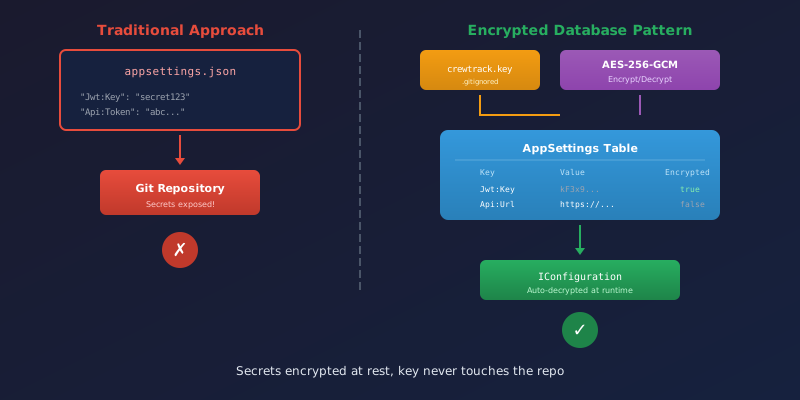
Here's what I built: configuration that lives in the database, encrypted at rest, with the encryption key living completely outside the repository.
The flow:
- App starts, reads connection string from appsettings.json (the only secret there)
- App reads encryption key from a gitignored file (or env var in CI)
- App queries the
AppSettingstable - Encrypted values get decrypted on the fly
- Everything merges into
IConfiguration
Your services never know the difference. Configuration["Jwt:Key"] just works.
The Database Table
Simple entity—the key follows the same hierarchical naming as appsettings.json:
public class AppSetting
{
    public int Id { get; set; }
    public string Key { get; set; } = string.Empty;      // e.g., "Jwt:Key"
    public string Value { get; set; } = string.Empty;    // Encrypted or plaintext
    public bool IsEncrypted { get; set; }
    public string? Description { get; set; }
}
The Key uses the same colon-separated format as appsettings.json, so Jwt:Key in the database becomes Configuration["Jwt:Key"] in code. Seamless.
The Encryption Service
I chose AES-256-GCM because it provides both confidentiality and authenticity. If someone tampers with the ciphertext, decryption fails immediately rather than returning corrupted garbage.
public class AesGcmEncryptionService : IEncryptionService
{
    private const int NonceSize = 12;   // 96 bits - GCM standard
    private const int TagSize = 16;     // 128 bits - max security
    private readonly byte[] _key;       // 32 bytes for AES-256

    public AesGcmEncryptionService(string keyFilePath)
    {
        _key = Convert.FromBase64String(File.ReadAllText(keyFilePath).Trim());
        if (_key.Length != 32)
            throw new InvalidOperationException("Key must be 32 bytes for AES-256");
    }

    public string Encrypt(string plaintext)
    {
        var plaintextBytes = Encoding.UTF8.GetBytes(plaintext);
        var nonce = new byte[NonceSize];
        RandomNumberGenerator.Fill(nonce);  // Random nonce is critical!

        var ciphertext = new byte[plaintextBytes.Length];
        var tag = new byte[TagSize];

        using var aes = new AesGcm(_key, TagSize);
        aes.Encrypt(nonce, plaintextBytes, ciphertext, tag);

        // Concatenate: nonce + ciphertext + tag, then base64
        var result = new byte[NonceSize + ciphertext.Length + TagSize];
        nonce.CopyTo(result, 0);
        ciphertext.CopyTo(result, NonceSize);
        tag.CopyTo(result, NonceSize + ciphertext.Length);

        return Convert.ToBase64String(result);
    }

    public string Decrypt(string encrypted)
    {
        var data = Convert.FromBase64String(encrypted);

        var nonce = data[..NonceSize];
        var ciphertext = data[NonceSize..^TagSize];
        var tag = data[^TagSize..];

        var plaintext = new byte[ciphertext.Length];

        using var aes = new AesGcm(_key, TagSize);
        aes.Decrypt(nonce, ciphertext, tag, plaintext);

        return Encoding.UTF8.GetString(plaintext);
    }
}
The encrypted value is base64-encoded, so it fits in a regular nvarchar column. The nonce, ciphertext, and authentication tag are all concatenated together.
The Configuration Provider
ASP.NET Core's configuration system is pluggable. Here's a provider that loads from the database and decrypts:
public class DatabaseConfigurationProvider : ConfigurationProvider
{
    private readonly string _connectionString;
    private readonly IEncryptionService _encryption;

    public DatabaseConfigurationProvider(string connectionString, IEncryptionService encryption)
    {
        _connectionString = connectionString;
        _encryption = encryption;
    }

    public override void Load()
    {
        using var context = new DbContext(_connectionString);

        foreach (var setting in context.AppSettings.AsNoTracking())
        {
            var value = setting.IsEncrypted
                ? _encryption.Decrypt(setting.Value)
                : setting.Value;

            Data[setting.Key] = value;  // "Jwt:Key" → decrypted value
        }
    }
}
And wire it up in Program.cs:
builder.Configuration.AddDatabaseConfiguration(
    connectionString,
    "config/myapp.key",                          // Local key file (gitignored)
    keyEnvVar: "MYAPP_ENCRYPTION_KEY");          // CI/CD fallback
From that point on, IConfiguration includes the database values. Your services inject IConfiguration or IOptions<T> as usual. They have no idea some values came from encrypted database rows.
The Canary Pattern
How do you know encryption is actually working? Seed a known value and verify it:
// On startup, ensure the canary exists
if (!await settingsService.ExistsAsync("System:EncryptionCanary"))
{
    await settingsService.SetAsync("System:EncryptionCanary", "encryption-verified", encrypt: true);
}

// In your /api/version endpoint
var canary = await settingsService.GetAsync("System:EncryptionCanary");
var encryptionOk = canary == "encryption-verified";
If the key is wrong or missing, the canary fails. Instant visibility into something that would otherwise silently break.
Key Management
The encryption key is now the crown jewel. Lose it and you lose access to all encrypted settings. Commit it and you've defeated the purpose.
Developer machine: config/myapp.key (gitignored file)
CI/CD: MYAPP_ENCRYPTION_KEY environment variable (from GitHub Secrets)
Production: Either approach works
Generate a key with: openssl rand -base64 32 > config/myapp.key
The key never touches the repo. The encrypted values in the database are useless without it.
What To Encrypt (And What Not To)
Encrypt things that could be exploited if the database leaks:
- JWT signing keys (someone could forge tokens)
- API tokens and secrets (someone could impersonate your app)
- Third-party credentials (someone could rack up charges)
Don't encrypt:
- URLs (no security benefit, just makes debugging harder)
- Feature flags (who cares if an attacker learns you have dark mode)
- Timeouts and non-sensitive config (encryption overhead for no gain)
The Tradeoffs
Startup time: Extra database query during configuration loading. Not noticeable in practice.
Key rotation: Need to re-encrypt all values when rotating keys. I have a console app for this.
Complexity: More moving parts than environment variables. Worth it if you're paranoid about the 3 AM commit (hi, it's me).
The upfront investment is about an afternoon of work. The peace of mind lasts forever.
Well, until the next 3 AM deploy. But at least this time you won't commit any keys.
Previous: Modern Database Testing with xUnit Fixtures - fast, reliable integration tests with real SQL Server.
Next up: Schema-Aware EF Core Migrations - running the same migrations across dev, staging, and production schemas.


