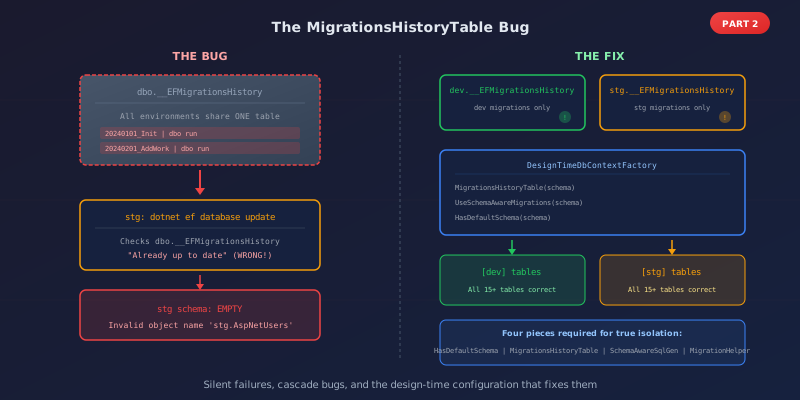
Part 2 of the Schema-Aware EF Core Migrations series. Read Part 1 first.
Three months after implementing schema-aware migrations, we hit a bug that cost us two days of debugging. The migrations ran successfully. CI was green. But the staging site couldn't log in.
The Symptom
After deploying to staging:
Invalid object name 'stg.AspNetUsers'
Everything looked correct. The health check showed "schema": "stg". Migrations reported success. But when we queried the database, all tables were in dbo schema, not stg.
The Investigation
We had the custom SQL generator, HasDefaultSchema(), environment variables—the whole setup from Part 1. The verbose migration logs showed:
[EF Migration] Environment: Staging
[EF Migration] Schema: stg
[EF Migration] MigrationHelper.Environment: stg
All correct. Then:
No migrations were applied. The database is already up to date.
But the stg schema was empty.
The smoking gun appeared in the SQL being executed:
SELECT [MigrationId], [ProductVersion]
FROM [__EFMigrationsHistory]
ORDER BY [MigrationId];
No schema prefix. It was reading from dbo.__EFMigrationsHistory, which had all migrations recorded from earlier (incorrect) runs.
The Root Cause
Here's what nobody tells you: HasDefaultSchema() does NOT affect the migrations history table.
Our DesignTimeDbContextFactory had:
var optionsBuilder = new DbContextOptionsBuilder<ApplicationDbContext>();
optionsBuilder.UseSqlServer(connectionString);  // <-- The bug
The __EFMigrationsHistory table was created in dbo by default. Once migrations were recorded there, every environment checked the same history table and saw "already applied."
The Cascade Failure
Here's the sequence:
- First deployment ran with misconfigured environment → tables created in
dbo dbo.__EFMigrationsHistorypopulated with all migrations- Later deployment ran with correct
stgschema - EF checked
[__EFMigrationsHistory](no schema =dbo) - Found all migrations "already applied"
- Skipped creating
stgtables entirely - Runtime tried to query
stg.AspNetUsers→ failure
The insidious part: no errors. Just "already up to date."
The Fix
Configure MigrationsHistoryTable in your IDesignTimeDbContextFactory:
public class DesignTimeDbContextFactory : IDesignTimeDbContextFactory<ApplicationDbContext>
{
    public ApplicationDbContext CreateDbContext(string[] args)
    {
        var environment = Environment.GetEnvironmentVariable("ASPNETCORE_ENVIRONMENT") ?? "Local";

        var schema = environment switch
        {
            "Local" => "local",
            "Development" => "dev",
            "Staging" => "stg",
            "Production" => "prod",
            _ => "prod"  // Default to prod for safety
        };

        var optionsBuilder = new DbContextOptionsBuilder<ApplicationDbContext>();

        // CRITICAL: MigrationsHistoryTable must be in the target schema
        optionsBuilder.UseSqlServer(connectionString, options =>
            options.MigrationsHistoryTable("__EFMigrationsHistory", schema));

        // ... rest of configuration
    }
}
Now each environment has isolated migrations history:
| Environment | Schema | History Table |
|---|---|---|
| Local | local | local.__EFMigrationsHistory |
| Development | dev | dev.__EFMigrationsHistory |
| Staging | stg | stg.__EFMigrationsHistory |
| Production | prod | prod.__EFMigrationsHistory |
Recovering From The Bug
If you're already in this state:
- Identify orphaned tables: Check
dboschema for tables that should be elsewhere - Don't touch production history: If production uses
dbo, leavedbo.__EFMigrationsHistoryalone - Fresh migration for affected environments: Run migrations with the fix—they'll create schema-specific history tables and all tables fresh
- Clean up orphans later: The
dbotables from bad runs can be dropped after verification
The Environment-Script Connection
While debugging, we also discovered our SQL seed scripts weren't respecting environments. The MigrationHelper.Environment mapping was wrong:
// WRONG
"development" => "prod"  // Was using prod scripts for dev!

// CORRECT
"development" => "dev"   // Use dev scripts with dev schema
The complete mapping:
MigrationHelper.Environment = environment switch
{
    "Local" => "local",       // SeedData.local.sql
    "Development" => "dev",   // SeedData.dev.sql
    "Staging" => "stg",       // SeedData.stg.sql
    "Production" => "prod",   // SeedData.prod.sql
    _ => "prod"
};
Verification Checklist
Before deploying schema-aware migrations:
-- After running migrations for staging, verify:
SELECT * FROM INFORMATION_SCHEMA.TABLES
WHERE TABLE_SCHEMA = 'stg';

-- Should return rows. If empty, you have the bug.

-- Check migrations history is in correct schema:
SELECT * FROM stg.__EFMigrationsHistory;

-- Should return migration records. If table doesn't exist,
-- your history is probably in dbo.
The Second Bug: Tables Still Going to dbo
After implementing the MigrationsHistoryTable fix, we ran migrations again. This time:
dev.__EFMigrationsHistorywas created (correct schema!)- All tables were STILL created in
dboschema
CREATE TABLE [AspNetRoles] ...     -- No [dev]. prefix!
CREATE TABLE [WorkOrders] ...      -- Still going to dbo
INSERT INTO [dev].[__EFMigrationsHistory] ...  -- But history is correct
The history table was isolated, but the actual table operations weren't being rewritten.
The Missing Link: UseSchemaAwareMigrations at Design Time
We had a SchemaAwareMigrationsSqlGenerator class that rewrites CREATE TABLE operations to include the schema. But it wasn't being registered during design-time migrations!
The custom SQL generator was only configured for runtime, not for dotnet ef database update.
The Complete Fix
Your DesignTimeDbContextFactory needs both configurations:
public class DesignTimeDbContextFactory : IDesignTimeDbContextFactory<ApplicationDbContext>
{
    public ApplicationDbContext CreateDbContext(string[] args)
    {
        var environment = Environment.GetEnvironmentVariable("ASPNETCORE_ENVIRONMENT") ?? "Local";

        var schema = environment switch
        {
            "Local" => "local",
            "Development" => "dev",
            "Staging" => "stg",
            "Production" => "prod",
            _ => "prod"  // Default to prod for safety
        };

        var optionsBuilder = new DbContextOptionsBuilder<ApplicationDbContext>();

        // FIX #1: MigrationsHistoryTable must be in the target schema
        optionsBuilder.UseSqlServer(connectionString, options =>
            options.MigrationsHistoryTable("__EFMigrationsHistory", schema));

        // FIX #2: Register the custom SQL generator at design time
        // All environments use named schemas - no special cases
        optionsBuilder.UseSchemaAwareMigrations(schema);

        // ... rest of configuration
    }
}
The Evidence
Before UseSchemaAwareMigrations:
CREATE TABLE [AspNetRoles] ...
CREATE INDEX [IX_AspNetRoleClaims_RoleId] ON [AspNetRoleClaims] ...
After UseSchemaAwareMigrations:
CREATE TABLE [dev].[AspNetRoles] ...
CREATE INDEX [IX_AspNetRoleClaims_RoleId] ON [dev].[AspNetRoleClaims] ...
Every single table and index operation now includes the [dev]. prefix.
The Complete Picture
For true schema isolation in EF Core migrations, you need all six pieces:
| Component | Purpose | Where Configured |
|---|---|---|
HasDefaultSchema() |
Runtime queries use target schema | OnModelCreating (runtime only) |
| Empty schema at design-time | Schema-less snapshot generation | DesignTimeDbContextFactory |
MigrationsHistoryTable() |
History table per schema | UseSqlServer() options |
UseSchemaAwareMigrations() |
Rewrite CREATE/ALTER/INDEX operations | DbContextOptionsBuilder |
ReplaceService<IModelCacheKeyFactory>() |
Runtime model caching per schema | DbContextOptionsBuilder |
MigrationHelper.Environment |
Environment-specific seed scripts | DesignTimeDbContextFactory |
Miss any one and you get subtle failures that only show up when you query the database directly. See Part 4 for details on the schema-less snapshot requirement and model cache key factory.
The Verification Queries
After running migrations, always verify:
-- 1. Check tables are in correct schema
SELECT TABLE_SCHEMA, TABLE_NAME
FROM INFORMATION_SCHEMA.TABLES
WHERE TABLE_SCHEMA = 'dev'
ORDER BY TABLE_NAME;
-- Should return 15+ rows (all your tables)

-- 2. Check migrations history is in correct schema
SELECT * FROM [dev].[__EFMigrationsHistory];
-- Should return all migration records

-- 3. Verify NO orphaned tables in dbo (for non-production databases)
SELECT TABLE_SCHEMA, TABLE_NAME
FROM INFORMATION_SCHEMA.TABLES
WHERE TABLE_SCHEMA = 'dbo' AND TABLE_TYPE = 'BASE TABLE';
-- Should be empty (or only contain production tables if shared)
Lessons Learned
- Migration logs lie: "Migrations completed successfully" doesn't mean tables are where you expect them
- Verbose mode is essential: Always use
--verboseto see actual SQL being executed - Design time != Runtime: Services registered for runtime aren't automatically available during
dotnet efcommands - Test multiple environments: Local success doesn't guarantee staging success
- Query the database: The only source of truth is
INFORMATION_SCHEMA.TABLES
The Moral
Schema-aware EF Core migrations require careful configuration at design time, not just runtime. The IDesignTimeDbContextFactory is your single point of truth for how migrations execute. If the custom SQL generator isn't registered there, your carefully crafted schema rewriting never runs during deployments.
Build a CI workflow that deploys to a test schema first. Verify tables exist in the correct schema before touching production.
Schema-Aware EF Core Migrations series:
- Schema-Aware EF Core Migrations - The custom SQL generator approach
- The MigrationsHistoryTable Bug - Why history table schema matters (this post)
- Hardening Schema Migrations - Tests that let you sleep at night
- The Model Cache Key Factory - Preventing false PendingModelChangesWarning
- The Design-Time vs Runtime Mental Model - Why schema handling is actually two systems
Note: Updated February 2026 to reflect using explicit named schemas for all environments (local, dev, stg, prod).


