Someone shared an Instagram post about how to get your brand recommended by ChatGPT. Seven steps. Inspect network requests to see what ChatGPT searches, scrape competitor headings, feed everything back to ChatGPT to write your article, then "humanize" it by removing em dashes and buzzwords.
It's a clever technique. Parts of it are genuinely useful. But the core idea — letting AI write your articles by averaging what's already ranking — is a race to the middle.
I took a different approach.
What's Actually Useful in That Technique
Credit where it's due. Two parts of the Instagram post are worth stealing:
Reverse-engineering ChatGPT's search queries — Understanding how AI search decomposes questions helps you target the phrases people actually use. That's real keyword research, and it's a smart way to get it.
Competitive heading analysis — Checking what the top 3 results cover before writing your own post is standard competitive analysis. Knowing the baseline helps you beat it.
Everything else — letting ChatGPT write the article, generate your meta description, and create an outline from averaged competitor content — produces generic content that Google's Helpful Content system is specifically designed to downrank.
The Real Problem Isn't Writing
Here's what I noticed about my own blog. I had 50+ technical posts based on real production experience. Original content that you genuinely can't get from ChatGPT because it came from my codebase, my bugs, my architectural decisions.
But I was still leaving SEO value on the table. Not because the content was bad, but because I was skipping the tedious maintenance work:
- Broken internal links — I renamed a post slug and forgot to update the link in three other posts. Readers hit dead ends. Google noticed.
- Orphaned content — 21 posts with zero outbound links to other posts. Google interprets that as isolated, low-value pages.
- Truncated descriptions — 85 of my post descriptions exceeded 160 characters. Google was truncating them in search results, cutting off my hooks mid-sentence.
- Unreferenced posts — 28 posts that no other post linked to. If my own site doesn't think they're worth linking to, why would Google?
- No search engine notification — New posts sat for days waiting for Google and Bing to notice them through my sitemap.
None of this is hard to fix. It's just tedious enough that it never gets prioritized over writing the next post.
So I automated all of it.
The Suite: 11 Scripts, 3 Automation Tiers
Everything lives in a scripts/seo/ directory as Node.js modules, runnable via npm scripts. The entire suite has zero external dependencies for the core tools.
Tier 1: Fully Automated (Zero Effort)
These run without me doing anything.
Pre-commit validation catches errors before they reach production:
$ git commit -m "Add new blog post"
Running blog post validation...
  ERROR: Broken internal link in adding-syntax-highlighting-with-prismjs.md:
         "/Blog/Post/sms-powered-llm-with-twilio-and-claude" — slug not found
That's a real error it caught on its first run. A link I'd written months ago pointing to a slug that was later renamed. Without automation, a reader would have found that broken link before I did.
The validation checks:
- Required fields in my posts metadata (slug, title, description, category, tags, date, image)
- That every referenced markdown file and SVG image actually exists
- That internal links point to valid post slugs
- Slug format, category values, tag conventions
CI pipeline runs the full validation and sitemap check on every push. If a post would break the sitemap or has missing files, the build fails before deployment.
IndexNow notification auto-submits new post URLs to Bing, Yandex, Naver, and other search engines the moment I push to main. The CI job diffs posts.json against the previous commit, detects new slugs, and pings the IndexNow API.
Google doesn't participate in IndexNow — they discover content through the sitemap and RSS feed, which already exist. But Bing responds well to it, and there's no reason to leave free indexing speed on the table.
Tier 2: One Command for New Posts
When starting a new post, one command scaffolds everything and front-loads the SEO decisions:
$ npm run seo:new -- --title "My New Post" --category tech --tags "seo,automation"
This creates the markdown file, adds the posts.json entry with all required fields, checks my tags against the existing vocabulary (catching typos like ci/cd vs ci-cd), and immediately shows cross-link suggestions:
=== Suggested Cross-Links ===

  Tags: seo, blogging (2)
  Paste: [SEO Demystified: A Developer's No-Nonsense Guide](/Blog/Post/seo-demystified)
Paste-ready markdown links. No digging through old posts trying to remember which ones are related. The tag overlap algorithm does it for me.
Tier 3: Periodic Audit
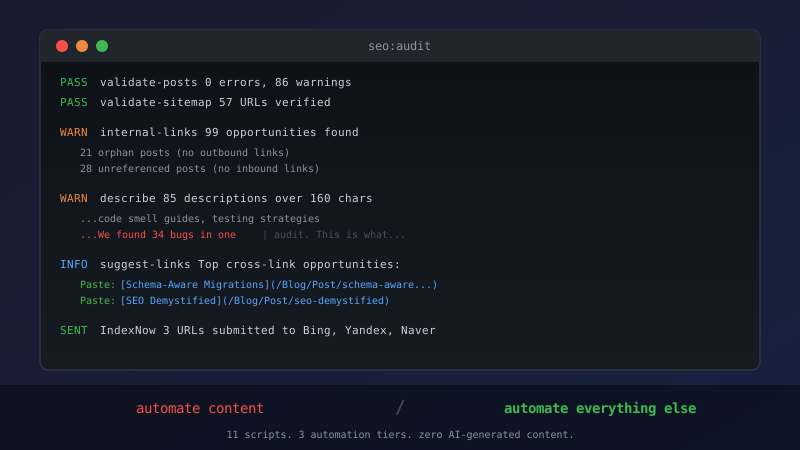
One command for a full SEO health check:
$ npm run seo:audit
This runs everything in sequence: validation, sitemap check, internal link gap analysis, description length flags, and cross-link suggestions. The description optimizer shows exactly where Google would truncate each description:
  the-architecture-tax-nobody-told-vibe-coders-about (200 chars, 40 over)
  Current:   ...code smell guides, testing strategies...We found 34 bugs in one| audit.
  Suggested: ...code smell guides, testing strategies...We found 34 bugs in one...
The | marks the 160-character cutoff. Everything after it is invisible in search results.
What This Looks Like in Practice
Here's the full workflow now:
- Start a new post —
seo:newcreates everything, suggests tags and cross-links - Write the content — The actual human part. Real experience, real code, real opinions
- Commit — Pre-commit hook validates metadata, files, and internal links
- Push — CI validates, checks sitemap, and auto-submits to search engines
- Monthly audit —
seo:auditcatches description drift and new cross-link opportunities
The first time I ran the link analysis, it found 99 cross-linking opportunities across 51 published posts. That's 99 places where two posts share multiple tags but don't link to each other. Each one is a small SEO improvement that I would never have found manually.
The Philosophy: Automate Infrastructure, Not Content
The Instagram technique automates the wrong thing. It automates writing — the one part that should be human — while leaving all the infrastructure work manual.
My approach is the opposite: the content stays human, and everything around it is automated. Validation, cross-linking, description optimization, search engine notification, post scaffolding.
This works because the competitive advantage of a technical blog isn't SEO tricks. It's that the posts come from real production experience. No AI can fabricate a two-day sync bug chase or the specific EF Core migration pattern I built for multi-tenant schemas. That's the content moat.
The automation just makes sure Google can actually find it.
The Scripts
All of this is Node.js running on standard node:fs — no heavy dependencies. The shared library loads posts.json and provides markdown parsing utilities. Each script is standalone and focused:
| Script | Purpose |
|---|---|
seo:validate |
Pre-commit field/file/link validation |
seo:sitemap |
Sitemap completeness check |
seo:submit |
IndexNow URL submission |
seo:links |
Internal link gap detector |
seo:suggest-links |
Paste-ready cross-link snippets |
seo:suggest-tags |
Tag vocabulary suggestions |
seo:describe |
Description length optimizer |
seo:headings |
Competitive heading analysis |
seo:new |
New post scaffolding |
seo:audit |
Full suite in one command |
seo:all |
Quick checkup (validate + sitemap + links) |
The heading analysis tool is the one idea I did take from that Instagram post — but instead of manually copying headings from Chrome DevTools, the script fetches competitor pages and compares their heading structure against mine automatically. You can give it URLs directly or, with a Google Custom Search API key, have it search automatically.
What I'd Add Next
The tag suggestion engine currently uses keyword frequency to match against existing tags. It works, but it's basic. A smarter version would analyze the full content and suggest tags based on topic modeling rather than just word matching.
I'd also like the audit to run on a schedule — maybe a weekly GitHub Actions cron job that opens an issue if it finds new problems. Right now it's manual, which means it only runs when I remember.
If you're running a technical blog on any framework, the approach is transferable. The scripts read from a JSON metadata file and markdown content — adapt the paths and you've got the same automation for your stack.
Related: SEO Demystified: A Developer's No-Nonsense Guide covers the fundamentals. What Your CI Workflow Actually Does explains the GitHub Actions pipeline these scripts plug into. RSS Feeds and Social Automation documents the feed infrastructure these scripts build on. Google Search Console Setup walks through the initial configuration.