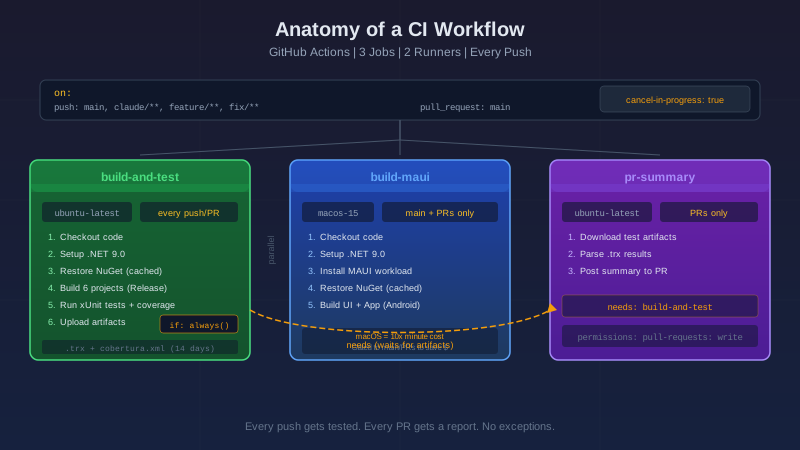
An AI wrote me a CI workflow last week. I looked at the YAML and understood... maybe 40% of it. I knew what "build" and "test" meant. The rest was hieroglyphics.
So I did what I always do when something confuses me. I went line by line until it didn't.
This is that walkthrough. If you've ever stared at a .yml file in .github/workflows/ and thought "I know this is important but I have no idea what half of it does" — this post is for you.
What CI Even Is
CI stands for Continuous Integration. The "continuous" part means automatic. Every time you push code, a server somewhere pulls your changes, builds the project, runs the tests, and tells you if anything broke.
Think of it as a bouncer at the door of your main branch. You don't push code to production and hope it works. The bouncer checks your code first. If the tests fail, the bouncer turns you away. If they pass, you're in.
Without CI, you're relying on "it worked on my machine." With CI, you're relying on "it worked on a clean machine that has never seen your code before." That's a much higher bar.
The Workflow
Here's the complete workflow file. I'm going to walk through every section, but having the full picture helps. Skim it now, then read the breakdowns below.
name: CI

on:
  push:
    branches: ["main", "claude/**", "feature/**", "fix/**"]
  pull_request:
    branches: ["main"]

concurrency:
  group: ${{ github.workflow }}-${{ github.ref }}
  cancel-in-progress: true

env:
  DOTNET_VERSION: "9.0.x"
  DOTNET_SKIP_FIRST_TIME_EXPERIENCE: 1
  DOTNET_NOLOGO: true
  NUGET_PACKAGES: ${{ github.workspace }}/.nuget/packages

jobs:
  build-and-test:
    name: Build & Test (.NET 9)
    runs-on: ubuntu-latest
    timeout-minutes: 15
    steps:
      - uses: actions/checkout@v4
      - uses: actions/setup-dotnet@v4
        with:
          dotnet-version: ${{ env.DOTNET_VERSION }}
      - uses: actions/cache@v4
        with:
          path: ${{ env.NUGET_PACKAGES }}
          key: nuget-${{ runner.os }}-${{ hashFiles('**/*.csproj', '**/global.json') }}
          restore-keys: nuget-${{ runner.os }}-
      - name: Restore
        run: dotnet restore RepWizard.Core/RepWizard.Core.csproj
        # ... (restores 6 non-MAUI projects)
      - name: Build
        run: dotnet build RepWizard.Core/RepWizard.Core.csproj --no-restore -c Release
        # ... (builds 6 non-MAUI projects)
      - name: Test with coverage
        run: |
          dotnet test RepWizard.Tests/RepWizard.Tests.csproj \
            --no-build -c Release \
            --logger "trx;LogFileName=test-results.trx" \
            --collect:"XPlat Code Coverage" \
            --results-directory ./TestResults
      - name: Upload test results
        if: always()
        uses: actions/upload-artifact@v4
        with:
          name: test-results
          path: TestResults/
          retention-days: 14
      - name: Upload coverage report
        if: always()
        uses: actions/upload-artifact@v4
        with:
          name: coverage-report
          path: TestResults/**/coverage.cobertura.xml
          retention-days: 14

  build-maui:
    name: Build MAUI (compile check)
    runs-on: macos-15
    timeout-minutes: 30
    if: github.ref == 'refs/heads/main' || github.event_name == 'pull_request'
    steps:
      - uses: actions/checkout@v4
      - uses: actions/setup-dotnet@v4
        with:
          dotnet-version: ${{ env.DOTNET_VERSION }}
      - name: Install MAUI workloads
        run: dotnet workload install maui
      - uses: actions/cache@v4
        with:
          path: ${{ env.NUGET_PACKAGES }}
          key: nuget-maui-${{ runner.os }}-${{ hashFiles('**/*.csproj', '**/global.json') }}
          restore-keys: nuget-maui-${{ runner.os }}-
      - name: Build RepWizard.UI
        run: dotnet build RepWizard.UI/RepWizard.UI.csproj --no-restore -c Release -f net9.0-android
      - name: Build RepWizard.App
        run: dotnet build RepWizard.App/RepWizard.App.csproj --no-restore -c Release -f net9.0-android

  pr-summary:
    name: PR test summary
    runs-on: ubuntu-latest
    needs: build-and-test
    if: github.event_name == 'pull_request'
    permissions:
      pull-requests: write
    steps:
      - uses: actions/download-artifact@v4
        with:
          name: test-results
          path: TestResults
      - uses: dorny/test-reporter@v1
        with:
          name: xUnit test results
          path: "TestResults/**/*.trx"
          reporter: dotnet-trx
          fail-on-error: true
That's 100-ish lines of YAML running three parallel jobs across two operating systems. Let's break it down.
Triggers: When Does This Run?
on:
  push:
    branches: ["main", "claude/**", "feature/**", "fix/**"]
  pull_request:
    branches: ["main"]
The on: block defines when GitHub fires this workflow. Two events trigger it:
push — When you push commits to any branch matching these patterns. The ** is a glob wildcard that matches any sub-path. So feature/** catches feature/login, feature/api/auth, feature/v2/refactor — anything under the feature/ prefix. Same for claude/** (branches created by AI coding tools) and fix/**.
pull_request — When anyone opens, updates, or synchronizes a PR targeting main. This is the bouncer moment — the workflow runs against your PR branch before it merges. If tests fail, the PR gets a red X.
Notice main appears in both. Pushes directly to main trigger the workflow. PRs targeting main also trigger it. Belt and suspenders.
Concurrency: No Pile-Ups
concurrency:
  group: ${{ github.workflow }}-${{ github.ref }}
  cancel-in-progress: true
This one surprised me. Without this block, every push queues a new workflow run. Push three commits in 30 seconds? Three runs. Push ten times while debugging a CI issue? Ten runs — all burning minutes on GitHub's servers.
The concurrency block fixes this. It creates a group — a unique key made from the workflow name and the branch ref. If a new run starts for the same group, cancel-in-progress: true kills the old one.
Push to feature/login three times fast? Only the last push gets a full run. The first two are cancelled. No pile-up. No wasted minutes.
The ${{ }} syntax is GitHub Actions' expression language. It interpolates variables at runtime. github.workflow resolves to "CI" (the workflow name). github.ref resolves to something like refs/heads/feature/login. Together they form a unique group key per branch.
Environment Variables: Global Config
env:
  DOTNET_VERSION: "9.0.x"
  DOTNET_SKIP_FIRST_TIME_EXPERIENCE: 1
  DOTNET_NOLOGO: true
  NUGET_PACKAGES: ${{ github.workspace }}/.nuget/packages
These are workflow-level environment variables — available to every job and every step. Think of them as constants.
DOTNET_VERSION: "9.0.x"— Thexmeans "latest patch." Today that might be 9.0.2. Next month, 9.0.3. You get security patches automatically without editing the workflow.DOTNET_SKIP_FIRST_TIME_EXPERIENCE: 1— .NET's first run on a new machine populates caches and shows a welcome message. In CI, nobody's watching. Skip it. Saves ~5 seconds.DOTNET_NOLOGO: true— Suppresses the "Welcome to .NET" banner. Keeps logs clean.NUGET_PACKAGES— Tells NuGet to store packages in a specific directory inside the workspace. This is critical for caching (more on that in a moment).
Defining these at the workflow level means you change the .NET version in one place and every job picks it up.
Job 1: Build & Test
build-and-test:
  name: Build & Test (.NET 9)
  runs-on: ubuntu-latest
  timeout-minutes: 15
A job is a group of steps that run on the same machine. This one runs on ubuntu-latest — a fresh Ubuntu VM spun up by GitHub, used for this run, then destroyed. You start clean every time. No stale state.
Why Ubuntu for a .NET project? .NET is cross-platform. Ubuntu runners are the cheapest (free for public repos, cheapest per-minute for private ones). Unless you need a specific OS feature, Ubuntu is the default choice.
timeout-minutes: 15 is a safety net. If something hangs (a test that waits for a network call that never comes, an infinite loop), the job dies after 15 minutes instead of burning your monthly minutes.
Checkout
- uses: actions/checkout@v4
This clones your repository onto the runner. Without it, there's no code. The @v4 is a version tag — you're pinning to a specific release of the checkout action, so it doesn't change under you.
Setup .NET
- uses: actions/setup-dotnet@v4
  with:
    dotnet-version: ${{ env.DOTNET_VERSION }}
Installs .NET 9.0.x on the runner. The runner comes with some .NET versions pre-installed, but this ensures you get exactly what you need. The with: block passes inputs to the action.
The NuGet Cache
- uses: actions/cache@v4
  with:
    path: ${{ env.NUGET_PACKAGES }}
    key: nuget-${{ runner.os }}-${{ hashFiles('**/*.csproj', '**/global.json') }}
    restore-keys: nuget-${{ runner.os }}-
This is the single biggest performance optimization in the workflow. Here's what it does:
path — What to cache. The NuGet packages directory we defined in the env: block.
key — A unique cache identifier. It's built from the runner OS and a hash of every .csproj and global.json file in the repo. If you add a NuGet package (which changes a .csproj), the hash changes, the old cache misses, and a new one is built. If you didn't change any dependencies, the hash matches, and NuGet packages are restored from cache in seconds instead of downloaded from the internet.
restore-keys — A fallback. If the exact key misses (you added a new package), it tries a partial match: any cache starting with nuget-Linux-. You still get most of your packages from cache, and only the new ones are downloaded.
Without caching, dotnet restore downloads every NuGet package on every run. For a project with dozens of dependencies, that's 30-60 seconds of pure network time. With caching, it's near-instant.
Restore, Build, Test
- name: Restore
  run: dotnet restore RepWizard.Core/RepWizard.Core.csproj
  # (6 projects restored individually)

- name: Build
  run: dotnet build RepWizard.Core/RepWizard.Core.csproj --no-restore -c Release
  # (6 projects built individually)

- name: Test with coverage
  run: |
    dotnet test RepWizard.Tests/RepWizard.Tests.csproj \
      --no-build -c Release \
      --logger "trx;LogFileName=test-results.trx" \
      --collect:"XPlat Code Coverage" \
      --results-directory ./TestResults
Three phases, run sequentially:
Restore downloads NuGet packages (fast, because cache). Each project is restored individually rather than using a solution file — this avoids restoring the MAUI projects, which would fail on Ubuntu (no MAUI workload installed).
Build compiles everything in Release mode.
--no-restoreskips the restore step since we just did it. No point doing it twice.Test runs the xUnit test suite. The interesting flags:
--no-build— we just built in the previous step--logger "trx"— outputs a.trxfile (Visual Studio's XML test format) for the PR summary job later--collect:"XPlat Code Coverage"— measures which lines of code the tests actually execute, outputs a Cobertura XML report--results-directory— puts everything in one place for easy artifact upload
The | after run: is YAML's multi-line string syntax. The \ at the end of lines is bash line continuation. Together they let you write a readable multi-line command.
Artifacts: Saving the Evidence
- name: Upload test results
  if: always()
  uses: actions/upload-artifact@v4
  with:
    name: test-results
    path: TestResults/
    retention-days: 14
Artifacts are files that survive after the runner is destroyed. Test results, coverage reports, build outputs — anything you want to inspect later or pass to another job.
retention-days: 14 means GitHub keeps these files for two weeks, then deletes them. Storage isn't free.
if: always() is crucial. By default, steps only run if all previous steps succeeded. If your tests fail, the "upload test results" step would be skipped — exactly when you need those results most. if: always() means "run this step no matter what." Tests pass? Upload. Tests fail? Upload. Build crashes? Upload whatever's there.
Job 2: Build MAUI
build-maui:
  name: Build MAUI (compile check)
  runs-on: macos-15
  timeout-minutes: 30
  if: github.ref == 'refs/heads/main' || github.event_name == 'pull_request'
This job is different in three important ways:
Why macOS?
MAUI (Multi-platform App UI) targets Android, iOS, macOS, and Windows. Building for Android works on any OS, but the full MAUI workload — especially iOS — needs macOS with Xcode. The macos-15 runner provides that environment.
macOS runners are more expensive than Ubuntu runners. On GitHub's free tier for public repos, macOS minutes count at a 10x multiplier. One minute of macOS = ten minutes of your monthly allowance. That's why this job has the if: gate.
The Gate
if: github.ref == 'refs/heads/main' || github.event_name == 'pull_request'
This job only runs on:
- Pushes directly to
main - Pull requests (targeting main)
It does not run on pushes to feature/** or fix/** branches. When you're iterating on a feature branch, the Ubuntu build-and-test job catches most issues. You only need the expensive macOS MAUI check when code is heading toward main.
This is a cost optimization. Without this gate, every push to every branch burns macOS minutes. With it, feature branch pushes are fast and free.
Why Android Only?
- name: Build RepWizard.UI
  run: |
    dotnet build RepWizard.UI/RepWizard.UI.csproj \
      --no-restore -c Release \
      -f net9.0-android
The -f net9.0-android flag targets only the Android framework. Building for iOS would require signing certificates and provisioning profiles — real credentials that you don't want floating around in CI unless you're actually publishing to the App Store.
Since this is a compile check (does the code build?), Android is enough. If the C# compiles for Android, it'll compile for iOS too. The platform-specific parts are tested at deployment time.
Job 3: PR Summary
pr-summary:
  name: PR test summary
  runs-on: ubuntu-latest
  needs: build-and-test
  if: github.event_name == 'pull_request'
  permissions:
    pull-requests: write
This is the "nice to have" job that becomes "can't live without" once you've seen it.
needs: build-and-test
This is a dependency. The pr-summary job doesn't start until build-and-test finishes. It needs the test results artifact that build-and-test uploaded.
Without needs:, GitHub runs all jobs in parallel by default. Here, that would fail — the artifact wouldn't exist yet.
permissions: pull-requests: write
GitHub Actions follow the principle of least privilege. By default, workflows can read your repo but can't write to PRs, issues, or other GitHub resources. This job needs to post a comment on the PR, so it explicitly requests write permission.
The Test Reporter
- uses: dorny/test-reporter@v1
  with:
    name: xUnit test results
    path: "TestResults/**/*.trx"
    reporter: dotnet-trx
    fail-on-error: true
dorny/test-reporter is a community action that reads test result files and creates a formatted summary directly on the PR. Instead of digging through CI logs to find which test failed, you get a clean table right in the PR conversation:
- How many tests ran
- How many passed/failed/skipped
- Stack traces for failures
- Duration per test
fail-on-error: true means if any test failed, this job fails too — which puts a red X on the PR check. The reviewer sees the failure before they even open the logs.
Concepts Recap
| Concept | What It Does | Why It Matters |
|---|---|---|
Triggers (on:) |
Defines when the workflow runs | Controls what events kick off CI |
| Concurrency | Cancels stale runs on the same branch | Prevents wasted runner minutes |
Environment variables (env:) |
Global constants for the workflow | Single source of truth for versions |
Runners (runs-on:) |
The machine your code runs on | Different OS = different cost and capability |
Cache (actions/cache) |
Saves/restores packages between runs | Turns 60s restore into near-instant |
Artifacts (upload-artifact) |
Files that survive after the runner dies | Test results, coverage, build outputs |
if: always() |
Run step even if previous steps failed | Don't lose test results on failure |
if: on jobs |
Conditional job execution | Gate expensive jobs to specific contexts |
needs: |
Job dependency ordering | Ensure artifacts exist before consuming them |
| Permissions | Least-privilege access control | Only request what the job actually needs |
What I'd Add Next
This workflow handles CI — the "does my code work?" question. But there's a whole other half: CD (Continuous Deployment). That's where things like deployment to staging, production, and app stores come in.
Some things I'm already thinking about:
- Secrets — Database connection strings, API keys, signing certificates. GitHub encrypts them and injects them at runtime. Never hardcode credentials in YAML.
- Environments — Named deployment targets (staging, production) with approval gates and their own secrets.
- Matrix builds — Run the same job across multiple OS/framework combinations in parallel.
- Release workflows — Automatically create GitHub releases with changelogs when you tag a version.
But that's another post. The CI workflow above is already doing the hard part: making sure every push is tested before it touches main.
The Real Lesson
I could have treated this workflow file like a black box. AI wrote it. It works. Don't touch it.
But then I'd be dependent on something I don't understand. And the moment it breaks — and it will break, because dependencies update and runners change and GitHub deprecates actions — I'd be stuck.
Going line by line took about an hour. Now I can read any GitHub Actions workflow and understand what it's doing. I can modify this one without fear. I can debug it when something goes wrong.
The YAML is the documentation. Now I can read it.
When things do go wrong — and they will — Debugging GitHub's Most Unhelpful Error: startup_failure in Reusable Workflows covers the bisection technique for tracking down CI failures that give you nothing to work with. And if you want coverage reporting wired into your pipeline, Code Coverage Without the Crying: A Practical Guide to Codecov picks up where this post leaves off.
Co-Authored-By: Claude Opus 4.6 [email protected]


