Two days. That's how long we'd been chasing a sync bug in a mobile app.
The symptoms were maddening: events piled up in a "pending" queue and never cleared. The task completion workflow would appear to succeed — no errors in the console, every API call returning 200 OK — but the data never actually synced. Thirty-plus pending events sitting there, growing with every tap of the "Complete" button, like a to-do list that only gets longer.
My AI assistant was helpful. It really was. It suggested checking the sync endpoint, verifying the auth tokens, reviewing the retry logic. All reasonable. All the kinds of things you'd try.
But on day two, something in my gut said: we're not debugging anymore. We're just guessing in a circle.
The Moment I Hit The Brakes
I've been a solution architect long enough to recognize the feeling. It's not frustration, exactly — it's that quiet alarm that goes off when you realize you've been treating symptoms instead of looking at the system.
So I stopped the AI mid-investigation and said, essentially: Something is wrong at a deeper level. Stop fixing. Start auditing. Trace the entire sync pipeline from the mobile app to the API and back.
And that's when the actual picture emerged.
The Bug That 200 OK Couldn't Hide
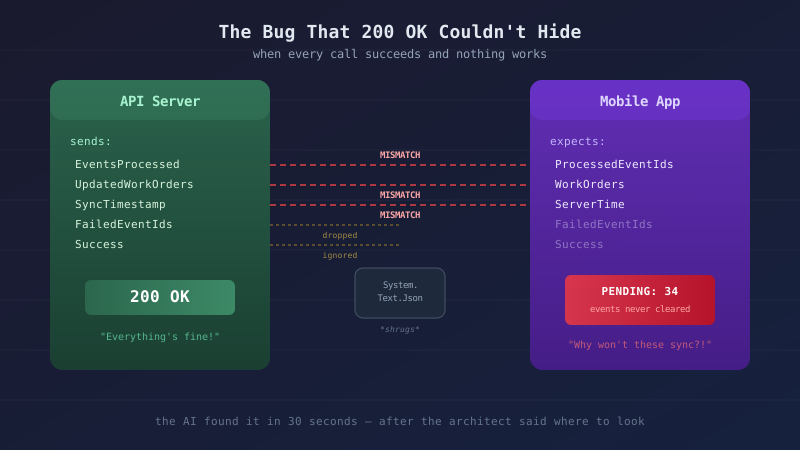
The AI did what I asked — it read the mobile app's sync service, read the API's sync service, and lined up every field in the request and response objects side by side. Here's what it found:
| API Returns | Mobile App Expects | Result |
|---|---|---|
EventsProcessed (int) |
ProcessedEventIds (List<Guid>) |
Field doesn't exist — events never marked as synced |
UpdatedWorkOrders |
WorkOrders |
Name mismatch — server updates silently dropped |
SyncTimestamp |
ServerTime |
Name mismatch — timestamp lost |
FailedEventIds |
(not present) | Ignored entirely |
Errors |
(not present) | Ignored entirely |
Success (bool) |
(not present) | Never checked — all 200s treated as success |
Read that first row again. The API returns EventsProcessed — an integer count of how many events it processed. The mobile app loops over ProcessedEventIds — expecting a list of specific GUIDs to mark as synced. That field always deserializes as an empty list because the API never sends it.
Every sync cycle: send events → API processes them successfully → mobile app gets back an empty list of processed IDs → marks nothing as synced → sends the same events again next cycle. Forever.
And System.Text.Json? It just... drops mismatched fields silently. No exception. No warning. No log entry. The JSON deserializer sees a field name it doesn't recognize, shrugs, and moves on.
The system looked healthy while being fundamentally broken. Every HTTP call succeeded. Every response was valid JSON. The only clue was a queue that kept growing — and you had to understand the architecture to know that was wrong.
Why The AI Didn't Catch It Sooner
Let me be clear: my AI assistant did excellent diagnostic work once pointed in the right direction. That mismatch table above? It built that in about 30 seconds of reading both codebases. It immediately understood the implications and proposed the right fix.
But it didn't volunteer to look there. And that's the important distinction.
For two days, we were iterating on the symptoms — checking if the sync endpoint was reachable, verifying auth tokens were valid, reviewing the retry logic. All correct things to check. But the AI was answering the questions I was asking instead of challenging the premise.
It didn't say: "Hey, before we debug the retry logic, can we verify that the response shape actually matches what the client expects?"
I did. Because I've been burned by serialization mismatches before. Because I've spent years building systems where the wire format between services is a first-class architectural concern. Because something about "30 pending events, all 200 OK" pattern-matched against experience the AI doesn't have.
This wasn't the only time, either. Over the past few weeks on this project, I've redirected the AI to apply a mapper pattern instead of manual property copying, to refactor toward single responsibility instead of growing god-classes, and to step back and review the architecture before adding more features to an unstable foundation. Each time, the AI adapted immediately and did great work — after the redirect.
The Junior Developer Analogy (But Not The One You Think)
There's a popular take going around: "AI will replace junior developers." I think that gets it exactly backwards.
AI is the junior developer. A really, really fast one with perfect recall and no ego. It'll write code all day, refactor without complaint, and never ask for a raise. But it shares the same fundamental limitation as any junior dev: it doesn't know what it doesn't know.
A junior developer would also iterate on retry logic for two days if you didn't redirect them. That's not a criticism — it's the natural behavior of someone (or something) that's optimizing for the immediate problem without the architectural context to see the bigger picture.
The "you don't need to learn to code anymore" crowd is essentially saying: "You don't need senior developers because junior developers are really fast now." Anyone who's managed a team knows how that ends.
What AI actually needs — what junior developers actually need — is someone who can:
- Recognize when iteration is circling instead of converging
- Know which layer of the stack to investigate based on the pattern of symptoms, not just the symptoms themselves
- Say "stop — we're not architecturally sound" before the technical debt buries you
That's not prompt engineering. That's engineering experience.
What We Found (And What It Means)
The sync mismatch wasn't an isolated bug. It was the tip of the iceberg.
Once we started auditing the architecture instead of chasing symptoms, three more issues surfaced in the same session:
Two code paths, one write. Location updates could arrive through a direct API call or through the sync event pipeline. The direct path had SignalR broadcasting from day one — crew members appeared on the map in real-time. The sync path was built later and just wrote to the database. Same data, different side effects. Crew members who synced their location via the mobile app were invisible on the live map. Classic shotgun surgery: adding a feature to one entry point but not the other.
Ghost fields on DTOs. The sync request included DeviceId and CrewMemberId fields that were never populated. The API didn't use them (it relied on JWT auth), so nobody noticed they were empty. They existed for diagnostic logging — which meant the diagnostic logging was useless. Fields that aren't validated rot silently.
A page with no door. The GPS audit trail was fully built and working at /admin/workorders/{id}/gps-audit. But no link pointed to it from anywhere in the app. And the URL used workorders while every other admin page used work-orders. A feature that technically exists but is unreachable is the same as a feature that doesn't exist.
Each of these was a different kind of bug. But they all shared the same root cause: the mobile app had grown its own parallel versions of every data transfer object that the API already defined in a shared library. Two sets of classes, same intent, different property names, no compile-time contract between them. When there's no single source of truth, every new feature is a coin flip on whether it'll work or silently diverge.
The fix isn't complicated: use the shared library types everywhere data crosses the wire. One definition, one contract, compile-time enforcement. One code path per write — sync event processing should delegate to domain services, not duplicate their logic. If the API response shape changes, the mobile app won't compile until it's updated. That's not a bug — that's a feature.
Or as the boy scouts say: leave it better than you found it. Every consolidation today is one less mystery bug tomorrow.
But knowing to look for that pattern, knowing to stop chasing individual field mismatches and ask "why do we have two sets of DTOs in the first place?" — that requires understanding the architecture. Not just the code.
The Real Skill
Here's what I've learned from building systems with AI over the past year:
The value isn't in writing code. AI writes code faster than I ever will. It refactors in seconds what would take me an hour. It catches syntax errors and suggests patterns I might not think of.
The value is in knowing when to stop writing code. When to step back and question the architecture. When to recognize that the third fix for the same symptom means you're in the wrong layer. When a queue of 30 pending events and a wall of 200 OK responses means the system is lying, not the code.
I've been writing CLAUDE.md files and architecture pattern documents — project guidelines that persist across AI sessions — and one rule keeps proving itself: "If your approach requires more than two attempted fixes for the same issue: STOP. You're likely treating symptoms, not the root cause."
The sync mismatch incident itself prompted an update to our global architecture patterns doc. New rule: "If data crosses the wire, it must use a type from the shared library. No internal parallel DTOs, period." That's institutional memory — hard-won, codified, and now enforced on every future AI session across every project.
I wrote that rule because I kept learning it the hard way. And the AI follows it perfectly — once told. That's the part that matters. The AI doesn't generate the wisdom. It amplifies it.
The Weight Of It
I'll be honest: after the audit, I felt it. The weight of inconsistent architecture pressing down on a project I care about. That moment where you realize the codebase has been growing faster than the foundations can support, and every new feature is adding load to something that needs shoring up first.
It's a humbling feeling. But it's also the feeling that leads to the best decisions. Because the alternative — ignoring it and building more features on a shaky foundation — is how projects die slowly.
So we stopped. Updated the architecture patterns. Documented the rules that would have prevented every one of these bugs. And committed to the refactor before adding a single new feature.
That's the part nobody talks about. The AI didn't feel the weight. It was ready to keep building. I'm the one who had to say "not yet."
What This Means For You
If you're a developer using AI tools — and you should be — here's the uncomfortable truth: the tools are only as good as your ability to direct them. Not "prompt engineer" them with clever wording. Direct them with architectural understanding.
If you don't understand why shared DTOs matter, you won't know to ask the AI to check for mismatches. If you don't understand serialization behavior, you won't know that 200 OK can hide a broken system. If you don't understand when to stop iterating and start auditing, you'll happily co-author a codebase that looks functional and is quietly rotting.
Learn the fundamentals. Understand your architecture. Build the judgment that tells you when the AI is circling.
Then turn the AI loose. It's incredible when pointed in the right direction.
This post is part of a series about developing with AI. See also: Why Your AI Assistant Keeps Guessing Wrong and Writing Technical Content When You're Too Tired to Be Funny.