The Problem Nobody Talks About
You built a website. It's beautiful. The code is clean, the content is helpful, and you're genuinely proud of it. You launch, share it with friends, and wait for the traffic to roll in.
Cricket sounds.
A week later, you Google your own site name and find... nothing. Or worse, you find a completely unrelated result. Your masterpiece is invisible. It's like throwing a party and forgetting to send invitations.
This was me. Multiple times. I'd build something useful, deploy it, and wonder why Google seemed personally offended by its existence.
The culprit? I was ignoring SEO—Search Engine Optimization. Not because I didn't care, but because every guide I found was either "just use WordPress plugins" or a 47-page dissertation on keyword density algorithms.
Let's fix that. Here's what actually matters, explained for developers who'd rather write code than read marketing blogs.
What Search Engines Actually Want
Before diving into implementation, it helps to understand what Google (and Bing, and DuckDuckGo) are trying to do. Their job is answering questions. Someone types "how to center a div" and the search engine needs to find the most helpful page about centering divs.
To do this, they need to:
- Find your pages — Discover that your site exists
- Understand your pages — Figure out what each page is about
- Trust your pages — Believe your content is legitimate and helpful
- Rank your pages — Decide where you appear in results
SEO is just making these four jobs easier. That's it. No magic, no tricks, no gaming the system. Just helping search engines understand what you've built.
The Two Types of SEO
SEO splits into two categories:
| Type | What It Is | Who Handles It |
|---|---|---|
| Content SEO | Writing useful stuff that answers questions | You, the human |
| Technical SEO | Making your site crawlable and understandable | You, the developer |
Content SEO is about writing well. Technical SEO is about code. This post focuses on the technical side—the stuff you can implement once and forget about.
Meta Tags: Your Page's Business Card
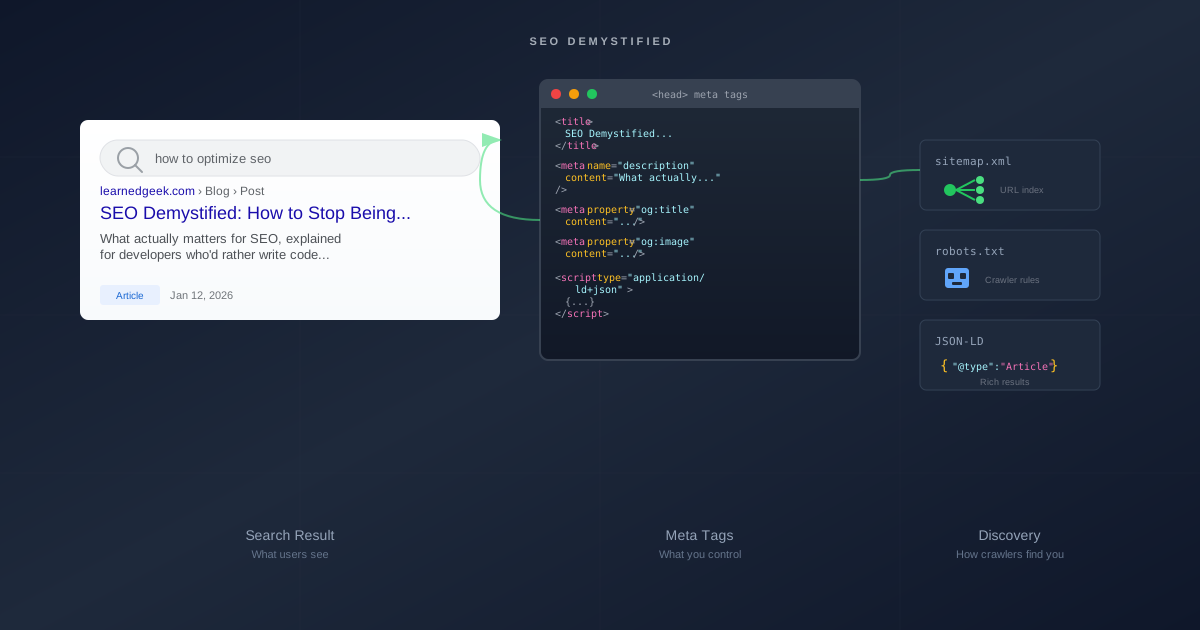
When a search engine visits your page, the first thing it reads is the <head> section. This is where you introduce yourself.
The Title Tag
The most important meta tag. This appears as the clickable headline in search results.
<title>SEO Demystified: How to Stop Being Invisible to Google - Learned Geek</title>
Rules of thumb:
- Keep it under 60 characters (Google truncates longer titles)
- Put the important stuff first—users scan left to right
- Make it specific to this page, not your whole site
- Include your brand name at the end (for recognition)
A bad title: Home - My Website
A good title: How to Center a Div in CSS (5 Methods) - CSS Tricks
The Meta Description
This is the snippet that appears below your title in search results. Google doesn't always use it (sometimes they pull text from your page instead), but when they do, it's your elevator pitch.
<meta name="description" content="Your test suite exists. It passes. But how much of your code does it actually test? Here's how to set up Codecov and stop living in denial." />
Rules of thumb:
- Keep it under 160 characters
- Include a call to action or hook
- Summarize what the reader will learn
- Don't keyword-stuff—write for humans
The Canonical URL
This tells search engines "this is the official URL for this content." It prevents duplicate content issues when the same page is accessible via multiple URLs.
<link rel="canonical" href="https://learnedgeek.com/Blog/Post/seo-demystified" />
Why does this matter? Because these URLs might all show the same content:
https://learnedgeek.com/Blog/Post/seo-demystifiedhttps://learnedgeek.com/Blog/Post/seo-demystified?utm_source=twitterhttps://learnedgeek.com/blog/post/SEO-Demystifiedhttp://learnedgeek.com/Blog/Post/seo-demystified
Without a canonical tag, Google might see these as four different pages with duplicate content. With a canonical tag, they know which one is the "real" one.
Open Graph: Looking Good on Social Media
When someone shares your link on Facebook, LinkedIn, or Twitter, those platforms look for Open Graph meta tags to build the preview card. Without them, you get an ugly link with no context.
<meta property="og:type" content="article" />
<meta property="og:url" content="https://learnedgeek.com/Blog/Post/seo-demystified" />
<meta property="og:title" content="SEO Demystified: How to Stop Being Invisible to Google" />
<meta property="og:description" content="What actually matters for SEO, explained for developers..." />
<meta property="og:image" content="https://learnedgeek.com/img/posts/seo-demystified.svg" />
<meta property="og:site_name" content="Learned Geek" />
Twitter has its own version:
<meta name="twitter:card" content="summary_large_image" />
<meta name="twitter:title" content="SEO Demystified: How to Stop Being Invisible to Google" />
<meta name="twitter:description" content="What actually matters for SEO, explained for developers..." />
<meta name="twitter:image" content="https://learnedgeek.com/img/posts/seo-demystified.svg" />
The og:image is crucial. A good image dramatically increases click-through rates. Aim for 1200x630 pixels—this displays well across all platforms.
Pro tip: Test your tags with the Facebook Sharing Debugger and Twitter Card Validator. They'll show exactly what your shared links look like.
Structured Data: Speaking Google's Language
Here's where it gets interesting. Structured data (usually JSON-LD format) lets you tell search engines exactly what your content is, in a machine-readable format.
Instead of Google guessing "this looks like a blog post," you can explicitly say "this is a BlogPosting, written by this author, published on this date, about these topics."
<script type="application/ld+json">
{
  "@context": "https://schema.org",
  "@type": "BlogPosting",
  "headline": "SEO Demystified: How to Stop Being Invisible to Google",
  "description": "What actually matters for SEO, explained for developers...",
  "image": "https://learnedgeek.com/img/posts/seo-demystified.svg",
  "url": "https://learnedgeek.com/Blog/Post/seo-demystified",
  "datePublished": "2026-01-12T00:00:00Z",
  "author": {
    "@type": "Person",
    "name": "Learned Geek"
  },
  "publisher": {
    "@type": "Organization",
    "name": "Learned Geek",
    "logo": {
      "@type": "ImageObject",
      "url": "https://learnedgeek.com/img/learned-geek-logo.png"
    }
  }
}
</script>
This enables rich results—those fancy search listings with star ratings, author photos, recipe cards, FAQ accordions, and more. Not every type of structured data gets special treatment, but blog posts, recipes, products, FAQs, and how-to guides often do.
The full vocabulary lives at schema.org. The Google Rich Results Test validates your implementation.
Sitemaps: Giving Google a Map
A sitemap is an XML file that lists every page you want search engines to find. It's like handing them a table of contents instead of making them explore blindly.
<?xml version="1.0" encoding="UTF-8"?>
<urlset xmlns="http://www.sitemaps.org/schemas/sitemap/0.9">
  <url>
    <loc>https://learnedgeek.com/</loc>
    <changefreq>weekly</changefreq>
    <priority>1.0</priority>
  </url>
  <url>
    <loc>https://learnedgeek.com/Blog</loc>
    <changefreq>daily</changefreq>
    <priority>0.9</priority>
  </url>
  <url>
    <loc>https://learnedgeek.com/Blog/Post/seo-demystified</loc>
    <lastmod>2026-01-12</lastmod>
    <changefreq>monthly</changefreq>
    <priority>0.7</priority>
  </url>
</urlset>
For dynamic sites, generate this programmatically. In ASP.NET Core:
[Route("sitemap.xml")]
public async Task<IActionResult> Sitemap()
{
    var posts = await _blogService.GetAllPostsAsync();

    // Build XML with all posts...

    return Content(xml, "application/xml");
}
Serve your sitemap at /sitemap.xml and tell Google about it via Google Search Console or your robots.txt file.
robots.txt: Setting Boundaries
The robots.txt file tells search engines what they're allowed to crawl. It lives at your domain root.
User-agent: *
Allow: /

Sitemap: https://learnedgeek.com/sitemap.xml
This says "all crawlers can access everything, and here's where my sitemap lives."
You can also block specific paths:
User-agent: *
Disallow: /admin/
Disallow: /api/
Disallow: /private/

Sitemap: https://learnedgeek.com/sitemap.xml
Important: robots.txt is a suggestion, not a security measure. Well-behaved crawlers respect it. Malicious ones don't. Never rely on it to hide sensitive content.
The Implementation Pattern
In practice, you want your layout to dynamically inject SEO tags based on the current page. Here's the pattern I use in ASP.NET Core:
In your controller:
ViewBag.Seo = new SeoMetadata
{
    Title = post.Title,
    Description = post.Description,
    Image = post.Image,
    Url = $"https://learnedgeek.com/Blog/Post/{post.Slug}",
    Type = "article",
    PublishedTime = post.Date
};
In your layout:
@{
    var seo = ViewBag.Seo as SeoMetadata;
    var title = seo?.Title ?? ViewData["Title"] ?? "Learned Geek";
    var description = seo?.Description ?? "Default site description";
}

<title>@title - Learned Geek</title>
<meta name="description" content="@description" />
<meta property="og:title" content="@title" />
<!-- ... more tags ... -->
Every page gets proper meta tags. Blog posts get article-specific ones. Generic pages get sensible defaults.
Common Mistakes (I've Made Them All)
Duplicate title tags — Every page needs a unique title. "Home" on every page tells Google nothing.
Missing meta descriptions — Google will pull random text from your page. It's rarely flattering.
Broken canonical URLs — Pointing to a URL that 404s or redirects breaks the whole purpose.
No HTTPS — Google explicitly favors secure sites. Get a free certificate from Let's Encrypt.
Slow pages — Core Web Vitals are a ranking factor. Compress images, minify CSS/JS, use caching.
Blocking your own site — I once deployed a robots.txt with Disallow: / to production. Three weeks of invisibility later, I learned to check my staging deployments more carefully.
No mobile support — Google uses mobile-first indexing. If your site is unusable on phones, your rankings suffer.
Testing Your Implementation
Before deploying, verify everything works:
- Google Rich Results Test — Validates structured data
- Facebook Sharing Debugger — Shows Open Graph previews
- Google Search Console — The source of truth for how Google sees your site
- View page source — Just look at your
<head>section. Are all the tags there?
After deploying, submit your sitemap to Google Search Console and request indexing for important pages. Google will eventually find you anyway, but this speeds things up.
The Long Game
Here's the thing about SEO: it's not instant. Google needs to crawl your site, process it, and decide where you rank. This takes weeks, sometimes months. New sites start with zero authority and build it over time.
The technical foundation we've covered is table stakes—it gets you in the game. Actual rankings come from:
- Useful content that answers real questions
- Backlinks from other reputable sites
- User engagement (people staying on your page, not bouncing)
- Consistency in publishing and quality
Technical SEO removes barriers. Content SEO builds the house.
Wrapping Up
SEO isn't magic, and it isn't manipulation. It's just communication—helping search engines understand what you've built so they can show it to people who need it.
Implement the technical basics:
- Unique, descriptive title tags
- Meta descriptions that hook readers
- Open Graph tags for social sharing
- Structured data for rich results
- A sitemap for discoverability
- robots.txt for crawler guidance
Then focus on writing things worth reading.
The search engines will find you. The question is whether you've made yourself worth finding.
This post is part of a series on SEO for developers. See also: SEO Oops Recovery Guide on what to do when you accidentally expose pages to search engines (or need to remove them).
Got questions about implementing SEO in your stack? Found a mistake in this post? Drop a comment below. I'm always learning too.


