You just survived a 5-part deep dive into schema-aware EF Core migrations. Custom SQL generators. Cache key factories. Migration history tables. Design-time vs runtime mental models. It was a lot.
This is the "explain it to your mom" version.
The Problem (In One Sentence)
Multiple copies of our app need to share one database without stepping on each other's toes.
The Apartment Building Analogy
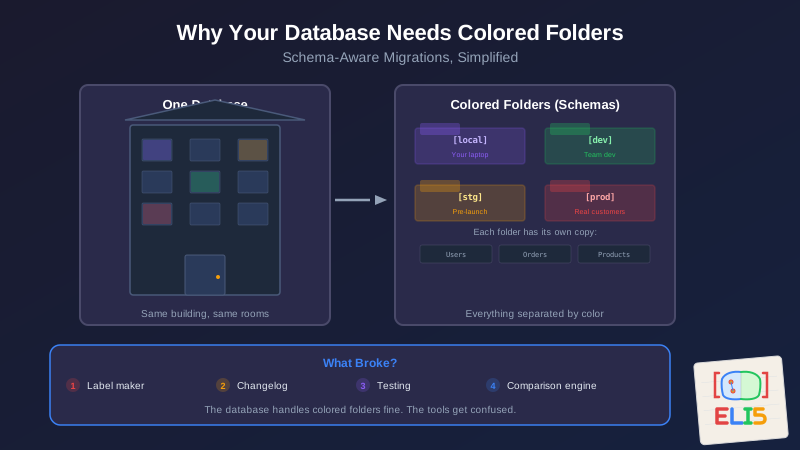
Imagine a database is an apartment building. Each apartment is a table—one for users, one for orders, one for products.
Now imagine you need four tenants in the same building:
- Local (your laptop, where you experiment)
- Dev (where the team develops together)
- Staging (where you test before going live)
- Production (the real thing, with real customers)
If everyone just moves into the same apartments, chaos. Local's experiments overwrite Production's customer data. Staging's test orders show up in the real store. Nobody can tell whose stuff is whose.
The Solution: Colored Folders
A schema is like giving each tenant their own colored folder system.
- Local gets blue folders
- Dev gets green folders
- Staging gets yellow folders
- Production gets red folders
Same apartment building. Same room numbers. But everything inside is clearly separated by color. Local's blue "Users" folder and Production's red "Users" folder sit side by side but never mix.
In database terms:
local.Users        -- Blue folder
dev.Users          -- Green folder
stg.Users          -- Yellow folder
prod.Users         -- Red folder
Four completely separate sets of data, living in one database.
So What's the Problem?
The problem is that our database management tool—Entity Framework Core—was designed assuming you'd only have one set of folders. When you tell it "hey, use colored folders," four things break:
1. The Label Maker Is Broken
When EF Core creates new tables, it stamps them with the default label. We told it to use "stg" but the label maker still prints plain labels.
The fix: We built a custom label maker (a MigrationsSqlGenerator) that intercepts every label and stamps it with the right color.
Part 1: The custom SQL generator
2. The Changelog Goes in the Wrong Drawer
EF Core keeps a changelog of every modification it's made—"I created this table on Tuesday, added that column on Thursday." But it stores this changelog in the default drawer, not the colored one.
So when Staging runs, it checks the wrong changelog, doesn't see its own history, and tries to create tables that already exist. Boom.
The fix: Tell EF Core to keep each color's changelog in that color's drawer.
Part 2: The MigrationsHistoryTable bug
3. We Weren't Testing the Right Thing
We had tests, but they were testing the easy stuff. "Did the label maker turn on?" Not the hard stuff: "Did the label maker actually stamp the right color on every single type of label?"
The fix: Tests that examine every label the system produces and verify the color is correct. Not just "it didn't crash" but "it actually did the right thing."
Part 3: Tests that let you sleep at night
4. The Comparison Engine Gets Confused
EF Core periodically compares its mental model of the database against reality. "Does my picture match what's actually there?" But it only keeps one picture in its head. When Local (blue) loads first, EF Core memorizes blue. Then Staging (yellow) starts, and EF Core says, "Wait—this doesn't match my picture! Something changed!"
Nothing changed. It's just looking at the wrong color.
The fix: Tell EF Core to keep separate pictures for each color, so blue's picture and yellow's picture never get mixed up.
Part 4: The Model Cache Key Factory
The Complete Picture
Here's everything you need, in plain English:
| What | Why | Analogy |
|---|---|---|
HasDefaultSchema() |
Queries look in the right folder | "Check the blue drawer, not the default one" |
MigrationsHistoryTable() |
Changelog goes in the right folder | "Keep blue's changelog in blue's drawer" |
UseSchemaAwareMigrations() |
New tables get the right color | "The label maker stamps blue on everything" |
ReplaceService<IModelCacheKeyFactory>() |
Separate mental pictures per color | "Don't compare blue's picture to yellow's reality" |
MigrationHelper.Environment |
Seed scripts know which color they're working with | "Plant blue flowers in the blue garden" |
Why Not Just Use Separate Databases?
You absolutely can. And for many teams, that's the right call. Separate databases means no color-coding gymnastics.
But separate databases mean separate costs, separate backups, separate connection strings, and separate maintenance. For small teams or personal projects, one database with colored folders is simpler and cheaper. You just need the label maker and the changelog to cooperate.
The Takeaway
Schema-aware migrations solve a simple problem in a complicated way because the tools weren't designed for it. The database is fine with colored folders—it's the management layer that gets confused.
Four things broke. Four fixes. And one mental model (Part 5) that makes it all click. Each one is simple once you understand what went wrong. The hard part was figuring out what was wrong in the first place.
This is part of the ELI5 series—technical concepts explained without the jargon. This post is a companion to the Schema-Aware EF Core Migrations series:
- Schema-Aware EF Core Migrations — The custom SQL generator approach
- The MigrationsHistoryTable Bug — Why history table schema matters
- Hardening Schema Migrations — Tests that let you sleep at night
- The Model Cache Key Factory — Preventing false PendingModelChangesWarning
- The Design-Time vs Runtime Mental Model — Why schema handling is actually two systems
If the series was the blueprint, this is the brochure.


