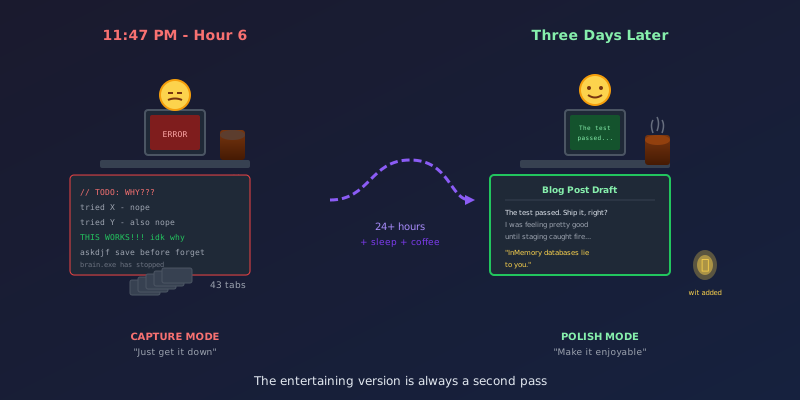
It's 11:47 PM. The bug is fixed. I have 43 browser tabs open, my coffee went cold two hours ago, and I've mass a mass of mass a mass of mass a mass of mass a just mass—sorry, my brain is doing that thing where words stop making sense.
This is not the time to write something entertaining.
But it is the perfect time to write something useful.
The Two-Pass Approach
Here's a secret about how technical blog posts get written (at least by me): they happen in two completely separate passes, usually days apart, in completely different mental states.
Pass 1: The Capture
- Happens at hour 6 of debugging
- Brain is fried but the solution is fresh
- Zero humor, maximum detail
- Lots of code snippets copied directly from the working solution
- Notes like "THIS WAS THE PROBLEM" in all caps
- Written for future-me who will definitely forget why this works
Pass 2: The Polish
- Happens days later, after sleep
- Can finally laugh about it
- Add the narrative arc, the analogies, the jokes
- Transform "THIS WAS THE PROBLEM" into a proper explanation
- Make it something someone would actually want to read
The key insight: these two passes require completely different mental states. Trying to do both at once produces content that's neither accurate nor entertaining.
Why Capture Mode Matters
When you're deep in a debugging session, you have context that's impossible to reconstruct later. You know:
- The 17 things you tried that didn't work
- The subtle difference between the fix and what you tried before
- The exact error message and why it was misleading
- The Stack Overflow answer that was almost right but missing one crucial detail
A week later? That's all gone. You'll remember "something about the schema" but not which schema or why it mattered.
So I write it down ugly. Stream of consciousness. Code blocks with TODO comments still in them. Sentences that trail off because I got distracted by another error.
It's not a blog post. It's a crime scene report.
Why Polish Mode Matters
Nobody wants to read a crime scene report.
Technical accuracy isn't enough. If readers wanted raw documentation, they'd read the official docs (and be confused, which is why they're searching for blog posts in the first place).
What readers actually want:
- Context: Why does this matter? What problem does it solve?
- Narrative: What was the journey? What did you try first?
- Empathy: Validation that this was genuinely confusing
- Entertainment: A reason to keep reading beyond "I need this fix"
That last one is important. The internet is full of correct-but-boring technical content. If you can make someone smile while teaching them about EF Core migrations, they'll remember both the lesson and your blog.
The Transformation
Here's what this looks like in practice.
Capture Mode (11:47 PM):
InMemory doesn't work. Tried for 3 hours. SQL translation
is different. Need real SQL Server.

Respawn fixes the speed problem - 20ms vs 1000ms for
EnsureDeleted/Created cycle.

IMPORTANT: Use fresh context for assertions! The original
context caches entities. Spent 45 min on this.

TODO: figure out CI container setup
Polish Mode (three days later):
The test passed. Ship it, right?
I was feeling pretty good about my integration test coverage until I deployed to staging and watched everything catch fire. The LINQ query that worked perfectly against
UseInMemoryDatabase()generated SQL that SQL Server politely refused to execute.That's when I learned the hard way: InMemory databases lie to you. They're fast and convenient, like a friend who tells you that outfit looks great when it definitely does not.
Same information. Completely different reading experience.
The Timing Secret
The gap between passes isn't just about rest—it's about emotional distance.
At hour 6, the bug is your nemesis. You're not objective. You're relieved it's fixed but also kind of angry it took so long. Writing in that state produces content that's either:
- Too bitter ("Microsoft's documentation is useless")
- Too relieved ("Just do X, it's easy!")
- Too detailed ("Here are all 47 things I tried")
A few days later, you can see the experience as a story. The frustration becomes humor. The relief becomes a teaching opportunity. "I spent 45 minutes on this" becomes "the original context caches entities, so always verify with a fresh context"—actionable advice instead of a complaint.
My Actual Workflow
During debugging: Keep a scratch file open. Every time something works (or notably fails), jot it down. Don't worry about formatting.
When the bug is fixed: Spend 15 minutes doing a brain dump. Get every relevant detail out of your head before you forget. Include code snippets, error messages, the actual fix.
Wait at least 24 hours: Do not try to polish while tired. You'll either give up or produce something you'll want to rewrite anyway.
Polish with fresh eyes: Read the brain dump like a story. What's the narrative arc? Where's the conflict? What's the resolution? Add the human elements—the analogies, the self-deprecating humor, the moments of "here's what I should have done first."
Cut ruthlessly: Your brain dump has everything. Your blog post needs only what serves the reader. That 30-line code block? Maybe they only need 10 lines.
The Unsexy Truth
Most of my "entertaining" technical posts started as exhausted notes written at unreasonable hours. The wit wasn't there originally. The analogies came later.
Writing technical content when you're too tired to be funny is actually the optimal strategy:
- You capture the details you'd otherwise forget
- You don't waste energy trying to be clever when you can't be
- You give yourself raw material that's easier to polish than a blank page
The blog post you're reading right now? First draft was bullet points at 1 AM. The "crime scene report" line came three days later, after coffee and perspective.
So if you're staring at a debugging session wondering how anyone writes about this stuff—they don't. Not in the moment. They write ugly notes now and pretty prose later.
The entertaining version is always a second pass.
Now if you'll excuse me, I have a cold cup of coffee to microwave and 43 browser tabs that aren't going to close themselves.