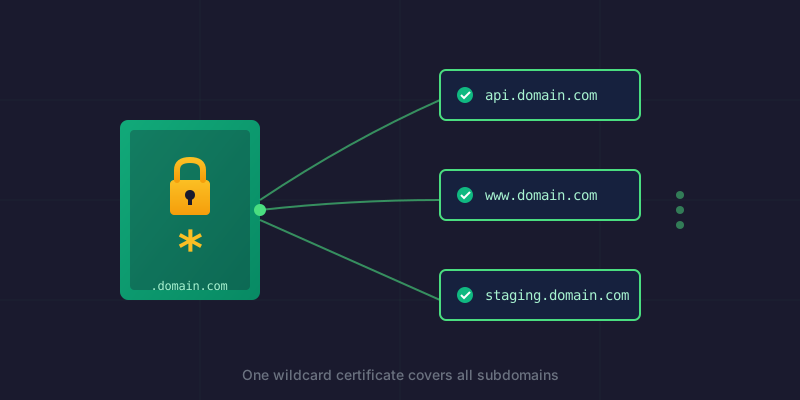
My SSL automation setup has been humming along nicely—until I needed subdomains for a multi-tenant SaaS application. My existing certificate covered myapp.com and www.myapp.com, but now I needed client1.myapp.com, client1-api.myapp.com, and potentially more client subdomains in the future.
Time to upgrade to a wildcard certificate.
Why Wildcard?
I could have just added each subdomain explicitly:
sudo certbot certonly \
  --dns-cloudflare \
  --dns-cloudflare-credentials /etc/letsencrypt/cloudflare.ini \
  -d myapp.com \
  -d www.myapp.com \
  -d client1.myapp.com \
  -d client1-api.myapp.com \
  -d client1-staging.myapp.com \
  -d client1-staging-api.myapp.com
But every new client would mean regenerating the certificate. A wildcard (*.myapp.com) covers all subdomains with one cert—add as many as you want without touching Certbot again.
The Upgrade Command
sudo certbot certonly \
  --dns-cloudflare \
  --dns-cloudflare-credentials /etc/letsencrypt/cloudflare.ini \
  --dns-cloudflare-propagation-seconds 60 \
  -d myapp.com \
  -d "*.myapp.com"
Note: You still need the root domain (myapp.com) explicitly—the wildcard only covers subdomains, not the apex.
Gotcha #1: The -0001 Directory
I expected Certbot to update my existing certificate. Instead:
Successfully received certificate.
Certificate is saved at: /etc/letsencrypt/live/myapp.com-0001/fullchain.pem
Key is saved at:         /etc/letsencrypt/live/myapp.com-0001/privkey.pem
Certbot saw that the domain list changed (adding *.myapp.com) and created a new certificate with -0001 suffix rather than replacing the existing one.
Now I had two certificates:
/etc/letsencrypt/live/myapp.com/— old (root + www only)/etc/letsencrypt/live/myapp.com-0001/— new wildcard
My export-pfx.sh script was still pointing to the old location. Ugly.
Gotcha #2: certbot rename Doesn't Exist
The internet suggested:
sudo certbot rename --cert-name myapp.com-0001 --new-cert-name myapp.com
My Raspberry Pi disagreed:
certbot: error: unrecognized arguments: rename --new-cert-name myapp.com
The rename subcommand was added in a later version of Certbot. Older versions (common on Raspberry Pi OS) don't have it.
The Manual Fix
First, delete the old certificate:
sudo certbot delete --cert-name myapp.com
Certbot will warn you about breaking things—confirm with Y since we're replacing it anyway.
Then manually rename the directories and update the config:
# Rename the live directory
sudo mv /etc/letsencrypt/live/myapp.com-0001 /etc/letsencrypt/live/myapp.com

# Rename the renewal config
sudo mv /etc/letsencrypt/renewal/myapp.com-0001.conf /etc/letsencrypt/renewal/myapp.com.conf

# Update paths inside the renewal config
sudo sed -i 's/myapp.com-0001/myapp.com/g' /etc/letsencrypt/renewal/myapp.com.conf
Verify the renewal config looks right:
cat /etc/letsencrypt/renewal/myapp.com.conf
All paths should reference myapp.com without the -0001 suffix.
Verifying the Wildcard
Confirm your certificate actually covers the wildcard:
sudo openssl x509 -in /etc/letsencrypt/live/myapp.com/fullchain.pem -text -noout | grep -A1 "Subject Alternative Name"
Should output:
X509v3 Subject Alternative Name:
    DNS:*.myapp.com, DNS:myapp.com
Both the wildcard and root domain are covered.
Re-Export and Upload
If you have a PFX export script like I do, just run it:
sudo /etc/letsencrypt/renewal-hooks/deploy/export-pfx.sh
Or manually:
sudo openssl pkcs12 -export \
  -out ~/certs/myapp.com.pfx \
  -inkey /etc/letsencrypt/live/myapp.com/privkey.pem \
  -in /etc/letsencrypt/live/myapp.com/fullchain.pem \
  -name "myapp.com" \
  -passout pass:your-password

chmod 644 ~/certs/myapp.com.pfx
Upload the new PFX to your hosting provider's SSL manager. One certificate now covers your root domain and all subdomains.
The Complete Checklist
When upgrading from specific domains to wildcard:
- Run certbot with
-d domain.com -d "*.domain.com" - Note if it creates a
-0001directory - Delete the old certificate:
certbot delete --cert-name domain.com - Rename the new directory to remove
-0001suffix - Rename the renewal config file
- Update paths in renewal config with
sed - Verify wildcard is in the SAN list
- Re-export to PFX
- Upload to hosting provider
What I Learned
- Wildcards require DNS-01 challenges — HTTP-01 can't validate wildcard certs
- Certbot creates new certs when the domain list changes, rather than modifying existing ones
- The
renamesubcommand isn't available in older Certbot versions - Manual rename works fine — just don't forget to update the renewal config
- Wildcards are worth it for multi-tenant apps where subdomains will grow over time
The wildcard cert will auto-renew just like before. Add as many subdomains as you need—the certificate doesn't care.
This post is part of a series on SSL automation:
- Part 1: SSL Automation with Let's Encrypt and Cloudflare — initial setup
- Part 2: Adding Domains to Your Certbot Setup — expanding to new domains
- Part 3: This post — upgrading to wildcard certificates


