You're building a mobile app with a complex architecture:
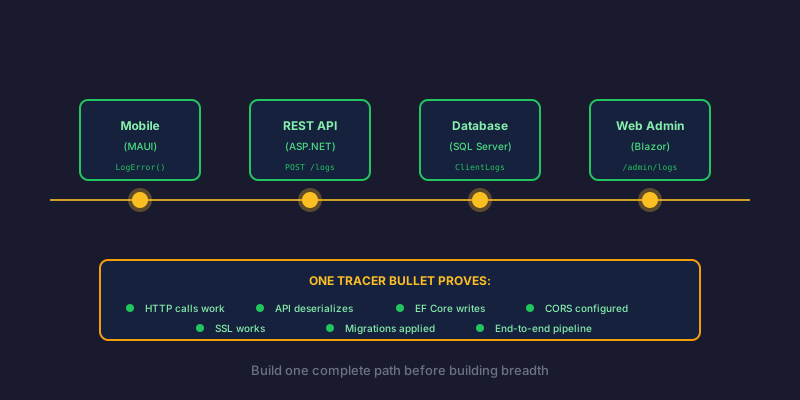
Mobile App (MAUI) → REST API → SQL Database → Web Admin (Blazor)
Field workers will use the mobile app to complete tasks, clock in/out, capture photos, and update GPS locations. All of that data needs to sync from mobile → API → database → web admin for supervisors to see.
That's a lot of moving parts. How do you know it all works before building months of features?
The Tracer Bullet Concept
The term comes from The Pragmatic Programmer by Hunt and Thomas. In warfare, tracer bullets are loaded alongside regular ammunition. They glow as they fly, showing soldiers whether they're hitting their target in real-time.
In software, a tracer bullet is a thin, end-to-end implementation that proves your architecture works. It's not a prototype or proof-of-concept—it's real production code, just minimal.
The key insight: Build one complete path through the system before building out the breadth.
My Tracer Bullet: Error Logging
Instead of starting with complex business logic (work orders, task completion, time tracking), I started with something simpler: error logging.
Why error logging?
- It needs the exact same pipeline: Mobile → API → Database → Web Admin
- It's simpler than business entities (no foreign keys, no validation rules)
- It's immediately useful (I can debug problems from day one)
- It proves every layer of the architecture
Here's what I built:
Mobile App (MAUI)
public class LoggingService : ILoggingService
{
    public async Task<string> LogErrorAsync(string message, Exception? ex)
    {
        var entry = new LogEntry
        {
            ReferenceId = ReferenceIdGenerator.Generate("ERR"),
            Message = message,
            DeviceInfo = GetDeviceInfo(),
            Timestamp = DateTime.UtcNow
        };

        await StoreLocallyAsync(entry);   // Offline-first
        await SyncToServerAsync(entry);   // Sync when online

        return entry.ReferenceId;
    }
}
REST API
[ApiController]
[Route("api/logs")]
public class LogsController : ControllerBase
{
    [HttpPost("sync")]
    public async Task<IActionResult> SyncLogs([FromBody] LogSyncRequest request)
    {
        foreach (var entry in request.Entries)
        {
            await _dbContext.ClientLogs.AddAsync(MapToEntity(entry));
        }
        await _dbContext.SaveChangesAsync();

        return Ok(new { Success = true, Count = request.Entries.Count });
    }
}
Database
CREATE TABLE ClientLogs (
    Id INT PRIMARY KEY IDENTITY,
    ReferenceId NVARCHAR(20) NOT NULL,
    Message NVARCHAR(MAX),
    Level NVARCHAR(20),
    DeviceInfo NVARCHAR(500),
    Timestamp DATETIME2,
    INDEX IX_ReferenceId (ReferenceId),
    INDEX IX_Timestamp (Timestamp DESC)
);
Web Admin (Blazor)
@page "/admin/logs"

<h1>System Logs</h1>
<input @bind="searchReferenceId" placeholder="Search by Reference ID" />

<table>
    @foreach (var log in logs)
    {
        <tr>
            <td>@log.ReferenceId</td>
            <td>@log.Message</td>
            <td>@log.Timestamp</td>
        </tr>
    }
</table>
The Moment of Truth
I added a "Test Error" button to the mobile app's developer tools:
private async Task TestErrorLogging()
{
    await _loggingService.LogErrorAsync(
        "Test error from mobile app",
        new Exception("This is a test exception"));
}
Then I:
- Tapped the button on the Android emulator
- Watched the debug output show the log being captured
- Saw the API receive the sync request
- Checked the database—row appeared
- Opened the web admin—log visible with full details
End-to-end in one click. Mobile → API → Database → Web Admin. Working.
What I Proved
With this single tracer bullet, I validated:
| Layer | What I Proved |
|---|---|
| Mobile | MAUI can make HTTP calls to my API |
| Mobile | Offline-first storage pattern works |
| Mobile | Device info capture works |
| API | Controller receives and deserializes requests |
| API | EF Core writes to SQL Server |
| API | Connection strings and auth are configured |
| Database | Schema migrations applied correctly |
| Database | Indexes are in place |
| Web Admin | Can query and display data |
| Infrastructure | CORS is configured correctly |
| Infrastructure | SSL/TLS works end-to-end |
That's 11 integration points validated with one feature.
Now Everything Else is Easy
With the tracer bullet in place, adding work order sync is straightforward:
public async Task SyncWorkOrderCompletionAsync(WorkOrderCompletion completion)
{
    var entry = new SyncEvent
    {
        EventType = "WORK_ORDER_COMPLETED",
        EntityId = completion.WorkOrderId,
        Payload = JsonSerializer.Serialize(completion),
        Timestamp = DateTime.UtcNow
    };

    await StoreLocallyAsync(entry);   // Same as logging
    await SyncToServerAsync(entry);   // Same as logging
}
I'm not guessing if it will work. I know it works because error logging already proved the path.
The Bugs I Found Early
The tracer bullet exposed issues I'd have hit later:
NavigationManager not initialized — Mobile error boundary crashed when trying to capture the current URL during early initialization. Found and fixed before it affected real features.
CORS misconfiguration — API was rejecting requests from the web client. Discovered immediately when log sync failed.
Timezone handling — Timestamps were being stored in local time instead of UTC. Caught when comparing mobile timestamps to server timestamps.
Connection string in wrong environment — Staging was accidentally pointing to dev database. Found when logs appeared in the wrong admin panel.
All of these would have been painful to debug in a complex feature. In error logging, they were obvious and easy to fix.
Tracer Bullet vs. Prototype vs. Spike
| Approach | Purpose | Code Quality | Kept? |
|---|---|---|---|
| Prototype | Explore a concept | Throwaway | No |
| Spike | Answer a technical question | Minimal | Sometimes |
| Tracer Bullet | Prove architecture | Production-ready | Yes |
The tracer bullet is real code. It's not scaffolding or a demo. It ships. It just happens to be the simplest possible implementation of the full path.
How to Choose Your Tracer Bullet
Pick a feature that:
- Touches every layer — If your system has Mobile → API → DB → Web, your tracer should too
- Is simple — No complex business rules, minimal validation
- Is useful — You'll actually use it, so you'll notice if it breaks
- Can fail gracefully — Errors in your tracer shouldn't crash the app
Good tracer bullet candidates:
- Error/crash logging (what I used)
- Health checks and heartbeats
- User preferences sync
- Simple audit logging
- Feature flags
Bad tracer bullet candidates:
- Core business transactions (too complex)
- Authentication (too critical to iterate on)
- File uploads (too many edge cases)
The Emotional Win
There's a psychological benefit too. After a day of building the tracer bullet and seeing it work end-to-end, you have confidence.
You're not wondering "will this architecture actually work?" You've seen it work. With your own eyes. On a real device, hitting a real server, storing in a real database, displaying on a real web page.
That confidence compounds. Every subsequent feature is "just another endpoint" instead of "I hope this all fits together."
Key Takeaways
- Build end-to-end first — Prove the architecture before building breadth
- Pick something simple — Error logging is perfect because it's useful and minimal
- Make it production code — Tracer bullets ship; prototypes don't
- Find bugs early — Integration issues surface immediately
- Build confidence — Seeing it work removes uncertainty
The next time you're starting a complex system, resist the urge to build features. Build a tracer bullet instead. Prove the path. Then everything else is just filling in the blanks.
This approach validated my entire mobile-to-web sync architecture in a single day. Error logging became the foundation that proved GPS tracking, time entry sync, and photo uploads would all work—before I wrote a single line of that code.
Further Reading
- The Pragmatic Programmer by David Thomas and Andrew Hunt — Chapter on Tracer Bullets
- Martin Fowler on Sacrificial Architecture
- The Walking Skeleton pattern (similar concept from Alistair Cockburn)
Related Posts
- Error Boundaries That Don't Trap Users — The error logging system mentioned here feeds into this error boundary
- Crockford Base32: Phone-Friendly Reference IDs — How those support-friendly error reference IDs work