You add an ErrorBoundary to your Blazor app. It catches unhandled exceptions and shows a nice error message. Great!
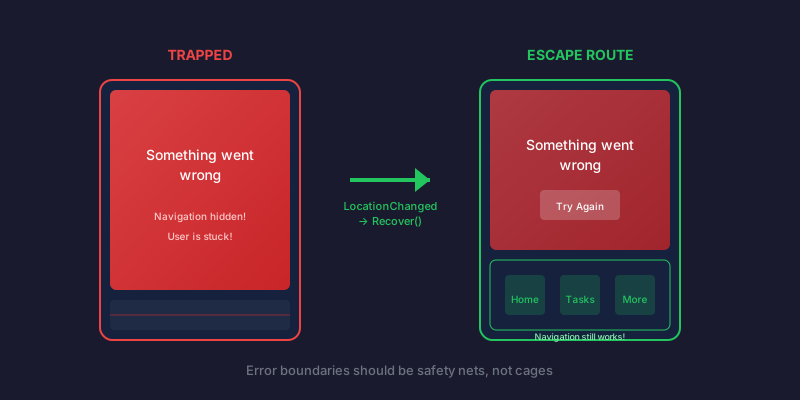
Then a user hits an error. They see your error screen. They try to navigate away using your app's navigation bar.
Nothing happens. They're trapped.
The error boundary caught the error, but it also blocked their escape route. Now they have to refresh the entire app or close it completely. That's a terrible user experience.
Why It Happens
Blazor's default ErrorBoundary component works like this:
- It wraps your content in a try-catch conceptually
- When an error occurs, it sets
CurrentExceptionand shows error content - The error state persists until you explicitly call
Recover()
The problem: navigation links still point to the same routes, but the ErrorBoundary is showing its error UI instead of rendering the child components. The navigation framework works, but your content area is stuck showing the error.
If your navigation is inside the ErrorBoundary, it's even worse—the whole thing is replaced by error content.
The UX Principle
Here's the rule: Errors should not break core navigation.
When something goes wrong, users need an escape route. If your error handling traps them, you've made a bad situation worse. The error boundary should be a safety net, not a cage.
The Fix
Subscribe to NavigationManager.LocationChanged and call Recover() when the user navigates:
@inherits ErrorBoundary
@implements IDisposable
@inject NavigationManager NavigationManager

@if (CurrentException != null)
{
    <div class="error-content">
        <h2>Something went wrong</h2>
        <p>An unexpected error occurred.</p>
        <button @onclick="Recover">Try Again</button>
    </div>
}
else
{
    @ChildContent
}

@code {
    protected override void OnInitialized()
    {
        NavigationManager.LocationChanged += OnLocationChanged;
    }

    private void OnLocationChanged(object? sender, LocationChangedEventArgs e)
    {
        if (CurrentException != null)
        {
            Recover();
        }
    }

    public void Dispose()
    {
        NavigationManager.LocationChanged -= OnLocationChanged;
    }
}
Now when users click a navigation link, the error boundary automatically recovers and shows the new page.
Placement Matters
Where you put the ErrorBoundary affects what stays functional during errors:
<!-- BAD: Nav is inside the boundary - navigation disappears on error -->
<ErrorBoundary>
    <nav>...</nav>
    <main>@Body</main>
</ErrorBoundary>

<!-- GOOD: Nav is outside the boundary - navigation always works -->
<nav>...</nav>
<ErrorBoundary>
    <main>@Body</main>
</ErrorBoundary>
In a layout component:
@inherits LayoutComponentBase

<div class="app-container">
    <main class="main-content">
        <SmartErrorBoundary>
            @Body
        </SmartErrorBoundary>
    </main>

    <!-- Navigation is OUTSIDE the error boundary -->
    <nav class="bottom-nav">
        <NavLink href="/">Home</NavLink>
        <NavLink href="/settings">Settings</NavLink>
    </nav>
</div>
Complete Implementation
Here's a production-ready error boundary with logging and navigation recovery:
@inherits ErrorBoundary
@implements IDisposable
@inject ILogger<SmartErrorBoundary> Logger
@inject NavigationManager NavigationManager

@if (CurrentException != null)
{
    <div class="error-content">
        <div class="error-card">
            <h2>Something went wrong</h2>
            <p>An unexpected error occurred.</p>

            @if (!string.IsNullOrEmpty(_referenceId))
            {
                <div class="reference-box">
                    <span class="label">Reference ID</span>
                    <span class="code">@_referenceId</span>
                </div>
                <p class="help-text">Provide this ID when contacting support.</p>
            }

            <button class="retry-btn" @onclick="Recover">Try Again</button>
        </div>
    </div>
}
else
{
    @ChildContent
}

@code {
    private string? _referenceId;

    protected override void OnInitialized()
    {
        NavigationManager.LocationChanged += OnLocationChanged;
    }

    private void OnLocationChanged(object? sender, LocationChangedEventArgs e)
    {
        if (CurrentException != null)
        {
            _referenceId = null;
            Recover();
        }
    }

    protected override Task OnErrorAsync(Exception exception)
    {
        _referenceId = ReferenceIdGenerator.Generate("ERR");
        Logger.LogError(exception, "Unhandled exception. Reference: {ReferenceId}", _referenceId);
        StateHasChanged();
        return Task.CompletedTask;
    }

    public void Dispose()
    {
        NavigationManager.LocationChanged -= OnLocationChanged;
    }
}
Key Features
- Navigation recovery — LocationChanged triggers Recover()
- Error logging — Exception is logged with a reference ID for support
- Clean disposal — Unsubscribes from events to prevent memory leaks
- User escape routes — Both "Try Again" button and normal navigation work
Testing This Behavior
Create a test page that throws on purpose:
@page "/test-error"

<h1>Error Test Page</h1>
<button @onclick="ThrowError">Trigger Error</button>

@code {
    private void ThrowError()
    {
        throw new InvalidOperationException("Test error for QA");
    }
}
Verify that:
- The error screen appears
- The navigation bar is still visible
- Clicking a nav link takes you to a new page
- The error state is cleared
The Broader Principle
This isn't just about error boundaries. It's about graceful degradation:
- Errors in one component shouldn't break unrelated components
- Users should always have a way out
- System failures shouldn't require app restarts
When you design error handling, ask: "If this fails, what can the user still do?" The answer should never be "nothing."
Field workers can't afford to restart the app every time something goes wrong—they need to keep working. The error boundary needed to be a speed bump, not a roadblock.
Related Posts
- MAUI Blazor's NavigationManager Not Initialized Gotcha — A timing issue that can crash your error boundary during early initialization
- Testing Non-Virtual Members Without Moq — How to test NavigationManager interactions when Moq won't cooperate
- Crockford Base32: Phone-Friendly Reference IDs — The encoding behind those reference IDs for support calls