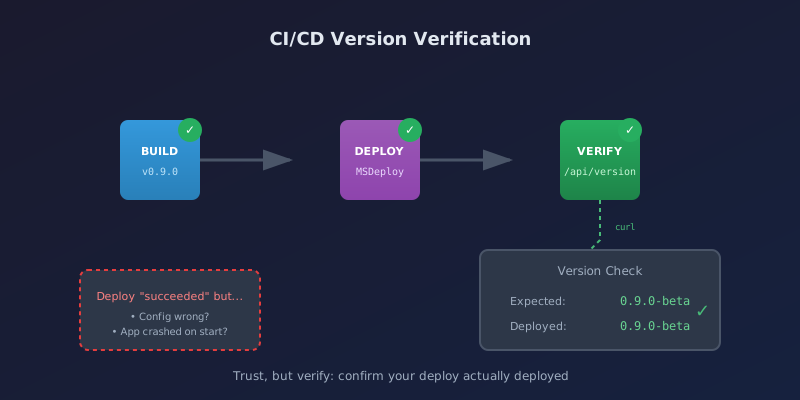
After setting up automated deployments to SmarterASP.NET, I needed a way to verify that the deployment actually succeeded. The deploy step can return success even when the new code fails to start properly. Here's how I added version verification to catch these issues.
The Problem
MSDeploy syncs files successfully, but that doesn't mean your app is healthy:
- Configuration might be wrong for the environment
- Database connection might fail
- A startup error might crash the app
- Files might deploy but the old version might still be cached
I've had deployments that "succeeded" but left the site showing errors or running old code. Without verification, you find out from users.
The Solution: Version Endpoints
Add endpoints that return the current version. After deployment, compare what the endpoint returns to what you just deployed.
API Version Endpoint
[ApiController]
[Route("api/[controller]")]
public class VersionController : ControllerBase
{
    private static readonly DateTime StartTime = DateTime.UtcNow;
    private static readonly Assembly Assembly = Assembly.GetExecutingAssembly();

    [HttpGet]
    [AllowAnonymous]
    public IActionResult GetVersion()
    {
        var assemblyName = Assembly.GetName();
        var informationalVersion = Assembly
            .GetCustomAttribute<AssemblyInformationalVersionAttribute>()?.InformationalVersion ?? "unknown";

        var versionParts = informationalVersion.Split('+');
        var version = versionParts[0];
        var commitHash = versionParts.Length > 1 ? versionParts[1] : null;

        return Ok(new
        {
            version,
            build = assemblyName.Version?.ToString(),
            commit = commitHash,
            environment = Environment.GetEnvironmentVariable("ASPNETCORE_ENVIRONMENT"),
            startTime = StartTime,
            uptime = DateTime.UtcNow - StartTime,
            timestamp = DateTime.UtcNow
        });
    }
}
The endpoint is anonymous so monitoring tools and CI/CD pipelines can access it without authentication.
Web Version File
For Blazor WASM (or any static site), generate a version.json during the build:
- name: Create version.json for Web
  run: |
    cat > ./publish/web/wwwroot/version.json << EOF
    {
      "version": "${{ steps.version.outputs.version }}",
      "build": "${{ steps.version.outputs.build_number }}",
      "commit": "${{ github.sha }}",
      "branch": "${{ github.ref_name }}",
      "timestamp": "$(date -u +%Y-%m-%dT%H:%M:%SZ)",
      "environment": "Staging"
    }
    EOF
GitHub Actions Verification Job
Add a verify job that runs after deployment:
verify:
  needs: [build, deploy-api, deploy-web]
  runs-on: ubuntu-latest
  if: success()
  environment: staging

  steps:
    - name: Wait for apps to start
      run: sleep 10

    - name: Verify API deployment
      if: ${{ vars.STAGING_DEPLOY_ENABLED == 'true' }}
      run: |
        echo "Checking API version endpoint..."
        RESPONSE=$(curl -s https://myapp-stg-api.example.com/api/version || echo '{"version":"error"}')
        echo "API Response: $RESPONSE"

        DEPLOYED_VERSION=$(echo "$RESPONSE" | jq -r '.version // "error"')
        EXPECTED_VERSION="${{ needs.build.outputs.version }}"

        echo "Expected: $EXPECTED_VERSION"
        echo "Deployed: $DEPLOYED_VERSION"

        if [ "$DEPLOYED_VERSION" != "$EXPECTED_VERSION" ]; then
          echo "::warning::API version mismatch! Expected $EXPECTED_VERSION but got $DEPLOYED_VERSION"
        else
          echo "API version verified successfully!"
        fi

    - name: Verify Web deployment
      if: ${{ vars.STAGING_DEPLOY_ENABLED == 'true' }}
      run: |
        echo "Checking Web version endpoint..."
        RESPONSE=$(curl -s https://myapp-stg.example.com/version.json || echo '{"version":"error"}')
        echo "Web Response: $RESPONSE"

        DEPLOYED_VERSION=$(echo "$RESPONSE" | jq -r '.version // "error"')
        EXPECTED_VERSION="${{ needs.build.outputs.version }}"

        if [ "$DEPLOYED_VERSION" != "$EXPECTED_VERSION" ]; then
          echo "::warning::Web version mismatch! Expected $EXPECTED_VERSION but got $DEPLOYED_VERSION"
        else
          echo "Web version verified successfully!"
        fi
The 10-second sleep gives the app time to restart after the AppOffline file is removed.
Why Warn Instead of Fail?
I use ::warning:: instead of exit 1 for mismatches. A version mismatch might mean:
- Cache issue - CDN serving old version.json (clears eventually)
- Slow startup - App hasn't fully restarted yet
- Real problem - Deployment actually failed
For staging, a warning is enough. For production, you might want stricter checks with retries:
for i in 1 2 3 4 5; do
  DEPLOYED=$(curl -s $URL | jq -r '.version')
  if [ "$DEPLOYED" = "$EXPECTED" ]; then
    echo "Verified!"
    exit 0
  fi
  echo "Attempt $i: got $DEPLOYED, expected $EXPECTED. Retrying..."
  sleep 10
done
echo "::error::Version verification failed after 5 attempts"
exit 1
What the Endpoint Returns
{
  "version": "0.9.0-beta",
  "build": "196",
  "commit": "761b103a9e5e3aa32dd2c52985663b57c2d87386",
  "environment": "Staging",
  "startTime": "2026-01-25T20:45:55.820Z",
  "uptime": "00:15:23",
  "timestamp": "2026-01-25T21:01:18.961Z"
}
Beyond verification, this data is useful for:
- Debugging: "What version is running in staging?"
- Monitoring: Track uptime, detect unexpected restarts
- Support: "What commit is deployed?" when investigating issues
- Alerting: Uptime drops to 0:00:00 means fresh restart
Deployment Summary
The workflow ends with a summary showing all the status:
- name: Deployment summary
  run: |
    echo "## Staging Deployment Summary" >> $GITHUB_STEP_SUMMARY
    echo "" >> $GITHUB_STEP_SUMMARY
    echo "**Version:** ${{ needs.build.outputs.version }}" >> $GITHUB_STEP_SUMMARY
    echo "**Build:** ${{ needs.build.outputs.build_number }}" >> $GITHUB_STEP_SUMMARY
    echo "" >> $GITHUB_STEP_SUMMARY
    echo "### Deployment Status" >> $GITHUB_STEP_SUMMARY
    echo "- Build: ${{ needs.build.result }}" >> $GITHUB_STEP_SUMMARY
    echo "- API: ${{ needs.deploy-api.result }}" >> $GITHUB_STEP_SUMMARY
    echo "- Web: ${{ needs.deploy-web.result }}" >> $GITHUB_STEP_SUMMARY
    echo "- Verify: ${{ needs.verify.result }}" >> $GITHUB_STEP_SUMMARY
    echo "" >> $GITHUB_STEP_SUMMARY
    echo "### URLs" >> $GITHUB_STEP_SUMMARY
    echo "- Web: https://myapp-stg.example.com" >> $GITHUB_STEP_SUMMARY
    echo "- API Version: https://myapp-stg-api.example.com/api/version" >> $GITHUB_STEP_SUMMARY
GitHub renders this nicely in the Actions run summary.
Lessons Learned
Make it anonymous. Authentication on version endpoints adds complexity for no benefit. The version isn't secret.
Include the commit hash. Versions like 0.9.0-beta might be built multiple times. The commit hash is unique.
Return JSON, not plain text. Easier to parse in CI/CD scripts with jq.
Uptime is gold. If uptime shows 0:00:05 when you expected hours, something restarted. Could be a crash, could be someone manually recycling the app pool.
Environment in the response. Catches config issues where staging accidentally points to production (or vice versa).
Version endpoints are cheap insurance. A few minutes of setup saves hours of "why isn't my code deployed?" debugging.
Related Posts
- Automatic Semantic Versioning with MinVer — How to generate those version numbers automatically from git tags
- Tracer Bullet Development: Prove Your Pipeline — Why proving your deployment pipeline early saves pain later
- The IIS app_offline.htm Deployment Trick — Graceful deployments that this verification step confirms