We had all the guardrails. Architecture documents. Code smell guides. Testing strategies. Naming conventions. Route rules. DTO validation checklists. We even had a global instructions file that the AI reads on every single conversation, containing lessons learned from every previous mistake.
Surely this time we had it covered.
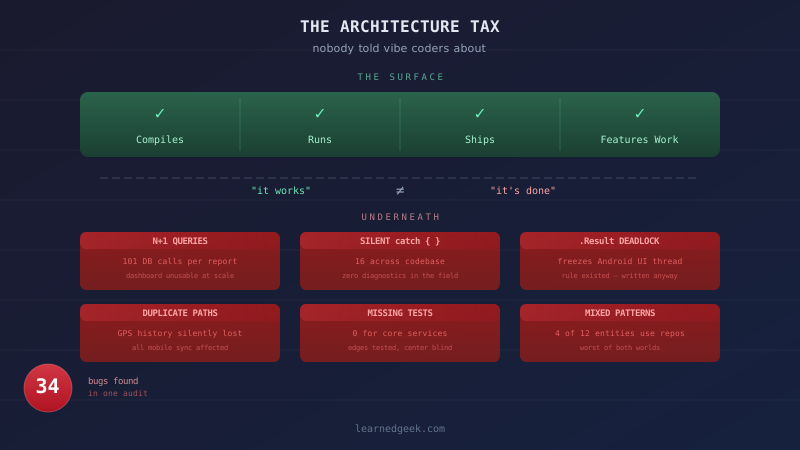
We found 34 bugs in one audit.
Not cosmetic bugs. A database query pattern that would make the dashboard unusable within months of real usage. A synchronous call that would freeze the mobile app on Android. Silent exception swallowing in 16 places across the codebase. An entire category of field data — GPS location history from mobile sync — being silently dropped because of a duplicate code path.
This is a post about what happens after "it works." Because in the age of AI-assisted development, getting code that works is the easy part. The hard part is getting code that keeps working.
The Vibe Coding Moment
"Vibe coding" is the term for a very real phenomenon: you describe what you want, an AI writes it, you paste it in, it compiles, it seems to work. You don't fully understand the code, but you understand the outcome. Ship it.
I'm not here to dismiss this. It's genuinely powerful. People who couldn't build software two years ago are building real applications. That's remarkable, and the tools are only getting better.
But there's a moment — and if you've been vibe coding for more than a few weeks, you've already hit it — where the thing you built starts resisting change. You add a feature and something else breaks. You fix that and a third thing breaks. You're spending more time debugging than building, and the AI keeps proposing fixes that create new problems.
That moment is the architecture tax coming due.
What Is the Architecture Tax?
Every piece of software accumulates structural decisions. Where data is stored. How components talk to each other. What happens when things fail. Whether the same operation done from two different places produces the same result.
When you're vibe coding, you're making these decisions without knowing you're making them. The AI makes them for you, and they're usually locally reasonable — they work for the feature you asked for. But they may not be globally consistent. And inconsistency is where bugs live. Not in the places you're looking. In the places you assume work fine because they worked fine yesterday.
Here's a real example from our project.
We have a mobile app that syncs data to a server. When a crew member updates their GPS location, it can arrive via two paths: a REST API call (direct), or bundled in a sync payload with other events (batched).
The REST path goes through LocationService, which creates a LocationRecord (history), updates the crew member's current position, and broadcasts to a real-time dashboard via SignalR.
The sync path went through SyncService, which updated the crew member's current position and broadcast via SignalR. But it never created the LocationRecord. It skipped the history step entirely.
Both paths "worked." The dashboard updated. The crew member's dot moved on the map. But one path — the one used by all mobile traffic — was silently discarding location history. We wouldn't have noticed until someone asked "why does the GPS audit trail have gaps?" in production, with a client watching.
This is the architecture tax. Not a crash. Not an error message. Silent data loss caused by two code paths that look like they do the same thing but don't.
How We Got Here Despite Being Careful
We'd built what we thought was a pretty airtight system. A global instructions file the AI reads every conversation — hard rules like "one code path per write" and "never use .Result on async methods." An architecture patterns document defining invariants and conventions. A code smell guide with 21 categorized patterns, severity ratings, and real-world examples. A testing strategy. A RAID log tracking every known issue with severity and dependencies.
We were proud of this setup. Every lesson learned got documented. Every mistake became a rule. The AI was reading all of it. Surely the bugs couldn't keep sneaking in.
The issues still accumulated. Because documentation isn't enforcement.
Here's the uncomfortable truth about working with AI: the AI reads your rules, understands them, and can explain them back to you. But when it's in the middle of implementing a feature — when the immediate problem is "this sync event needs to update the crew member's location" — it takes the shortest path to a working solution. It writes the database update inline instead of calling the service that already does it. Not because it doesn't know the rule. Because the rule isn't the thing it's optimizing for in that moment.
Sound familiar? It's exactly what human developers do under deadline pressure. The difference is that AI never feels the pressure. It just has a context window and a next-token prediction, and the locally-optimal next token is often "write the code that solves the immediate problem." It's not cutting corners. It doesn't have corners. It's solving the problem in front of it, and the problem in front of it is never "maintain architectural consistency."
The Audit: What We Found
After weeks of reactive bug-fixing — GPS not working, then sync not working, then analytics wrong, then tests failing — we stopped. No more features. No more "quick fixes." We read every service, every controller, every repository, every DTO.
Here's what a careful read found.
Critical — would cause production incidents:
N+1 query catastrophe in the report service. Every report loaded all work orders, then looped through each one calling the database again for details. 100 work orders = 101+ database queries for a single dashboard load. The AI had written it this way because the repository had a "get by ID with details" method, and the simplest way to get details for multiple items was to call it in a loop. Locally reasonable. Architecturally disastrous.
Synchronous .Result call on an async method, wired to a UI-bound property.
public bool IsClockedIn => GetActiveEntryAsync().Result != null;This works on desktop. On Android's UI thread, it can deadlock and freeze the entire app. The AI wrote this because the interface needed a synchronous boolean property, and.Resultis the obvious way to make an async method synchronous. It's also explicitly forbidden in our global instructions file. The AI wrote it anyway, in the middle of implementing a larger feature. Rules are only as strong as the attention they're competing with.16 bare
catch { }blocks in the mobile app. Exceptions vanishing into the void. When the app breaks in the field — on a construction site, on a phone with spotty reception — you have zero diagnostic information. This one accumulated gradually. Each service added its own error handling, each one swallowed exceptions "temporarily" until proper error handling could be added later. There is nothing more permanent than a temporary exception handler.
High — architectural debt that breeds bugs:
Repository pattern used for 4 of 12 entities. Some services use repositories (testable with mocks). Others hit the database directly (need a real database to test). New code has no clear pattern to follow. You end up with the worst of both worlds — paying the abstraction cost of repositories without getting the consistency benefit.
Zero unit tests for the services that keep breaking. SyncService, TaskService, WorkOrderService, TimeEntryService — the core business logic — had no unit tests. The test infrastructure was excellent: 24 well-organized test files, 359 tests, all passing. But the tests covered the edges of the system (API integration, MAUI service mocking, DTO validation) and not the center — the services that actually do things. It's like having smoke detectors in every hallway but none in the kitchen.
Why the AI Didn't Catch These
This is the question worth sitting with. If the AI knows the rules, reads the architecture doc, and understands the code — why did it create these problems?
Three reasons.
1. Context window vs. codebase scope.
When the AI is implementing "add GPS coordinates to the task completion sync event," its context is that task. It sees the sync handler, the task entity, the DTO. It might not see that LocationService already has a method that does exactly what it needs. It writes the code that works in the context it has.
This is the fundamental limitation of AI-assisted development: the AI sees the trees brilliantly but may not see the forest. It can reason about architecture when you ask it to reason about architecture. But when you ask it to implement a feature, it's implementing, not auditing.
2. Consistency requires memory across sessions.
The repository pattern decision was made early in the project. Repositories were created for the four main entities. Then, over many sessions, new services were added. Each session, the AI did what the immediate task required — sometimes using a repository, sometimes going direct to the database. No single session was wrong. But the aggregate was inconsistent.
Humans have the same problem. It's called "code entropy" — the gradual degradation of patterns over time as different people (or different AI sessions) make locally reasonable decisions that are globally inconsistent. It's been plaguing software projects since long before AI could write a for loop.
3. The incentive structure favors completion over caution.
When you tell an AI "add this feature," success is defined by the feature working. Not by the architecture remaining clean. Not by the new code following the same patterns as existing code. Not by the test coverage remaining adequate. The AI will absolutely follow rules you give it — but it has to balance "follow this rule" against "complete the task the human asked for," and completion wins. Every time.
The Guidance Document Approach (and Its Limits)
After each incident, we updated the guidance documents. Circular dependency fix → added "never use Lazy<T> in DI" to the code smells guide. Schema migration disaster → added the entire six-component schema-aware solution to the architecture doc. Silent exceptions → added "catch specific exceptions, not Exception" to the global rules.
This works. The AI doesn't make the same mistake twice. If you tell it "never use .Result on async methods" in a global instructions file, it will avoid .Result in new code.
But it creates a new problem: the documents grow, and the rules multiply, and the AI has more constraints to juggle against the immediate task. Your instructions file goes from a helpful cheat sheet to a terms-and-conditions agreement. Our global instructions file is substantial. The architecture patterns document has 16 sections. The code smell guide has 21 categories. The testing strategy has its own quick reference.
At some point, the AI is holding so many rules in context that some of them slip. Not maliciously. Not randomly. The ones most relevant to the current task get prioritized, and the ones that seem tangential get deprioritized. Which is exactly what happened with the .Result rule — the AI was implementing a time tracking feature and needed a synchronous property, and the "never use .Result" rule was in a global file that wasn't directly related to the task at hand.
The documents are necessary. They're not sufficient.
What Actually Works: The Architecture Audit
The thing that caught 34 bugs in one pass wasn't a rule, a guide, or a convention. It was stopping everything to look at everything at once.
Not glamorous. Not AI-powered (well, AI-assisted — we used it to read the codebase systematically). Just reading.
We did a full codebase audit — not triggered by a specific bug, but by the pattern of bug-chasing. When you notice that every fix creates a new problem, that's not bad luck. That's a signal that the system has accumulated enough inconsistency that local fixes can't help.
The audit was simple in concept:
- Read every service, controller, repository, and DTO
- For each one, ask: does this follow the patterns we documented?
- Where it doesn't, ask: is this an intentional exception or drift?
- Categorize by severity and dependency order
Step 3 is where most of the bugs live. Drift doesn't announce itself.
The hard part was doing it. It's not fun work. Nobody wants to stop building features to read 274 lines of a report service and notice that every method has an N+1 query pattern. But it's the work that prevents production incidents.
Concrete Advice for Vibe Coders
If you're building with AI and you're not a professional software architect, here's what I wish someone had told me at the start — and yes, even with 30+ years of experience, I learned most of these the hard way with AI.
Recognize the Warning Signs
Your architecture tax is coming due when:
- Fixes create new problems. You ask the AI to fix a bug and something unrelated breaks. This is the big one. When a fix creates a bug, the problem isn't the fix — it's the foundation.
- The same category of bug keeps appearing. Not the same bug — the same type. Data inconsistency. Missing validation. Null reference exceptions. Patterns repeat because the root cause is structural, not local.
- Features take longer than they used to. Early in a project, everything is fast. As debt accumulates, each new feature has to navigate around the accumulated inconsistencies.
- You're afraid to change things. If you avoid touching certain files because "they work and I don't want to break them," that's a sign those files have become load-bearing mysteries. Developers call these "lava layers" — code that solidified under pressure and nobody dares touch.
Build Your Safety Net Early
This is the "eat your vegetables" section. You know it's right. You might not do it until you've been burned. But here it is, ready for after the burning.
- Start a rules file. One document that the AI reads every session. Start small: "we use X framework, Y database, Z patterns." Add rules as you learn lessons. This is your institutional memory.
- Write tests before you have bugs. I know. But "does this API endpoint return the right data?" is a test you can write with AI help, and it will save you when a future change accidentally breaks it.
- Pick patterns and stick to them. If you use repositories for some database access, use them for all database access. If you validate input DTOs in some places, validate them everywhere. Consistency is more important than which pattern you choose.
Schedule Regular Audits
This is the most important one. Don't wait for a crisis.
Every 2–4 weeks, or after every significant feature addition:
- Ask the AI to read your architecture from scratch — not to implement anything, just to describe what it sees. "Read every service in this folder and describe the patterns you find. Are they consistent?"
- Ask it to look for the specific smells that accumulate: N+1 queries (loops that call the database), bare catch blocks, duplicate code paths, missing validation.
- Ask it to compare the code to your rules file. "Does this codebase follow the rules in our instructions file? Where doesn't it?"
This takes 30 minutes and can save you weeks of debugging.
Know When to Call It
Sometimes the debt is too deep. If you're spending more time fighting the codebase than building features, consider:
- Extract what works. Your DTOs, your database schema, your UI designs — these have value even if the plumbing behind them is a mess.
- Rewrite with patterns. Ask the AI to implement the same features but following strict conventions from the start. "Build a service for X that follows the repository pattern, has validation on all inputs, and has unit tests."
- Don't feel bad about it. Professional developers rewrite code all the time. It's not failure. It's learning. The second version is always better, because you're no longer guessing at the requirements.
The Mindset Shift
The biggest adjustment for vibe coders isn't technical. It's this:
"It works" is not the same as "it's done."
When the AI produces code that compiles and the feature appears to work, you're maybe 60% finished. The remaining 40% is: Does it handle errors? Does it validate input? Is it consistent with the rest of the codebase? Will it still work when there's 100x more data? Can you test it? Can you change it later without breaking something else?
That 40% is invisible until it isn't. And when it becomes visible, it's usually because a user found it in production.
The experienced developers who seem skeptical of vibe coding? They're not gatekeeping. They've lived through the consequences of that invisible 40%. They've been paged at 2 AM because a query that worked fine with 50 records brought the database to its knees with 50,000. They've spent weekends tracking down a bug caused by two code paths that should have been one.
You don't have to become a professional developer to build with AI. But you do have to respect the complexity that AI makes invisible. The code it writes is real code. It runs on real servers. It stores real data. And it accumulates real debt.
The architecture tax always comes due. The only question is whether you pay it on your schedule or on production's.
This post was written by a developer who builds with AI every day, and the AI that builds with them. The 34 bugs were real. The audit was real. The fixes were real. We have over 2,000 passing tests and we still found critical issues by just... reading the code.
If you've watched an AI confidently iterate on symptoms while the real bug hid in plain sight, When Your AI Finds the Bug You Told It to Look For is that story.


