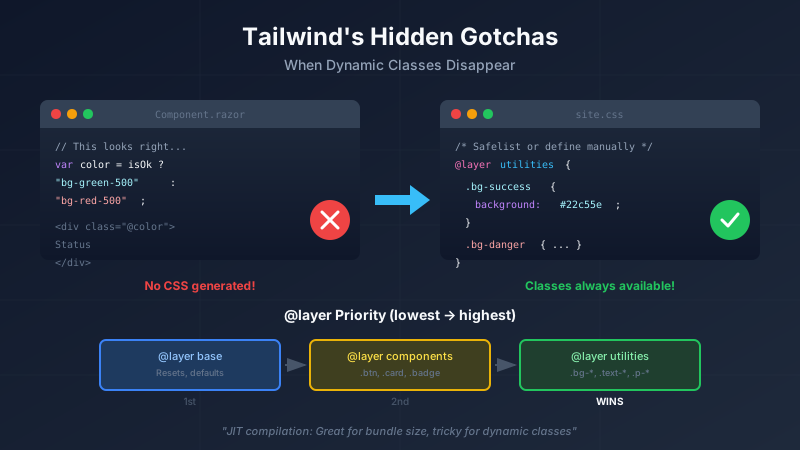
The Moment It Clicks (Then Breaks)
You've read about Tailwind. You've tried the examples. You're sold on the utility-first approach. You start building something real.
Then you write this perfectly reasonable code:
private string GetStatusColor()
{
    return isComplete ? "bg-green-500" : "bg-orange-500";
}
<div class="@GetStatusColor()">Status indicator</div>
And nothing happens. Your status indicator has no background color. You check your browser's dev tools. The class is there in the HTML. But there's no CSS rule for it.
Welcome to Tailwind's most confusing gotcha.
Why Your Dynamic Classes Disappear
Here's the thing that trips up everyone coming from Bootstrap: Tailwind only generates CSS for classes it can find in your source files.
This is how Tailwind keeps your CSS bundle small. It scans your files, finds class names, and only includes those in the output. Brilliant for performance. Terrible if you're generating class names dynamically.
This works:
<div class="bg-green-500">Always green</div>
Tailwind scans your file, sees bg-green-500, includes it in the output. Done.
This breaks:
// Blazor component
private string GetStatusColor()
{
    return isComplete ? "bg-green-500" : "bg-orange-500";
}
Tailwind scans your .razor file but can't execute your C# code. It sees @GetStatusColor(), shrugs, and moves on. No bg-green-500 or bg-orange-500 in your CSS output.
The same problem hits React, Vue, and any framework where you build class names programmatically:
// React - also broken
const color = isError ? 'bg-red-500' : 'bg-blue-500';
return <div className={color}>...</div>;
// Vue - also broken
const bgClass = computed(() => `bg-${props.color}-500`);
That template literal? Tailwind can't parse it. It doesn't know what props.color will be at runtime.
The Fixes (Depending on Your Setup)
The solution depends on which version of Tailwind you're using and how you've set it up.
Option 1: Safelist (Tailwind v3 with Node CLI)
If you're using Tailwind v3 with the standard Node-based CLI (the most common setup), you can use the safelist feature.
In tailwind.config.js:
module.exports = {
  content: ["./**/*.razor", "./**/*.jsx", "./**/*.vue"],
  safelist: [
    'bg-green-500',
    'bg-orange-500',
    'bg-red-500',
    'bg-blue-500',
    // Add any classes you generate dynamically
  ],
  // ...
}
The safelist tells Tailwind "generate these classes even if you don't see them in the source." Problem solved.
You can also use patterns for more flexibility:
safelist: [
  {
    pattern: /bg-(green|orange|red|blue)-(400|500|600)/,
  },
]
This generates all combinations: bg-green-400, bg-green-500, bg-green-600, etc.
Option 2: Manual CSS (Tailwind v4 or Standalone CLI)
Here's the gotcha that cost me hours: Tailwind v4 and the standalone CLI don't support safelist in config files.
The standalone executable is a self-contained binary that doesn't read tailwind.config.js the same way. If you're using the standalone CLI (common in .NET projects that don't want Node dependencies), your safelist will be silently ignored.
The fix? Define your dynamic classes directly in your CSS source:
/* In your source CSS file (e.g., site.css) */
@layer utilities {
  /* Classes for dynamic application in code */
  .bg-success { background-color: #22c55e; }
  .bg-warning { background-color: #f97316; }
  .bg-danger { background-color: #ef4444; }
  .bg-info { background-color: #3b82f6; }
}
This is actually more explicit and self-documenting. The comment explains why these classes exist separately from Tailwind's generated output.
Option 3: Restructure Your Code
Sometimes the best fix is changing how you write the dynamic part:
// Before: Tailwind can't see these
private string GetStatusColor() =>
    isComplete ? "bg-green-500" : "bg-orange-500";

// After: Full strings visible in source
private string GetStatusColor() => isComplete
    ? "bg-green-500"   // Tailwind finds this
    : "bg-orange-500"; // And this
Some build setups are smart enough to find complete class strings in your code, even inside ternaries and switch expressions. The key is that the full class name appears as a literal string somewhere in your source.
This doesn't work:
// String interpolation - Tailwind can't parse this
var color = $"bg-{status}-500";
This might work (depending on your setup):
// Complete strings - scanner might find them
var color = status switch
{
    "success" => "bg-green-500",
    "warning" => "bg-orange-500",
    "error" => "bg-red-500",
    _ => "bg-gray-500"
};
When in doubt, use the safelist or manual CSS approach.
Understanding @layer: Why It Matters
You saw @layer utilities in that CSS example. Let's unpack that.
Tailwind organizes CSS into three layers with specific cascade priority:
@layer base {       /* 1. Lowest priority - resets, element defaults */
  h1 { font-size: 2rem; }
  a { color: inherit; }
}

@layer components { /* 2. Middle - reusable component classes */
  .btn { padding: 0.5rem 1rem; border-radius: 0.25rem; }
  .card { border: 1px solid #e5e7eb; border-radius: 0.5rem; }
}

@layer utilities {  /* 3. Highest priority - single-purpose helpers */
  .text-center { text-align: center; }
  .sr-only { position: absolute; width: 1px; /* ... */ }
}
Why Layers Matter
The layer determines cascade priority, regardless of source order.
<button class="btn bg-red-500">
The bg-red-500 utility overrides whatever background .btn defined - because utilities have higher layer priority than components. No !important needed. No specificity wars.
This is CSS's native @layer feature (not Tailwind-specific), but Tailwind was built around it.
Putting Your Custom Classes in the Right Layer
When you define manual classes for dynamic use, the layer you choose matters:
@layer utilities {
  /* These override component styles, as utilities should */
  .bg-success { background-color: #22c55e; }
  .bg-warning { background-color: #f97316; }
  .bg-danger { background-color: #ef4444; }
}

@layer components {
  /* Reusable patterns that utilities can override */
  .status-badge {
    padding: 0.25rem 0.75rem;
    border-radius: 9999px;
    font-size: 0.875rem;
    font-weight: 500;
  }
}
Now you can use them together predictably:
<span class="status-badge bg-success">Complete</span>
<span class="status-badge bg-warning">Pending</span>
<span class="status-badge bg-danger">Failed</span>
The bg-* utilities override the component's default background (if any) because utilities layer > components layer.
The Unlayered Trap
If you write CSS outside any @layer, it has higher specificity than all layers:
/* This overrides EVERYTHING, even utilities */
.my-special-class {
  background-color: purple;
}

@layer utilities {
  /* This can be overridden by unlayered CSS above */
  .bg-blue-500 { background-color: #3b82f6; }
}
Unlayered CSS wins. This can cause unexpected overrides that are maddening to debug.
Rule of thumb: Always use @layer for custom Tailwind extensions. Keep unlayered CSS for truly global overrides (and even then, think twice).
Quick Reference
| Scenario | Solution |
|---|---|
| Tailwind v3 + Node CLI | Use safelist in config |
| Tailwind v4 | Manual CSS with @layer utilities |
| Standalone CLI | Manual CSS with @layer utilities |
String interpolation (bg-${x}-500) |
Avoid - use complete strings or manual CSS |
| Complete strings in ternaries | Often works, but test it |
The Bootstrap Comparison
Bootstrap never had this problem because all its classes were pre-generated. Every possible .bg-primary, .text-danger, and .p-3 was in the CSS file whether you used it or not.
Tailwind's JIT approach trades that convenience for much smaller bundles. Your production CSS contains only what you actually use. A typical Bootstrap build is 150KB+. A typical Tailwind build is 10-30KB.
Fair trade. You just need to know the rules.
One More Thing
If you're hitting these issues, you're probably building something real with Tailwind. That's good. These gotchas show up when you move beyond tutorials into actual applications.
The patterns here - safelist, manual CSS, @layer - become second nature after you've used them a few times. And the payoff (tiny CSS bundles, no naming conventions, no specificity fights) is worth the learning curve.
Now go make that dynamic status indicator actually work.
This post is part of a series on Tailwind CSS. See also: Tailwind vs Bootstrap: The Paradigm Shift for the fundamental mindset change, and The v4 @source Directive Gotcha on migrating from v3's content array.


