The Problem With Guessing
I've been playing a mobile hero collector — one of those idle RPGs where you collect heroes, level them up, and build teams. It's the usual formula. And like every game in this genre, it gives you almost no information about what actually works.
Which heroes synergize? What are the real faction bonus numbers? Does it matter if I stack three same-faction heroes or spread across factions? The in-game tooltips are vague, the wiki is empty, and the Reddit has twelve posts — half of them asking the same questions I have.
So I did what any reasonable person would do. I took the game apart.
What's Inside an APK?
An APK is just a ZIP file with a different extension. Rename it, unzip it, and you're looking at the guts of an Android app. For a Unity-based mobile game, the structure looks something like this:
| Path | What's In There |
|---|---|
lib/ |
Native libraries (IL2CPP compiled C++) |
assets/bin/Data/ |
Unity's main data archive |
assets/android/ |
Asset bundles — textures, audio, and game data |
classes.dex |
Java bootstrap (just launches Unity) |
AndroidManifest.xml |
App permissions and metadata |
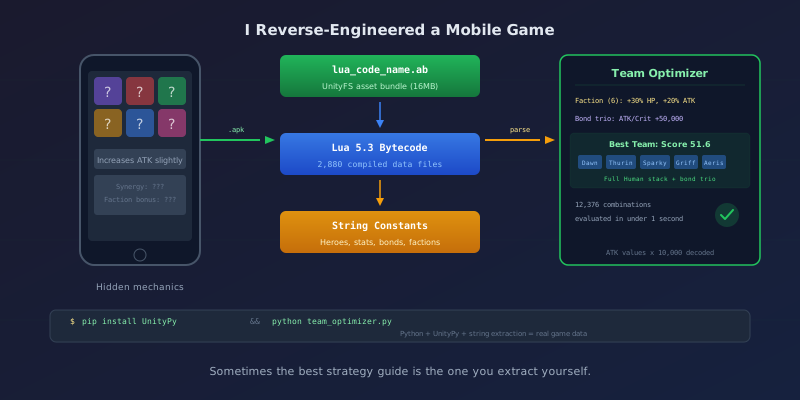
The interesting stuff lives in assets/android/. That's where I found a 16MB file called lua_code_name.ab — a Unity asset bundle containing every data table the game uses.
Cracking Open the Asset Bundle
Unity asset bundles use a format called UnityFS. They can be compressed with LZ4 or LZMA, and they pack multiple assets into a single file. You can't just unzip them.
My first attempt was parsing the binary format manually — reading the header, decompressing blocks, reconstructing the asset table. It worked right up until it didn't. The compression flags were more complex than the documentation suggested, and I hit a wall with LZ4 block boundaries.
Then I found UnityPy, a Python library that handles all of this cleanly:
import UnityPy
import os

bundle_path = 'assets/android/lua_code_name.ab'
outdir = '_extracted/lua_bundle'
os.makedirs(outdir, exist_ok=True)

env = UnityPy.load(bundle_path)

for obj in env.objects:
    if obj.type.name == "TextAsset":
        data = obj.read()
        name = data.m_Name
        script = data.m_Script

        if isinstance(script, str):
            content = script.encode('utf-8', errors='surrogateescape')
        elif isinstance(script, bytes):
            content = script
        else:
            content = bytes(script)

        safe_name = name.replace('/', '_').replace('\\', '_')
        with open(os.path.join(outdir, safe_name + '.bytes'), 'wb') as f:
            f.write(content)
Ten lines of code. Out came 2,880 files.
The Files Aren't What You'd Expect
I was hoping for JSON, or maybe CSV. What I got was compiled Lua 5.3 bytecode — every file starting with the magic bytes \x1bLuaS followed by version 0x53.
This game runs on XLua, a framework that embeds Lua scripting into Unity. The developers wrote their game data as Lua tables, compiled them to bytecode, and packed them into the asset bundle. Smart for performance. Annoying for data mining.
But here's the thing about Lua bytecode: string constants are stored in plaintext. The bytecode format tags each constant with a type byte — 0x04 for short strings, 0x14 for long strings — followed by the length and the raw UTF-8 text. You don't need a decompiler to read the data. You just need to know where to look.
def extract_strings(filepath):
    with open(filepath, 'rb') as f:
        data = f.read()

    strings = []
    i = 0
    while i < len(data):
        if data[i] in (0x04, 0x14):  # String constant tags
            i += 1
            # Read length as varint
            length = 0
            shift = 0
            while i < len(data):
                b = data[i]
                i += 1
                length |= (b & 0x7F) << shift
                shift += 7
                if b < 0x80:
                    break

            if 0 < length < 10000 and i + length - 1 <= len(data):
                try:
                    s = data[i:i+length-1].decode('utf-8')
                    if s.isprintable() and len(s) > 1:
                        strings.append(s)
                except:
                    pass
                i += length - 1
            else:
                continue
        else:
            i += 1
    return strings
Running this across the data files produced everything: hero names, stat formulas, skill descriptions, faction bonuses, bond requirements. All of it.
What I Found
The extraction yielded some genuinely useful discoveries.
160 Heroes, 12 Bond Trios
The game has 80+ base heroes across 5 factions plus special/legendary variants. Heroes are organized into 12 bond trios — groups of three that activate stat bonuses when you deploy two or three of them together.
| Trio | Heroes | Bonus |
|---|---|---|
| A | [Hero 1] + [Hero 2] + [Hero 3] | ATK/Crit +50,000 |
| B | [Hero 4] + [Hero 5] + [Hero 6] | ATK/Crit +30,000 |
| C | [Hero 7] + [Hero 8] + [Hero 9] | ATK/Crit +50,000 |
The game shows you bond pairs in the hero screen, but it never tells you the actual numbers, or that the +50,000 trios are strictly better than the +30,000 ones. That matters when you're deciding which heroes to invest in.
Faction Stacking Is Huge
The faction bonus table, buried in data_en_battle_attri.lua.bytes, scales aggressively:
| Same-Faction Count | HP Bonus | ATK Bonus |
|---|---|---|
| 2 | +6% | +4% |
| 3 | +10% | +7% |
| 4 | +15% | +10% |
| 5 | +22% | +16% |
| 6 | +30% | +20% |
Going from 4 to 6 of the same faction nearly doubles the bonus. The game never tells you this. It just says "faction bonus active" with a little icon.
Stat Values Are Disguised
All percentage values in the data files are stored as integers multiplied by 10,000. So when a skill says "increases ATK by 5%," the actual value in the bytecode is 50000. A +30,000 bond bonus is really +3.0%. Once you know the encoding, every number in the game becomes readable.
Building the Team Optimizer
With real data in hand, I built something I actually wanted: a Python script that evaluates every possible team combination from my owned heroes and ranks them by synergy.
The scoring engine weighs five dimensions:
| Dimension | What It Measures |
|---|---|
| Bond Score | How many bond pairs/trios are active |
| Faction Bonus | Same-faction stacking multipliers |
| Role Balance | Tank/DPS/Support/CC distribution |
| Skill Synergy | Debuff amplifiers paired with debuff providers |
| Tier Rating | Hero quality as a tiebreaker |
The workflow is simple: edit a text file with your heroes, run the script, get ranked teams with explanations.
# my_heroes.txt
HeroA 6
HeroB 6
HeroC 6
HeroD 5
HeroE 5
HeroF 5
python team_optimizer.py
The output shows your top 10 teams with score breakdowns, an investment priority list (which heroes to level first), and recommendations for which heroes to acquire next.
For a 17-hero roster, it evaluates all 12,376 possible 6-hero combinations in under a second. For larger rosters where combinations explode, it uses smart sampling — building teams around known bond trios first, then filling with random combinations.
The Payoff
Running the optimizer against my actual roster produced immediately useful results. My best team scores 51.6 — a full same-faction stack with a complete bond trio, one hero providing CC triggers for another's passive, and a third amplifying burn damage.
Before this analysis, I was spreading resources across heroes that didn't synergize. Now I know exactly which heroes to prioritize and which to save for.
The "Heroes Worth Acquiring" section is probably the most valuable output. It told me one specific hero would be my single biggest roster upgrade (Value: 18) because she completed a bond trio AND was S-tier AND enabled faction stacking. When I pulled her, my team score jumped 33% overnight.
Try It Yourself
The approach works on any Unity game that uses Lua or similar scripting for data tables. The general process:
- Rename the APK to .zip and extract
- Find asset bundles in
assets/(look for.abfiles ordata.unity3d) - Extract with UnityPy — it handles UnityFS decompression automatically
- Identify the data format — could be Lua bytecode, JSON, MessagePack, or plain text
- Extract readable data — string constants, even in compiled bytecode, are usually plaintext
You'll need Python and pip install UnityPy. That's it.
The optimizer code is straightforward enough to adapt for other hero collectors. The scoring engine is generic — swap in different heroes, bonds, and faction tables, and it works for any game with similar mechanics.
The Bigger Picture
Mobile games are deliberately opaque about their mechanics. Vague tooltips and hidden multipliers aren't bugs — they're design choices that keep you spending resources through trial and error.
But the data is right there in the APK you already downloaded. The tools to read it are free and open source. And the difference between guessing and knowing is the difference between wasting a week of progress on the wrong hero and making every upgrade count.
(A note on legality: reverse-engineering for personal interoperability and analysis is generally protected under the DMCA's reverse-engineering exemption and similar laws in other jurisdictions. This is data extraction from a local copy for personal use — not redistribution, cheating, or server exploitation. That said, always check the ToS for your specific game.)
Sometimes the best strategy guide is the one you extract yourself.
This project grew out of a longer series — Reverse Engineering a Mobile Game: Part 1 — What's Inside the Box? starts from the very beginning if you want the full picture of how I got from "I wonder how this works" to building an optimizer.