Series: Part 4 of a 5-part series. Part 1 | Part 2 | Part 3 | Part 5
The Authentication Chain
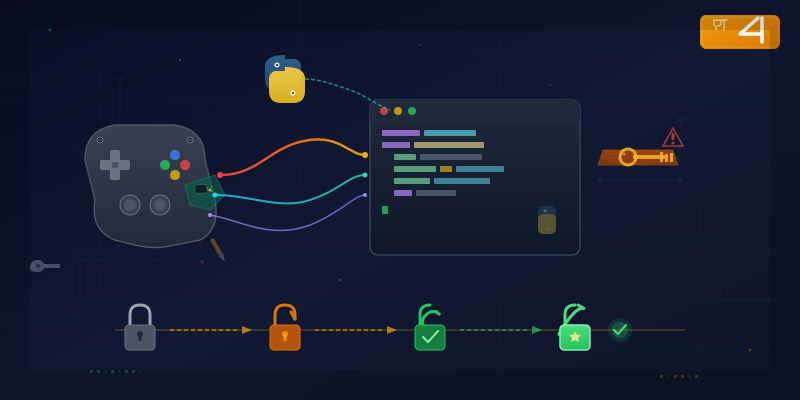
Before we can send game messages, we need to log in. The game has a 4-step authentication sequence — each step feeding credentials into the next, like a series of locked doors where each key is behind the previous one:
1. Bootstrap     ->  Get dynamic URLs for everything
2. Account login ->  Get account ID + auth tokens
3. Server list   ->  Get server addresses
4. WebSocket     ->  Connect and log in as your character
Let's walk through each step.
Step 1: Bootstrap — "Where Is Everything?"
The game's first HTTP request asks a central server for the locations of every service:
resp = requests.get("https://login.example.com/api/v1/config?v=platform_version")
config = resp.json()
This returns a JSON blob with URLs for login servers, WebSocket gateways, CDN endpoints, and feature flags. One particular URL parameter is critical — without it, you get a minimal response instead of the full configuration. I found this by watching the game's own requests through the proxy.
Nothing sensitive here — it's just a phone book. But it's the foundation everything else builds on.
Step 2: Account Login — "It's Me, I Promise"
payload = {
    "account": "",
    "device": "<device-fingerprint-hash>",
    "channel": "<platform-id>",
    "sign": md5_sign(fields, SECRET_KEY),
}
resp = requests.post("https://login.example.com/api/sdk/login", data=payload)
Here's the fascinating part: the account field is empty for guest accounts. The server creates (or retrieves) an account based solely on the device fingerprint hash. That hash is the only credential. No password. No 2FA. No CAPTCHA.
It's like a bank that identifies you by your shoe size.
The MD5 Signing
The game uses MD5 signatures on requests to prevent tampering. The approach:
def md5_sign(fields, key):
    raw = "".join(fields) + key
    return hashlib.md5(raw.encode()).hexdigest()
The signing keys? Hardcoded in the Lua bytecode. I found multiple keys used for different endpoints. This is security through obscurity — the mechanism is sound (signing prevents tampering), but the keys are sitting in a file that anyone can extract from the APK.
Hiding your house key under the doormat. The lock works great. The hiding spot... less so.
Step 3: Server List — "Where's My Character?"
resp = requests.get(f"{login_url}/api/v1/server", params={
    "account": account_id,
    "auth": auth_token,
    # ... platform params
})
Returns two lists:
- "my servers": Where you have existing characters
- "recommended": Newest servers for new accounts
Each entry includes the server's internal address and port. For some regions, these are private IP addresses behind a WebSocket gateway. The gateway URL needs a routing parameter to forward your connection to the right game server — without it, you get a generic error from the CDN.
Step 4: WebSocket Login — The Real Deal
This is where the binary protocol from Part 3 takes over. The login message needs about 18 fields, but most are either empty strings or device metadata. The important ones:
w = MsgWriter()
w.writeString(account_id)        # from step 2
w.writeString(auth_token)        # from step 2
w.writeString(server_id)         # from step 3
w.writeString(channel_name)      # platform identifier
w.writeInt32(protocol_version)   # from the Lua source
w.writeString(device_fingerprint)
# ... ~12 more fields (reserved, device info, language)
I figured out the field order by correlating three sources: the Lua encode function for the login message, the debug log output showing field values, and trial-and-error — changing one field at a time and seeing what the server accepted.
The Client Architecture
I structured the Python client as a layered library:
game_api/
  auth.py         -- MD5 signing
  http_client.py  -- Bootstrap, login, server list
  ws_client.py    -- WebSocket connect, send/receive packets
  client.py       -- High-level: connect() -> login() -> play
The WebSocket client runs a receive loop in a background thread, dispatching responses by their message ID. The game uses a clean convention: requests use one ID prefix, and the matching response comes back with a different prefix:
class WSClient:
    def send_and_wait(self, msg_id, body, timeout=10.0):
        response_id = msg_id + RESPONSE_OFFSET
        event = threading.Event()
        self._pending[response_id] = event
        self._ws.send(build_packet(msg_id, body), opcode=2)
        event.wait(timeout)
        return self._responses.pop(response_id, None)
Send a request, wait for the matching response. Clean and simple.
First Successful Login
client = GameClient(device_fp=DEVICE_FP)
client.bootstrap()
client.login()
client.connect_to_server()
character = client.get_character()

print(f"Character: {character['name']} lv{character['level']}")
print(f"Premium currency: {character['diamonds']}")
print(f"Gold: {character['gold']}")
Character: [my character] lv56
Premium currency: 7,136
Gold: 6,869,784
It worked. My character data, coming back from a client I built from scratch, speaking a protocol I reverse-engineered byte by byte.
This is the reverse engineering equivalent of finally understanding what someone is saying in a language you've been studying for months. The conversation just... flows.
Security Observations
Working through this process revealed a few patterns worth noting:
- No SSL pinning — A proxy sees all traffic with zero effort
- Hardcoded signing keys — Extractable from the Lua bytecode
- Device fingerprint as sole credential — No password, no 2FA, no rate limiting
- Verbose debug logging — Credentials and tokens visible in plaintext system logs
- Internal IPs in API responses — Server infrastructure topology exposed
This isn't unusual for mobile games. But it's a good reminder that "security through obscurity" has limits — especially when the obscured parts ship on the user's device.
In Part 5, I'll build an automation bot that uses this client to handle daily tasks — and accidentally end up fighting myself in the arena.
A note on responsible disclosure: This series describes techniques for analyzing software you've downloaded for personal use. Game names, server addresses, and authentication details have been generalized. The methodology is educational — the same techniques are taught in mobile security courses and used in authorized security research. Always respect terms of service and applicable laws in your jurisdiction.
Tools used: Python (requests, websocket-client), mitmproxy for validation, hashlib