ASP.NET 8 shipped AddRateLimiter(). It's a perfectly good rate limiting middleware. I wrote my own anyway.
Not because the built-in is bad. Because API Combat has a specific requirement that doesn't fit neatly into the provided abstractions: rate limits that vary by subscription tier, read directly from JWT claims, with structured JSON error responses that tell developers exactly what happened and what to do about it.
The Requirement
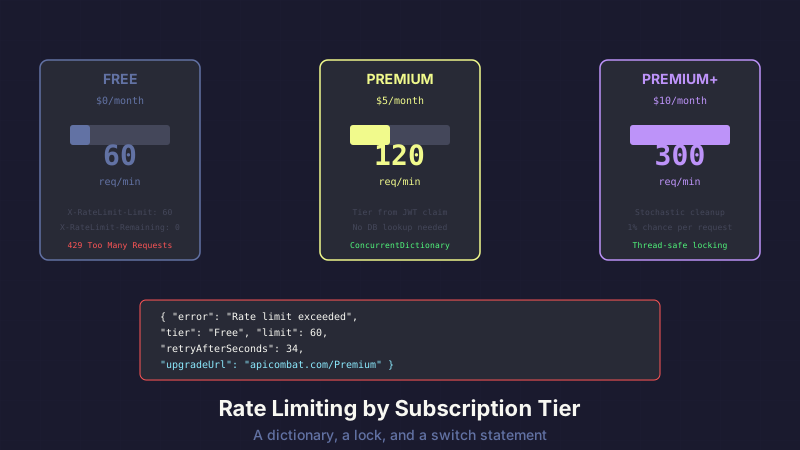
Three tiers, three limits:
| Tier | Requests/Minute | Monthly Cost |
|---|---|---|
| Free | 60 | $0 |
| Premium | 120 | $5 |
| Premium+ | 300 | $10 |
The tier is embedded as a claim in the player's JWT (see Dual Authentication). The rate limiter needs to read it without hitting the database. No DB call per request — that would be slower than the rate limiting is worth.
The Implementation
The entire rate limiter is a single middleware class:
public class TierRateLimitingMiddleware
{
    private readonly RequestDelegate _next;
    private readonly ILogger<TierRateLimitingMiddleware> _logger;
    private static readonly ConcurrentDictionary<string, ClientRateInfo> _clients = new();

    public static bool Enabled { get; set; } = true; // Escape hatch for tests

    public TierRateLimitingMiddleware(RequestDelegate next,
        ILogger<TierRateLimitingMiddleware> logger)
    {
        _next = next;
        _logger = logger;
    }

    public async Task InvokeAsync(HttpContext context)
    {
        if (!Enabled || !context.Request.Path.StartsWithSegments("/api"))
        {
            await _next(context);
            return;
        }

        var tier = context.User?.FindFirst("Tier")?.Value ?? "Free";
        var ip = context.Connection.RemoteIpAddress?.ToString() ?? "unknown";
        var bucketKey = $"{ip}:{tier}";

        var limit = GetLimit(tier);
        var info = _clients.GetOrAdd(bucketKey, _ => new ClientRateInfo(limit));

        int remaining;
        lock (info)
        {
            // Reset window if expired
            if (DateTime.UtcNow >= info.WindowReset)
            {
                info.RequestCount = 0;
                info.WindowReset = DateTime.UtcNow.AddMinutes(1);
                info.Limit = limit; // Re-read limit in case tier changed
            }

            if (info.RequestCount >= info.Limit)
            {
                var retryAfter = (int)(info.WindowReset - DateTime.UtcNow).TotalSeconds;
                SetRateLimitHeaders(context, info.Limit, 0, info.WindowReset);

                context.Response.StatusCode = 429;
                context.Response.ContentType = "application/json";
                var response = JsonSerializer.Serialize(new
                {
                    error = "Rate limit exceeded",
                    limit = info.Limit,
                    tier = tier,
                    retryAfterSeconds = Math.Max(1, retryAfter),
                    upgradeUrl = tier == "Free"
                        ? "https://apicombat.com/Premium"
                        : null
                });
                context.Response.WriteAsync(response);
                return;
            }

            info.RequestCount++;
            remaining = info.Limit - info.RequestCount;
        }

        SetRateLimitHeaders(context, limit, remaining, info.WindowReset);

        // Stochastic cleanup: 1% chance per request
        if (Random.Shared.Next(100) == 0)
            CleanupStaleEntries();

        await _next(context);
    }

    private static int GetLimit(string tier) => tier switch
    {
        "PremiumPlus" => 300,
        "Premium" => 120,
        _ => 60
    };

    private static void SetRateLimitHeaders(HttpContext context,
        int limit, int remaining, DateTime reset)
    {
        context.Response.Headers["X-RateLimit-Limit"] = limit.ToString();
        context.Response.Headers["X-RateLimit-Remaining"] = remaining.ToString();
        context.Response.Headers["X-RateLimit-Reset"] =
            new DateTimeOffset(reset).ToUnixTimeSeconds().ToString();
    }

    private static void CleanupStaleEntries()
    {
        var cutoff = DateTime.UtcNow.AddMinutes(-5);
        foreach (var key in _clients.Keys.ToList())
        {
            if (_clients.TryGetValue(key, out var info) && info.WindowReset < cutoff)
                _clients.TryRemove(key, out _);
        }
    }
}

public class ClientRateInfo
{
    public int RequestCount { get; set; }
    public int Limit { get; set; }
    public DateTime WindowReset { get; set; }

    public ClientRateInfo(int limit)
    {
        Limit = limit;
        WindowReset = DateTime.UtcNow.AddMinutes(1);
    }
}
That's it. A ConcurrentDictionary, a lock, and a sliding one-minute window.
Why Not the Built-In?
ASP.NET 8's AddRateLimiter() uses PartitionedRateLimiter<HttpContext> with partition keys. You'd configure it something like:
builder.Services.AddRateLimiter(options =>
{
    options.AddPolicy("tiered", context =>
    {
        var tier = context.User?.FindFirst("Tier")?.Value ?? "Free";
        var limit = tier switch
        {
            "PremiumPlus" => 300,
            "Premium" => 120,
            _ => 60
        };

        return RateLimitPartition.GetFixedWindowLimiter(
            partitionKey: context.Connection.RemoteIpAddress?.ToString() ?? "unknown",
            factory: _ => new FixedWindowRateLimiterOptions
            {
                PermitLimit = limit,
                Window = TimeSpan.FromMinutes(1)
            });
    });
});
This works, but:
The partition key doesn't include the tier. If a player upgrades from Free to Premium mid-session, the partition (keyed by IP) still has the old limit. Our bucketKey = "{IP}:{tier}" means upgrading effectively resets the bucket — the Premium partition is a different entry.
No built-in structured error responses. The default 429 response is a plain status code with a Retry-After header. API Combat needs JSON with error, limit, tier, and retryAfterSeconds because developers are our users and they deserve machine-readable error messages.
No upgrade URL in the response. When a Free player hits their limit, the 429 response includes a link to the Premium page. That's a conversion opportunity baked into the error handling. The built-in middleware has no concept of "here's how to get a higher limit."
Custom response headers on every request. We send X-RateLimit-Limit, X-RateLimit-Remaining, and X-RateLimit-Reset on every API response — not just 429s. Players can build dashboards that monitor their remaining quota. The built-in middleware only adds headers on rate-limited responses.
Could I have made the built-in work? Probably, with enough customization of the OnRejected handler and a custom IRateLimiterPolicy. But at that point, I'm writing more code to configure the framework than I would just writing the middleware directly.
Thread Safety
The ConcurrentDictionary handles thread-safe bucket creation and lookup. But the rate check — reading the count, comparing to the limit, incrementing — is a compound operation that needs to be atomic. Two concurrent requests could both read count=59 (under the limit of 60), both increment to 60, and both proceed. Off-by-one at the boundary.
The lock on the ClientRateInfo object solves this. Each bucket has its own lock, so checking Player A's rate doesn't block Player B's check. The lock is held for microseconds — just long enough to read, compare, increment.
Is this perfect? No. Under extreme concurrency (thousands of simultaneous requests from the same IP), the per-bucket lock becomes a bottleneck. For API Combat's traffic patterns, it's fine. A SemaphoreSlim or Interlocked operations would be marginally faster but harder to read.
Stochastic Cleanup
Here's my favorite implementation detail:
if (Random.Shared.Next(100) == 0)
    CleanupStaleEntries();
One percent of requests trigger a cleanup pass that removes entries older than 5 minutes. No background timer. No scheduled job. Just probabilistic housekeeping.
Why? Because adding another background timer feels like overkill for a dictionary that holds maybe a few hundred entries. The dictionary grows during traffic, shrinks during cleanup passes, and never gets large enough to matter. A dedicated cleanup timer would run even during zero-traffic periods when there's nothing to clean.
The 1% probability means on average, every 100th request does a little extra work. At 60 requests/minute per player, that's roughly one cleanup per player per 90 seconds. Plenty frequent to keep the dictionary bounded.
The Test Escape Hatch
public static bool Enabled { get; set; } = true;
Integration tests set TierRateLimitingMiddleware.Enabled = false before running. Without this, tests that make multiple rapid API calls would hit the rate limit and fail — not because the feature under test is broken, but because the test is too fast.
A static bool is crude but effective. The alternative — registering a different middleware pipeline for tests — is more "correct" but adds complexity to the test setup for zero benefit. The rate limiter itself is tested in isolation with its own unit tests.
What the 429 Response Looks Like
When a Free player exceeds 60 requests in a minute:
{
  "error": "Rate limit exceeded",
  "limit": 60,
  "tier": "Free",
  "retryAfterSeconds": 34,
  "upgradeUrl": "https://apicombat.com/Premium"
}
Response headers on every request (not just 429s):
X-RateLimit-Limit: 60
X-RateLimit-Remaining: 0
X-RateLimit-Reset: 1740825600
This is deliberate. API Combat is a game played by developers. They're building clients that consume these endpoints. Structured error responses with actionable information — retry time, current tier, upgrade path — aren't just polite, they're part of the gameplay experience. A developer who builds a client that handles 429s gracefully with exponential backoff is learning real-world API resilience patterns.
What I'd Change
IP-based keying is imperfect. Players behind a shared NAT (office, school) share a bucket. This hasn't been a problem yet, but for an educational product used in classrooms — where 30 students share one IP — it could be. A player-ID-based key (from the JWT) would be more accurate, but unauthenticated requests (login, register) don't have a player ID.
The window is fixed at one minute. A sliding window would be smoother — instead of "60 requests in this calendar minute," it would be "60 requests in the last 60 seconds." The fixed window means a player could theoretically send 60 requests at 12:00:59 and 60 more at 12:01:01 — 120 requests in 2 seconds. A token bucket or sliding window algorithm would prevent this burst. Not worth the complexity for now, but it's the first thing I'd change at scale.
Takeaway
Middleware is just a function that sits in the request pipeline. Sometimes the simplest implementation — a dictionary, a lock, and a switch statement — beats a framework's abstraction because your requirements don't fit the abstraction's assumptions.
If your rate limiting needs are straightforward (fixed window, per-IP, uniform limits), use the built-in middleware. It's well-tested and requires minimal code.
If your limits vary by user tier, need structured error responses, include conversion CTAs, and require headers on every response — consider writing your own. It's about 100 lines of code, fully within your control, and you'll never fight with someone else's abstraction layer.
This post is part of a series about building API Combat. See also: Dual Authentication: JWT + Cookies for how we embed tier data in JWT claims, and Tier Gating with Custom Action Filters for subscription-based endpoint access control. For another approach to protecting endpoints, check out reCAPTCHA v3 in ASP.NET Core.


