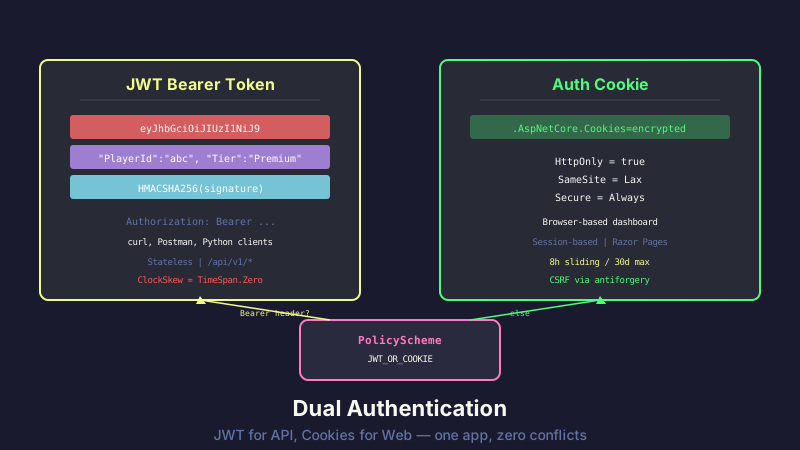
API Combat is two applications in one. There's the REST API — played with curl, Postman, Python, or whatever client you build — authenticated with JWT bearer tokens. And there's the web dashboard — player profile, settings, analytics, admin panel — authenticated with cookies.
Same codebase. Same Program.cs. Same deployment. Two completely different authentication schemes that need to coexist without stepping on each other.
The Problem
If you only serve an API, you use JWT. If you only serve web pages, you use cookies. Simple.
But API Combat needs both:
- API routes (
/api/v1/*): Used by player-built clients. JWT tokens in theAuthorizationheader. Stateless. No browser involved. - Web routes (
/Profile,/Settings,/admin/*): Razor Pages. Browser-based. Cookies for session management. CSRF protection via antiforgery tokens. - Hybrid routes: JavaScript on the web dashboard calling
/api/v1/*endpoints — these come from a browser (cookies), not an external client (JWT).
The last one is the tricky case. A browser-based JavaScript call to an API endpoint sends cookies automatically, not a JWT header. Your authentication pipeline needs to handle both.
The Configuration
Here's how you set up dual authentication in ASP.NET Core:
builder.Services.AddAuthentication(options =>
{
    options.DefaultScheme = "JWT_OR_COOKIE";
    options.DefaultChallengeScheme = "JWT_OR_COOKIE";
})
.AddPolicyScheme("JWT_OR_COOKIE", "JWT or Cookie", options =>
{
    options.ForwardDefaultSelector = context =>
    {
        // Check for Bearer token first
        var authHeader = context.Request.Headers.Authorization.FirstOrDefault();
        if (authHeader?.StartsWith("Bearer ") == true)
            return JwtBearerDefaults.AuthenticationScheme;

        // API paths without Bearer header — check for cookie
        if (context.Request.Path.StartsWithSegments("/api"))
            return JwtBearerDefaults.AuthenticationScheme;

        // Everything else uses cookies
        return CookieAuthenticationDefaults.AuthenticationScheme;
    };
})
.AddJwtBearer(options =>
{
    options.TokenValidationParameters = new TokenValidationParameters
    {
        ValidateIssuer = true,
        ValidateAudience = true,
        ValidateLifetime = true,
        ValidateIssuerSigningKey = true,
        ValidIssuer = jwtSettings.Issuer,
        ValidAudience = jwtSettings.Audience,
        IssuerSigningKey = new SymmetricSecurityKey(
            Encoding.UTF8.GetBytes(jwtSettings.Secret)),
        ClockSkew = TimeSpan.Zero  // No grace period
    };
})
.AddCookie(options =>
{
    options.Cookie.HttpOnly = true;
    options.Cookie.SameSite = SameSiteMode.Lax;
    options.Cookie.SecurePolicy = CookieSecurePolicy.Always;
    options.SlidingExpiration = true;
    options.ExpireTimeSpan = TimeSpan.FromHours(8);
    options.Cookie.MaxAge = TimeSpan.FromDays(30);
    options.LoginPath = "/Account/Login";
    options.AccessDeniedPath = "/Account/AccessDenied";
});
The AddPolicyScheme is the magic. It's a virtual authentication scheme that doesn't authenticate anything itself — it just decides which real scheme to forward to based on the request.
The ForwardDefaultSelector runs on every request and returns a scheme name. The logic is simple: if there's a Bearer token in the Authorization header, use JWT. If the path starts with /api, use JWT (which will fail and return 401 if there's no valid token). Everything else uses cookies.
ClockSkew = TimeSpan.Zero
The default ClockSkew in JWT validation is 5 minutes. That means a token that expired 4 minutes ago is still accepted. For most applications, this grace period handles minor clock differences between servers.
For a game, it's a problem. If a player's subscription expires and their JWT still has the old Tier: Premium claim, those 5 minutes mean 5 minutes of free premium access. Multiply that across rate limits, battle quotas, and premium-only endpoints, and it adds up.
Setting ClockSkew to zero means expired means expired. Immediately. If the token says it expires at 14:00:00.000, then at 14:00:00.001 it's rejected. The client needs to refresh.
Embedding Game Data in JWT Claims
Standard JWT claims cover identity: name, email, roles. But for API Combat, we embed game-specific data:
public string GenerateToken(Player player)
{
    var claims = new List<Claim>
    {
        new(ClaimTypes.NameIdentifier, player.Id.ToString()),
        new(ClaimTypes.Name, player.Username),
        new(ClaimTypes.Email, player.Email),
        new("PlayerId", player.Id.ToString()),
        new("Tier", player.CurrentTier.ToString()),
        new("GuildId", player.GuildId?.ToString() ?? "")
    };

    var key = new SymmetricSecurityKey(Encoding.UTF8.GetBytes(_jwtSettings.Secret));
    var creds = new SigningCredentials(key, SecurityAlgorithms.HmacSha256);

    var token = new JwtSecurityToken(
        issuer: _jwtSettings.Issuer,
        audience: _jwtSettings.Audience,
        claims: claims,
        expires: DateTime.UtcNow.AddHours(8),
        signingCredentials: creds);

    return new JwtSecurityTokenHandler().WriteToken(token);
}
The Tier claim is the most useful. The rate limiting middleware reads it directly from the JWT — no database call needed. Free players get 60 requests/minute, Premium gets 120, Premium+ gets 300. The tier is already in the token, so the middleware just decodes and checks.
The PlayerId claim is a convenience. Instead of parsing ClaimTypes.NameIdentifier and converting to a GUID in every controller, we have an extension method:
public static class ClaimsPrincipalExtensions
{
    public static Guid GetPlayerId(this ClaimsPrincipal user)
    {
        var claim = user.FindFirst("PlayerId")?.Value;
        return Guid.TryParse(claim, out var id) ? id : Guid.Empty;
    }

    public static SubscriptionTier GetTier(this ClaimsPrincipal user)
    {
        var claim = user.FindFirst("Tier")?.Value;
        return Enum.TryParse<SubscriptionTier>(claim, out var tier)
            ? tier
            : SubscriptionTier.Free;
    }
}
Clean usage in controllers:
[Authorize]
[HttpGet("profile")]
public async Task<IActionResult> GetProfile()
{
    var playerId = User.GetPlayerId();
    var profile = await _playerService.GetProfileAsync(playerId);
    return Ok(profile);
}
The Hybrid Route Gotcha
Here's the gotcha that took the longest to debug: JavaScript on the web dashboard calling API endpoints.
A player is logged in via cookies, viewing their profile page. The page loads, then JavaScript fires fetch('/api/v1/battles/recent') to populate a battle history widget. The browser automatically includes the auth cookie. No Authorization: Bearer header.
The policy scheme sees a request to /api/* with no Bearer header and forwards to JWT authentication. JWT auth looks for a token, finds none, and returns 401. The browser-based JavaScript call fails even though the player is logged in.
The fix: on hybrid endpoints that serve both web and API clients, accept both schemes:
[Authorize(AuthenticationSchemes = "Cookies,Bearer")]
[HttpGet("api/v1/battles/recent")]
public async Task<IActionResult> GetRecentBattles()
{
    var playerId = User.GetPlayerId();
    // Works whether authenticated via cookie or JWT
    return Ok(await _battleService.GetRecentAsync(playerId));
}
This tells ASP.NET Core to try both authentication schemes. If either succeeds, the request is authenticated. The cookie scheme checks for the auth cookie, the JWT scheme checks for a Bearer token. At least one will work.
Not every API endpoint needs this. Pure API endpoints (battle queue, team management, strategy uploads) only need JWT because they're never called from browser JavaScript. The dual-scheme attribute only goes on endpoints that the dashboard's JavaScript consumes.
Cookie Configuration Details
A few settings that aren't obvious:
SameSite = Lax, not Strict. Strict would break OAuth callbacks — the redirect back from LinkedIn or Instagram wouldn't include the cookie, and the callback endpoint would think the admin isn't logged in. Lax allows top-level navigations (link clicks, redirects) to include the cookie while still blocking cross-site POST requests.
SlidingExpiration = true with 8-hour window. Each request resets the 8-hour timer. A player actively using the dashboard stays logged in. Walk away for 8 hours, you're logged out. The 30-day MaxAge is the absolute maximum — even with sliding, the cookie eventually expires.
HttpOnly = true always. JavaScript should never read the auth cookie. If you need token data in JavaScript, expose it through an API endpoint, don't put it in a readable cookie.
Takeaway
Policy schemes are the cleanest way to serve two authentication strategies from one ASP.NET Core app. The key insights:
- Use
ForwardDefaultSelectorto route requests to the right scheme based on headers or path - Embed game/business data in JWT claims to avoid database lookups in middleware
- Set
ClockSkewto zero for time-sensitive applications - Use dual
AuthenticationSchemeson endpoints that serve both browser and API clients - Keep cookie and JWT configurations independent — they serve different audiences with different security requirements
One app, two auth schemes, zero conflicts. It just takes a 10-line policy selector to make them play nice.
This post is part of a series about building API Combat. See also: Hand-Rolling Rate Limiting by Subscription Tier for how we use JWT claims in middleware, and Tier Gating with Custom Action Filters for subscription-based endpoint access control.


