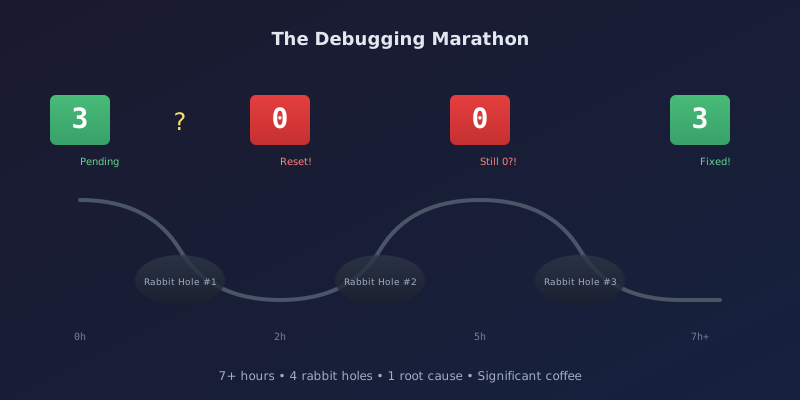
What started as a "quick test" turned into a 7+ hour debugging session across multiple rabbit holes. The symptom was simple: navigate away from a page and back, and the pending count resets to zero. The journey to fix it revealed fundamental lessons about state management in MAUI Blazor Hybrid apps.
The Bug
The More page in our MAUI app shows a pending sync count—how many items need to sync to the server. Click "Test Error Logging" and the count increments to 3. Navigate to another tab and back. The count is 0.
The data was still there. The count just wasn't updating the UI.
First Attempt: Force Count Refresh
Maybe the count wasn't being recalculated when the page loaded? I modified LoggingService.GetLogCountAsync() to always update the pending count:
public async Task<int> GetLogCountAsync()
{
    await LoadCacheIfNeeded();
    var unsyncedCount = _logCache.Count(e => !e.IsSynced);
    _syncStatus.SetPendingCount(unsyncedCount);  // Always update
    return _logCache.Count;
}
Result: Still broken. Count still reset to 0.
Second Attempt: Add Debug Logging
Time to see what's actually happening. Added [STARTUP] debug logs everywhere:
// MauiProgram.cs
System.Diagnostics.Debug.WriteLine("[STARTUP] CreateMauiApp starting");

// App.xaml.cs
System.Diagnostics.Debug.WriteLine("[STARTUP] App constructor");

// And many more...
Deployed, ran adb logcat, watched the output. Services were initializing correctly. The count was being set. But then something was overwriting it.
The Real Problem: Two Services, One Counter
Here was the architecture flaw. We had:
LoggingService- manages error logs, updates pending countSyncService- manages sync events, also updates pending countSyncStatusService- singlePendingEventCountproperty
Both services were calling SetPendingCount() with their own count. When you navigate back to the page:
OnInitializedAsync()callsLoggingService.GetLogCountAsync()→ sets count to 3OnInitializedAsync()callsSyncService.InitializeAsync()→ sets count to 0- Final count: 0
The logging service's count was being immediately overwritten by the sync service.
The Fix: Separate Counts + INotifyPropertyChanged
Two changes were needed:
1. Split the counter into separate tracked values
public interface ISyncStatusService : INotifyPropertyChanged
{
    int PendingSyncEventCount { get; }
    int PendingLogCount { get; }
    int TotalPendingCount { get; }  // Sum of both

    void SetPendingSyncEventCount(int count);
    void SetPendingLogCount(int count);
}
2. Implement INotifyPropertyChanged for proper change notification
public class SyncStatusService : ISyncStatusService
{
    private int _pendingSyncEventCount;
    private int _pendingLogCount;

    public event PropertyChangedEventHandler? PropertyChanged;

    public int TotalPendingCount => _pendingSyncEventCount + _pendingLogCount;

    public void SetPendingLogCount(int count)
    {
        if (_pendingLogCount == count) return;
        _pendingLogCount = count;
        OnPropertyChanged(nameof(PendingLogCount));
        OnPropertyChanged(nameof(TotalPendingCount));
    }

    private void OnPropertyChanged(string propertyName)
    {
        PropertyChanged?.Invoke(this, new PropertyChangedEventArgs(propertyName));
    }
}
3. Subscribe to changes in the Blazor component
@implements IDisposable

protected override void OnInitialized()
{
    SyncStatus.PropertyChanged += OnPropertyChanged;
}

private void OnPropertyChanged(object? sender, PropertyChangedEventArgs e)
{
    InvokeAsync(StateHasChanged);
}

public void Dispose()
{
    SyncStatus.PropertyChanged -= OnPropertyChanged;
}
Result: Count persists across navigation! But now the app crashes on startup...
Rabbit Hole #1: ObjectDisposedException
The app now crashed immediately on launch with:
System.ObjectDisposedException: Cannot access a disposed object.
Object name: 'IServiceProvider'.
The crash was in the Razor template accessing AppInfo.VersionString:
<span>v@(AppInfo.VersionString)</span> <!-- Crashes during disposal! -->
The static AppInfo class was being accessed during component disposal. Fix: move to a field initialized in OnInitialized():
private string _appVersion = "1.0.0";

protected override void OnInitialized()
{
    try
    {
        _appVersion = AppInfo.VersionString;
    }
    catch { /* Fallback to default */ }
}
<span>v@(_appVersion)</span>
Rabbit Hole #2: Debug APK Won't Start
With the fix in place, I built a Debug APK and ran adb install. The app icon appeared, I tapped it... and it immediately closed. No crash log, just gone.
Turns out MAUI's "Fast Deployment" feature doesn't embed assemblies in the APK—Visual Studio pushes them separately. A Debug APK installed via adb install has no assemblies to run.
I tried setting EmbedAssembliesIntoApk=true in the csproj. Still crashed in Debug. The workaround: use Release APK for adb install testing (which embeds assemblies by default).
Rabbit Hole #3: Version Shows 0.0.0
After fixing the crash, the version displayed "0.0.0-alpha" instead of the expected "0.9.0-alpha". The assembly version was wrong.
MinVer calculates version from git tags, but my local repo had outdated tags (v0.5.0 was latest). MinVer found no relevant tag and fell back to 0.0.0.
Also, Assembly.GetName().Version returns the four-part CLR version (like 1.0.0.0), not the semantic version. The fix is to read the AssemblyInformationalVersionAttribute:
protected override void OnInitialized()
{
    try
    {
        var attr = typeof(App).Assembly
            .GetCustomAttributes(typeof(AssemblyInformationalVersionAttribute), false)
            .FirstOrDefault() as AssemblyInformationalVersionAttribute;

        if (attr != null)
        {
            var version = attr.InformationalVersion;
            // Remove git hash suffix (e.g., "0.9.0-alpha+abc123def")
            var plusIndex = version.IndexOf('+');
            _appVersion = plusIndex > 0 ? version[..plusIndex] : version;
        }
    }
    catch { /* Fallback to default */ }
}
Rabbit Hole #4: Logs Not Showing in Web Admin
Final verification: create errors in mobile app, sync to server, view in web admin. The sync showed "0 pending" after going online. But the web admin showed no new logs.
The problem? The Release APK syncs to the staging API (myapp-stg-api.example.com), but I was running the web admin locally against my local database. Different databases entirely.
The logs were syncing successfully—just to a different server than I was checking.
Why INotifyPropertyChanged?
You might wonder: why use INotifyPropertyChanged instead of just fixing the service to not overwrite counts? Because this pattern scales.
In a mobile app with offline-first sync, you'll have many types of pending items:
- Pending sync events
- Pending log entries
- Pending photos
- Pending time entries
- Pending work order updates
Each of these might be managed by different services. Using INotifyPropertyChanged:
- Services stay independent - Each service manages its own count
- UI stays reactive - Components automatically update when any count changes
- No timing bugs - Doesn't matter which service initializes first
- Standard pattern - Any .NET developer recognizes it immediately
Key Takeaways
Shared state needs coordination - When multiple services update the same value, you need either separate values or a mutex. Separate values are usually cleaner.
StatusChanged events aren't enough - A
StatusChangedevent that fires when status changes (Idle → Syncing → Idle) won't fire when counts change without a status change.INotifyPropertyChangedis more granular.Static property access in Razor is risky - Properties like
AppInfo.VersionStringcan throw during disposal. Move to fields initialized inOnInitialized().Debug APKs aren't standalone - MAUI Fast Deployment requires Visual Studio to push assemblies. Use Release for
adb installtesting.Know which server you're hitting - Debug builds hit localhost, Release hits staging. Make sure you're checking the right database.
MinVer needs git tags - Without tags, you get 0.0.0. Consider setting
MinVerMinimumMajorMinoras a fallback.
The Final Count
- Time spent: 7+ hours
- Root causes found: 1 (plus 4 secondary issues)
- Services refactored: 4
- Debug logs added then removed: 20+
- APK installs: Lost count
- Coffee consumed: Significant
What started as "the pending count resets" turned into a tour through Blazor component lifecycle, .NET property change notification, MAUI deployment quirks, MinVer version calculation, and multi-environment debugging.
Sometimes a "quick test" is anything but.
The code is now committed as v0.9.0-alpha: "Mobile error logging complete with end-to-end sync". All those rabbit holes? They're documented in the commit history and this blog post, so the next developer won't have to rediscover them.
Related Posts
- MAUI Blazor NavigationManager Not Initialized — Another MAUI Blazor timing gotcha
- Error Boundaries That Don't Trap Users — Building Blazor error boundaries that let users escape
- Tracer Bullet Development: Prove Your Pipeline — Why error logging was the first thing we built end-to-end
- The Permission Nobody Told Us About — The Android GPS permission that took two weeks to find