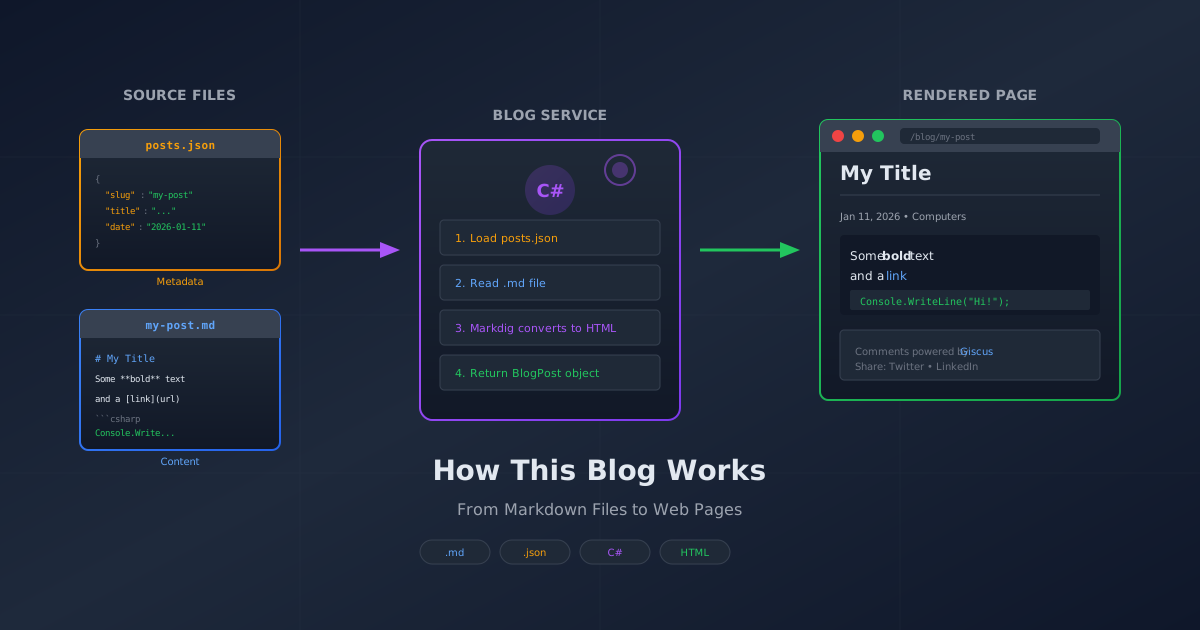
You're reading a blog post right now. But how did it get here? There's no WordPress, no database, no admin panel. Just some plain text files and a bit of C# magic. Let me show you how it works.
The Goal: Keep It Simple
When I built this site, I wanted writing to feel like... writing. Not clicking through menus, not fighting with rich text editors, not waiting for pages to load. Just open a file, type words, save, done.
The solution? Markdown files. The same format you'd use in a GitHub README or a Discord message.
The Ingredients
The system has three parts:
- A JSON file that lists all posts and their metadata
- Markdown files containing the actual content
- A service that brings them together
Let's look at each one.
Part 1: The Post Registry
Every blog post starts as an entry in posts.json:
{
  "slug": "how-this-blog-works",
  "title": "How This Blog Works: From Markdown to Web Page",
  "description": "No database, no CMS, just Markdown files...",
  "category": "Computers",
  "tags": ["blog", "markdown", "aspnet-core", "architecture"],
  "date": "2026-01-11",
  "featured": true,
  "image": "/img/posts/how-this-blog-works.svg"
}
This is the metadata - everything about the post except the actual content. The slug is the URL-friendly name (/Blog/Post/how-this-blog-works). The date controls when it appears (future dates stay hidden until that day).
Think of it like a library card catalog. The card tells you where to find the book, what it's about, and when it was published - but it's not the book itself.
Part 2: The Markdown Files
The actual content lives in a .md file named after the slug:
Content/
  posts.json
  posts/
    how-this-blog-works.md
    another-post.md
    yet-another-post.md
Inside, it's just Markdown - the same format you might already know from GitHub:
# My Post Title
Here's some **bold text** and a [link](https://example.com).
## A Subheading
- Bullet point one
- Bullet point two
```csharp
// Code blocks work too
Console.WriteLine("Hello, blog!");
```
No special syntax. No proprietary format. Just plain text that any editor can open.
Part 3: The Blog Service
Here's where the magic happens. The BlogService class reads the JSON, finds the matching Markdown file, and converts it to HTML.
public async Task<BlogPost?> GetPostBySlugAsync(string slug)
{
    // Load all post metadata from JSON
    var posts = await LoadPostsMetadataAsync();

    // Find the one we want
    var post = posts.FirstOrDefault(p =>
        string.Equals(p.Slug, slug, StringComparison.OrdinalIgnoreCase));

    if (post == null)
        return null;

    // Load the markdown file
    var mdPath = Path.Combine(_contentPath, "posts", $"{post.Slug}.md");
    if (File.Exists(mdPath))
    {
        post.Content = await File.ReadAllTextAsync(mdPath);
        post.HtmlContent = Markdown.ToHtml(post.Content, _markdownPipeline);
    }

    return post;
}
The heavy lifting is done by Markdig, a fantastic .NET library that converts Markdown to HTML. It handles all the syntax - headers, bold, links, code blocks, tables, everything.
The Flow
When you visit /Blog/Post/how-this-blog-works, here's what happens:
- Controller receives request - "Someone wants the post with slug 'how-this-blog-works'"
- BlogService checks the JSON - "Do we have that post? Is its date today or earlier?"
- Load the Markdown - Read
how-this-blog-works.mdfrom disk - Convert to HTML - Markdig transforms
**bold**into<strong>bold</strong> - Render the view - The Razor template wraps it in the site layout
- You read it - Ta-da!
Why No Database?
You might wonder: why not use a database? Here's why I prefer flat files for a personal blog:
Version control - Every post is tracked in Git. I can see exactly what I changed and when. I can revert mistakes. I can work on drafts in branches.
Portability - The entire blog is just files. I can copy them anywhere, edit them in any text editor, back them up by copying a folder.
Simplicity - No database to configure, no connection strings to manage, no migrations to run. Just files.
Speed - Reading a file from disk is fast. For a small blog, there's no need for query optimization or caching (though the service does cache the JSON in memory).
Future-Dated Posts
One neat feature: posts with future dates don't appear in listings. The service filters them out:
return posts
    .Where(p => p.Date.Date <= DateTime.Today)
    .OrderByDescending(p => p.Date);
This lets me write posts ahead of time and schedule them to appear on a specific day. The post you're reading right now was written days before you saw it.
Adding a New Post
My workflow for a new post:
- Create
my-new-post.mdin the posts folder - Add an entry to
posts.jsonwith the metadata - Create an SVG image (I make these in code too - another post someday!)
- Commit and push
No admin panel. No login. Just files and Git.
The Trade-offs
This approach isn't for everyone. If you need:
- Multiple authors with different permissions - use a CMS
- Comments stored locally - use a database (I use Giscus for GitHub-based comments)
- Full-text search - you'll need to build that (or use client-side search)
- Thousands of posts - the flat file approach might slow down
But for a personal blog with dozens of posts? This is perfect.
Wrapping Up
Sometimes the simplest solution is the best one. A JSON file for metadata, Markdown files for content, and a thin service layer to connect them. No frameworks fighting you, no databases to manage, no complexity you don't need.
Just words in files, becoming pages on the web.
And if you want to see the actual code? It's all on GitHub. The beauty of open source - you can read exactly how this post became the page you're reading.
One thing that improved the reading experience significantly after the core architecture was in place: Adding Syntax Highlighting to a Blog (The Easy Way) — three lines of HTML and fifteen minutes, and the code blocks went from monochrome to fully highlighted.


