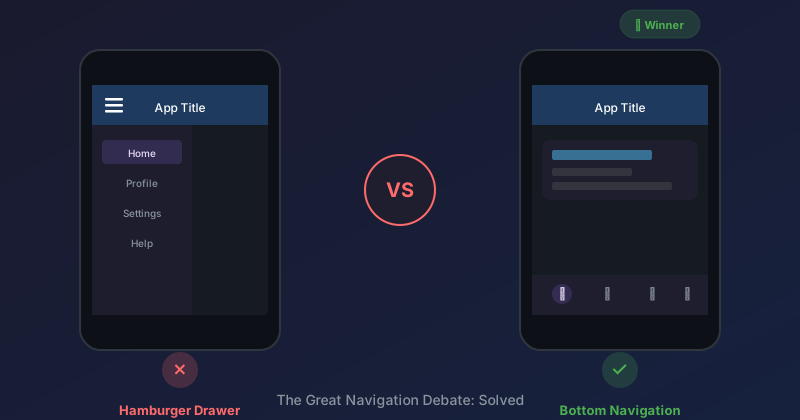
We started with a hamburger menu. Three months later, we ripped it out. Here's the decision framework that made the choice obvious—and might save you the same refactoring.
The Starting Point
Our mobile app had a standard Material Design drawer:
┌─────────────────────────────────────────┐
│  ☰     Good morning, Mike               │
│                                         │
├─────────────────────────────────────────┤
│                                         │
│         Main content                    │
│                                         │
└─────────────────────────────────────────┘

         (Tap hamburger)
               ↓

┌────────────────┬────────────────────────┐
│ MyApp      │                        │
├────────────────┤                        │
│ 📋 My Work     │    (dimmed content)   │
│ ⏱️ Time        │                        │
│ ⋯ Settings     │                        │
│                │                        │
└────────────────┴────────────────────────┘
It looked clean. It followed established patterns. It was wrong for our users.
The Realization
Watch someone use a drawer menu:
- Look for the hamburger icon (often overlooked)
- Tap it
- Wait for animation
- Scan the options
- Tap the desired item
- Wait for animation to close
- See the new screen
That's 7 steps to navigate. More importantly, the actual navigation options are hidden until you tap the hamburger. Users can't see what's available without taking action.
For our users—field workers who need to clock in quickly between tasks—this was unacceptable.
The Framework
Here's how to decide between drawer and bottom nav:
Question 1: How many primary actions?
| # of Actions | Recommendation |
|---|---|
| 2-4 | Bottom nav |
| 5+ | Drawer (or rethink your IA) |
We had 3 primary destinations: My Work, Time, and Settings. That's bottom nav territory.
Question 2: Are all actions equally important?
Drawers treat all items equally—they're all hidden behind the hamburger. Bottom navs show everything, but limited space means you must prioritize.
Our actions weren't equal:
- My Work and Time are used dozens of times per day
- Settings is used maybe once a week
Solution: Put the two primary actions in bottom nav, move Settings to a profile avatar in the header.
Question 3: How expert are your users?
Drawers require users to know that navigation exists and where to find it. This assumes familiarity with the hamburger convention.
Our users ranged from 20-year-old apprentices to 60-year-old master electricians. Some had never used a hamburger menu. For them, visible navigation isn't just easier—it's necessary.
Question 4: What's the interaction context?
Drawer: Two hands free, focused attention, sitting down Bottom nav: One hand, glancing, possibly moving
Our users are often holding tools, standing on ladders, or walking across job sites. One-handed thumb reach is essential. Bottom nav sits right in the thumb zone.
Question 5: Is discoverability important?
Drawers hide functionality. If you want users to discover features, they need to actively open the menu.
Bottom nav surfaces everything. New features are immediately visible. Usage patterns are observable (which tabs do users tap most?).
For an app that's being actively developed with new features, bottom nav provides natural feature discovery.
The Decision
Based on this framework:
| Question | Our Answer | Points To |
|---|---|---|
| How many actions? | 3 | Bottom nav |
| Equally important? | No (2 primary, 1 secondary) | Bottom nav + header |
| User expertise? | Varied, some low | Bottom nav |
| Interaction context? | One-handed, quick | Bottom nav |
| Discoverability? | Important | Bottom nav |
Every question pointed the same direction.
The Implementation
We moved from drawer to 2-tab bottom nav:
┌─────────────────────────────────────────┐
│  [MJ]  Good morning, Mike               │  ← Profile avatar
│                                         │
├─────────────────────────────────────────┤
│                                         │
│         Main content                    │
│                                         │
├─────────────────────────────────────────┤
│                                         │
│   📋            ⏱️                      │
│   My Work       Time                    │
│   ▬▬▬                                   │  ← Active indicator
│                                         │
└─────────────────────────────────────────┘
Key changes:
- 2 tabs instead of hamburger with 3 items
- Settings via profile avatar — visible but not competing for attention
- 64px touch targets — chunky for glove-friendly operation
- Active state indicator — always clear where you are
The profile avatar serves double duty: it shows the user's initials (personalization) and provides navigation to settings (functionality).
The Code
The Razor component is dead simple:
<nav class="m3-bottom-nav">
    <NavLink class="m3-bottom-nav__item" href="" Match="NavLinkMatch.All">
        <svg class="m3-bottom-nav__icon"><!-- icon --></svg>
        <span class="m3-bottom-nav__label">My Work</span>
    </NavLink>
    <NavLink class="m3-bottom-nav__item" href="time">
        <svg class="m3-bottom-nav__icon"><!-- icon --></svg>
        <span class="m3-bottom-nav__label">Time</span>
    </NavLink>
</nav>
The profile avatar in the header:
<button class="m3-profile-avatar m3-profile-avatar--header" @onclick="NavigateToProfile">
    @User.FirstName[0]@User.LastName[0]
</button>
No drawer state to manage. No animation callbacks. No gesture handlers. Just navigation links.
The Objection: "But We Might Add More Features"
The drawer argument often includes "but we might need more navigation items later." This is speculative complexity.
If you genuinely need 7+ navigation items someday:
- You probably need to rethink your information architecture anyway
- You can add a drawer then, with actual requirements
- Bottom nav can expand to 5 items before getting crowded
Don't build for hypothetical future complexity. Build for known current needs.
The Objection: "Users Know Hamburger Menus"
Some users do. Many don't. And even those who know about hamburger menus don't prefer them—they tolerate them.
Bottom nav has a 100% discoverability rate. You literally can't miss it. That's not true of hamburger menus, especially for older or less tech-savvy users.
The Result
After switching to bottom nav:
- Navigation time decreased — Two taps max to get anywhere
- Feature visibility increased — Users actually found the Time page
- Code complexity decreased — No drawer state, no animations, no gestures
- Thumb reach improved — Bottom nav is in the natural thumb zone
The drawer looked more "sophisticated." The bottom nav works better.
When to Keep the Drawer
Drawers aren't always wrong. Keep them when:
- You have 5+ navigation items that are all important
- Your app has a "power user" audience comfortable with hidden nav
- Screen real estate is precious (content-heavy apps)
- You need hierarchical navigation (sections → subsections)
Gmail uses a drawer well because it has 10+ navigation destinations, and users are power users who know where things are.
Our field worker app isn't Gmail.
Key Takeaways
- Use the framework — Don't default to patterns; evaluate your context
- Count your actions — 2-4 = bottom nav, 5+ = drawer (or rethink IA)
- Consider expertise — Less experienced users need visible navigation
- Thumb zone matters — One-handed use favors bottom nav
- Hidden ≠ clean — Visible navigation isn't clutter, it's usability
- Profile avatar trick — Secondary actions can live in the header
Further Reading
- Material Design: Navigation — Official guidelines
- Nielsen Norman Group: Hamburger Menus — Research on discoverability
- Luke Wroblewski: Obvious Always Wins — Classic article on visible UI
We deleted more code removing the drawer than we added for the bottom nav. Sometimes less is literally less.
Related Posts
- M3E for Blue-Collar Apps — The design context for these decisions
- The Floating Card Pattern — Where the bottom nav lives


