The Silent Failure
You upgraded to Tailwind v4. Your build runs. Your CSS file generates. Everything looks fine.
Then you load your app and half your styles are missing.
No errors. No warnings. Just... missing CSS. Your buttons are naked. Your cards have no shadows. That carefully crafted gradient? Gone.
You check the terminal. Clean build. You check the CSS file. It exists. You question your career choices.
Welcome to the @source directive gotcha - the upgrade surprise that doesn't announce itself.
What Changed in Tailwind v4
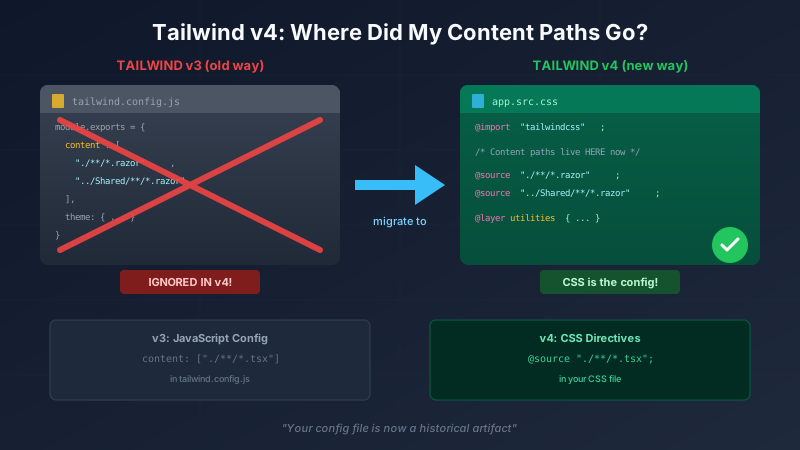
Tailwind v4 moved from JavaScript-based configuration to CSS-based configuration. This is actually a great change - your config lives alongside your styles, everything is more declarative, and the tooling is simpler.
But if you're upgrading from v3 (or following older tutorials), you might still have a tailwind.config.js file like this:
module.exports = {
  content: [
    "./**/*.razor",
    "./**/*.html",
    "../SharedUI/**/*.razor",
  ],
  theme: { /* ... */ },
}
Here's the problem: Tailwind v4 doesn't read the content array from config files.
Your config file sits there, looking authoritative, doing absolutely nothing. It's like a "Beware of Dog" sign on a house with no dog.
The Symptom
You'll see styles working for some files but not others. In our case:
- Components in the main project: styled correctly
- Components in a shared library: no styles
The shared library's Razor components had classes like flex-1, h-2, gap-3, and min-w-[45px]. All valid Tailwind classes. All missing from the generated CSS.
The build succeeded. The CSS file was created. But Tailwind only scanned the local project because that's the default behavior - it didn't know about our shared library.
The Fix: @source Directive
In Tailwind v4, you tell the compiler where to scan using @source directives in your CSS:
/* app.src.css - Your Tailwind entry point */
@import "tailwindcss";

/* Tell Tailwind where to scan for classes */
@source "./**/*.razor";
@source "./**/*.html";
@source "../CrewTrack.UI/**/*.razor";  /* Shared library! */

/* Import your other styles */
@import "../CrewTrack.UI/Styles/app.src.css";
The @source directive is the v4 equivalent of the content array. Same concept, different syntax, different location.
Multi-Project Architectures
This gotcha hits hardest in solutions with shared libraries. Consider this structure:
/src
  /MyApp.Web          # Web project
    app.src.css       # Tailwind entry point
    /Components
      Header.razor    # Uses Tailwind classes
  /MyApp.Maui         # Mobile project
    app.src.css       # Tailwind entry point
    /Components
      MobileNav.razor # Uses Tailwind classes
  /MyApp.UI           # Shared library
    /Components
      Button.razor    # Uses Tailwind classes
      Card.razor      # Uses Tailwind classes
Each consuming project (Web, Maui) needs its own @source directives pointing to:
- Its own components
- The shared library's components
/* src/MyApp.Web/app.src.css */
@import "tailwindcss";

@source "./**/*.razor";
@source "./**/*.cshtml";
@source "../MyApp.UI/**/*.razor";  /* Don't forget this! */

@import "../MyApp.UI/Styles/shared.css";
/* src/MyApp.Maui/app.src.css */
@import "tailwindcss";

@source "./**/*.razor";
@source "./**/*.html";
@source "../MyApp.UI/**/*.razor";  /* Same shared library */

@import "../MyApp.UI/Styles/shared.css";
Each project owns its CSS build. Each project explicitly declares what to scan.
The Config File Confusion
You might still have a tailwind.config.js file. Tailwind v4 will read some things from it:
Still works in v4:
theme.extend(custom colors, spacing, etc.)plugins
Ignored in v4:
contentarray (use@sourceinstead)safelist(use manual CSS with@layerinstead)
The config file isn't useless - it's just not where you define content paths anymore.
If you're migrating, consider adding a comment:
/** @type {import('tailwindcss').Config} */
module.exports = {
  // NOTE: Tailwind v4 ignores 'content' - use @source in CSS instead
  // This content array is here for documentation only
  content: [
    "./**/*.razor",
    "../CrewTrack.UI/**/*.razor",
  ],
  theme: {
    extend: {
      colors: {
        primary: '#1976d2',
        // ...
      },
    },
  },
}
Debugging Missing Styles
When styles don't appear:
Check the generated CSS - Search for the missing class name. If it's not there, Tailwind didn't scan the file containing it.
Check your @source paths - Are they relative to the CSS file? Do they match your file extensions?
Check file extensions -
@source "./**/*.razor"won't find.cshtmlfiles. Be explicit.Check for typos in class names -
bg-gray-100vsbg-grey-100. American vs British spelling has ended friendships. (Tailwind uses American spelling.)Rebuild the CSS - Tailwind caches aggressively. Delete that output file and rebuild. Trust nothing.
Quick Reference
| v3 Config | v4 CSS Equivalent |
|---|---|
content: ["./**/*.tsx"] |
@source "./**/*.tsx"; |
content: ["./src/**/*.vue"] |
@source "./src/**/*.vue"; |
safelist: ["bg-red-500"] |
Manual CSS with @layer utilities |
The Lesson
Tailwind v4's CSS-based configuration is cleaner once you understand it. The @source directive is explicit about what gets scanned, and it lives right next to your other CSS. No more hunting through JavaScript config files to figure out why something isn't being picked up.
The gotcha is that old habits (and old config files) might make you think your content paths are being respected when they're not. The v3 → v4 migration path doesn't exactly scream "HEY, YOUR CONTENT ARRAY IS NOW DECORATIVE."
When in doubt: check your @source directives, rebuild, and verify the classes appear in your generated CSS. And maybe add a comment to that old config file before it tricks someone else on your team.
This is part 3 of a series on Tailwind CSS. See also: Part 1: Tailwind vs Bootstrap - The Paradigm Shift and Part 2: Dynamic Classes and @layer.


