The Setup That Should Have Worked
Picture this: You're building a .NET Core web app that needs to work in multiple languages. You've done your homework. You created those .resx files—the special XML files that hold your translated strings. You've got Messages.en.resx for English, Messages.es.resx for Spanish. You hit Build, and Visual Studio happily compiles everything.
You even see those beautiful "satellite assemblies" appear in your output folder—en/YourApp.resources.dll, es/YourApp.resources.dll. The files exist. The translations are in there.
You run the app, switch your browser to Spanish, refresh the page, and...
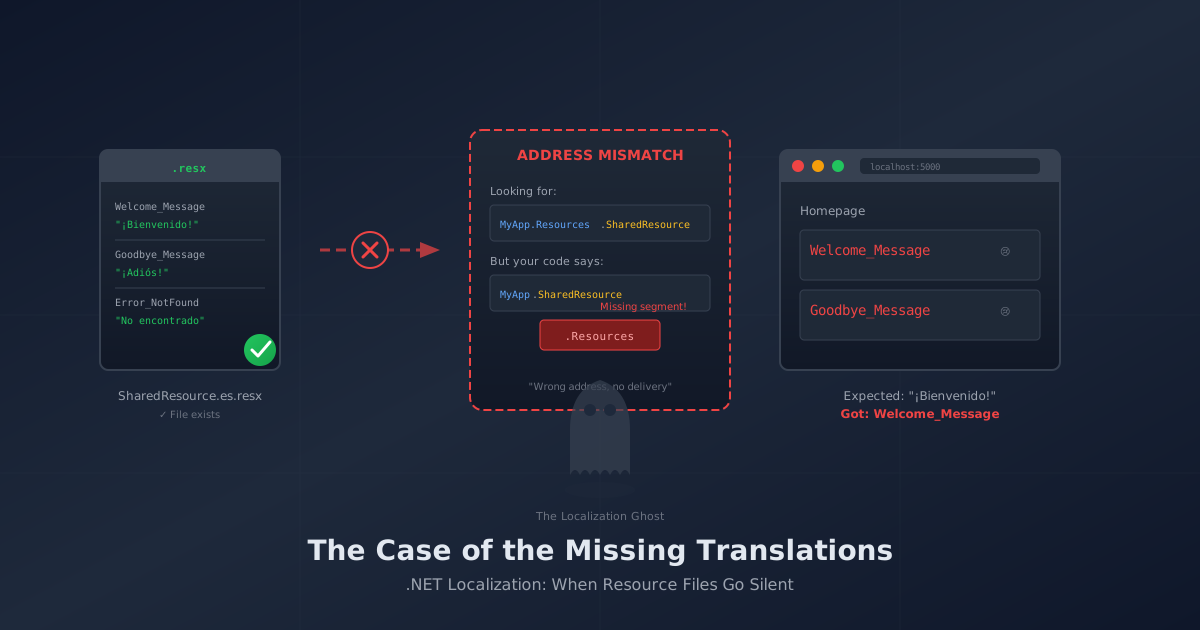
Welcome_Message
Not "¡Bienvenido!" Just the raw key name, staring back at you like a passive-aggressive sticky note.
What happened?
The Silent Treatment
Here's the frustrating thing about .NET localization: it fails silently.
If your code asks for a translation and the system can't find it, there's no error. No exception. No red squiggly lines. The localizer just shrugs and hands you back the exact key you asked for. "You wanted Welcome_Message? Here's Welcome_Message. Good luck figuring out why."
This is by design—it prevents your app from crashing just because a translation is missing. But it also means you can have everything almost right and never know what's broken.
The Address Book Problem
Think of .NET's localization system like a mail carrier. Your resource files are packages, and the localizer needs to know exactly where to deliver requests. But instead of street addresses, it uses a combination of:
- Your project's root namespace (like the city)
- The resources folder path (like the street)
- The resource file name (like the house number)
If any part of this "address" is wrong, the mail carrier walks right past your translations and delivers... nothing.
Here's what the system is actually doing when you ask for a localized string:
Looking for: YourApp.Resources.SharedResource
Your files:  YourApp.SharedResource (wrong street!)
Result:      🤷 Key name it is.
The namespace in your code has to match what .NET calculates based on your folder structure. If there's a mismatch, the packages never get delivered.
The Three Things That Are Probably Wrong
After debugging this more times than I'd like to admit, it almost always comes down to one of these three issues:
1. The Folder Path Isn't Where You Think It Is
In your Program.cs (or Startup.cs for older projects), you tell .NET where your resource files live:
builder.Services.AddLocalization(options => options.ResourcesPath = "Resources");
This seems straightforward—"my .resx files are in a folder called Resources." But here's the catch: this path becomes part of the namespace calculation.
If you set ResourcesPath = "Resources" but your files are actually in Localization/Resources, or if they're in the root with no folder at all, the addresses won't match.
The fix: Make sure your .resx files are exactly where you said they'd be. If you said "Resources", there should be a folder called Resources containing your files.
2. The "Marker Class" Is Missing or Misplaced
.NET's localizer needs something to anchor to—a class that tells it "look for resources associated with me." This is often called a "marker class" or "dummy class," and it's wonderfully anticlimactic:
namespace YourApp.Resources
{
    public class SharedResource { }
}
That's it. An empty class. It exists purely to give the localizer an address to work with.
Your resource files should be named to match: SharedResource.en.resx, SharedResource.es.resx, etc.
When you inject the localizer, you reference this class:
public class HomeController : Controller
{
    private readonly IStringLocalizer<SharedResource> _localizer;

    public HomeController(IStringLocalizer<SharedResource> localizer)
    {
        _localizer = localizer;
    }
}
The critical part: The namespace of your marker class, combined with the ResourcesPath, must create a path that matches where your files actually are.
If your marker class is in YourApp.Resources and your ResourcesPath is "Resources", .NET looks for YourApp.Resources.SharedResource—which means files at Resources/SharedResource.xx.resx.
3. The Middleware Is in the Wrong Order
This one is sneaky. You've configured localization, you've set up your supported cultures, but you put the middleware in the wrong spot:
// ❌ Wrong order
app.UseRouting();
app.UseEndpoints(...);
app.UseRequestLocalization();  // Too late! Request already routed.

// ✅ Correct order
app.UseRequestLocalization();  // Check culture FIRST
app.UseRouting();
app.UseEndpoints(...);
The request localization middleware needs to run before your app starts processing the request. If it comes after routing, the culture is determined too late, and everything defaults to your system language.
The rule: UseRequestLocalization() should be one of the first middleware calls, definitely before UseRouting().
A Working Setup, Step by Step
Here's a minimal configuration that actually works:
Folder structure:
YourApp/
├── Resources/
│   ├── SharedResource.cs        (the marker class)
│   ├── SharedResource.en.resx   (English strings)
│   └── SharedResource.es.resx   (Spanish strings)
├── Controllers/
│   └── HomeController.cs
└── Program.cs
The marker class (Resources/SharedResource.cs):
namespace YourApp.Resources
{
    public class SharedResource { }
}
Program.cs configuration:
// Add localization services
builder.Services.AddLocalization(options => options.ResourcesPath = "Resources");

builder.Services.AddControllersWithViews()
    .AddViewLocalization()
    .AddDataAnnotationsLocalization();

var app = builder.Build();

// Configure supported cultures
var supportedCultures = new[] { "en-US", "es-ES" };
var localizationOptions = new RequestLocalizationOptions()
    .SetDefaultCulture(supportedCultures[0])
    .AddSupportedCultures(supportedCultures)
    .AddSupportedUICultures(supportedCultures);

// This MUST come before UseRouting
app.UseRequestLocalization(localizationOptions);

app.UseRouting();
// ... rest of your middleware
Using it in a controller:
using Microsoft.Extensions.Localization;
using YourApp.Resources;

public class HomeController : Controller
{
    private readonly IStringLocalizer<SharedResource> _localizer;

    public HomeController(IStringLocalizer<SharedResource> localizer)
    {
        _localizer = localizer;
    }

    public IActionResult Index()
    {
        ViewData["Greeting"] = _localizer["Welcome_Message"];
        return View();
    }
}
Debugging Tips
Still seeing key names? Here's how to figure out what's happening:
Check if the localizer is finding anything:
var allStrings = _localizer.GetAllStrings().ToList();
Console.WriteLine($"Found {allStrings.Count} strings");
foreach (var s in allStrings)
{
    Console.WriteLine($"  {s.Name}: {s.Value} (not found: {s.ResourceNotFound})");
}
If this returns zero strings or everything shows ResourceNotFound: true, your addressing is wrong.
Verify your culture is being set:
var culture = CultureInfo.CurrentUICulture;
Console.WriteLine($"Current UI Culture: {culture.Name}");
If this shows en-US when you expected es-ES, your middleware order or culture provider configuration needs work.
The Takeaway
.NET localization isn't magic—it's mail delivery. The system needs:
- The right address (namespace + resource path alignment)
- A valid recipient (marker class matching your file names)
- Proper timing (middleware before routing)
Get those three things right, and your translations will start flowing. Get any of them wrong, and you'll keep seeing Welcome_Message where "¡Bienvenido!" should be.
The good news? Once you understand the addressing system, it clicks into place and rarely breaks again. The bad news? You'll spend the next hour checking every namespace in your codebase.
Ask me how I know.
This post is part of a series on .NET localization. See also: Building a Language Switcher on letting users change languages and persisting their choice with cookies.
Next up: Now that your translations are working, how do you let users switch languages and remember their choice? That's where cookies and the culture provider come in.


