The Missed Opportunity
Your visitor just hit a 404. Maybe they mistyped a URL. Maybe they clicked a broken link from some ancient blog post. Maybe they're testing your site for vulnerabilities (hello, security scanners).
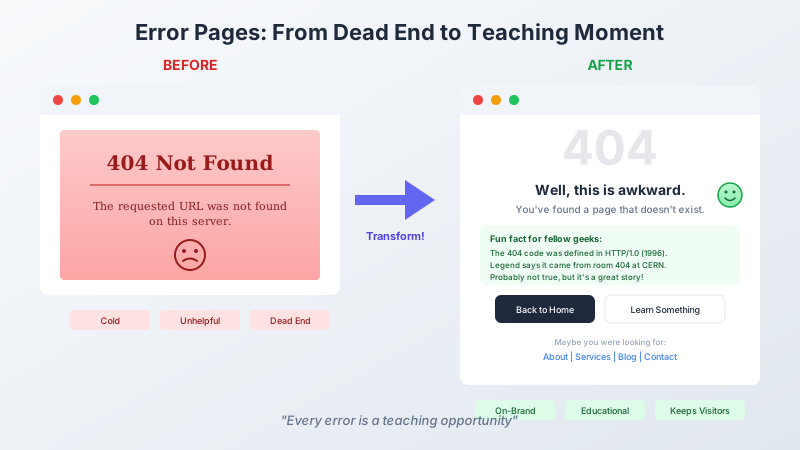
Whatever the reason, they're staring at an error page. And most error pages look like this:
404 Not Found
The requested URL was not found on this server.
Cold. Unhelpful. Boring. A dead end that makes your site feel broken, even when it's working exactly as designed.
But here's the thing: error pages are guaranteed traffic. Every site has them. Every visitor eventually sees one. Why waste that moment on a generic browser message when you could make it memorable?
The Teaching Moment Philosophy
At Learned Geek, we believe everything is a teaching opportunity. Even your mistakes. Especially your mistakes.
So when someone hits a 404 on this site, they don't just see "Page Not Found." They see this:
Well, this is awkward.
You've found a page that doesn't exist. In HTTP terms, that's a
404 Not Found.Fun fact for fellow geeks: The 404 status code was defined in the original HTTP/1.0 spec (RFC 1945) back in 1996. Legend has it the "404" came from room 404 at CERN where the web's database was stored. Probably not true, but it's a great story.
Is it educational? Yes. Is it on-brand? Absolutely. Does it turn an error into a tiny dopamine hit of "huh, I learned something"? That's the goal.
Implementing Custom Error Pages in ASP.NET Core
Let's build this. The key is UseStatusCodePagesWithReExecute in your middleware pipeline.
Step 1: Configure the Middleware
In Program.cs, add this before your routing middleware:
app.UseStatusCodePagesWithReExecute("/Home/StatusCode", "?code={0}");
This tells ASP.NET: "When you encounter an error status code, don't show the default page. Instead, re-execute the request to /Home/StatusCode and pass the status code as a query parameter."
Step 2: Create the Controller Action
public class HomeController : Controller
{
    [ResponseCache(Duration = 0, Location = ResponseCacheLocation.None, NoStore = true)]
    public IActionResult StatusCode(int? code)
    {
        var statusCode = code ?? 500;
        Response.StatusCode = statusCode;

        ViewBag.StatusCode = statusCode;
        ViewBag.StatusMessage = statusCode switch
        {
            404 => "Page Not Found",
            403 => "Forbidden",
            500 => "Server Error",
            _ => "Error"
        };
        ViewBag.StatusDescription = statusCode switch
        {
            404 => "The page you're looking for doesn't exist.",
            403 => "You don't have permission to access this resource.",
            500 => "Something went wrong on our end.",
            _ => "An unexpected error occurred."
        };

        return View();
    }
}
The ResponseCache attribute is important—you don't want error pages cached.
Step 3: Build the View
Here's where the fun happens. Create Views/Home/StatusCode.cshtml:
@{
    ViewData["Title"] = ViewBag.StatusMessage;
    var statusCode = (int)ViewBag.StatusCode;
}

<div class="min-h-[80vh] flex items-center">
    <div class="max-w-2xl mx-auto px-6 text-center py-24">
        <!-- Big status code number -->
        <div class="text-9xl font-semibold text-neutral-200 dark:text-neutral-800">
            @statusCode
        </div>

        @if (statusCode == 404)
        {
            <h1 class="mt-4 text-4xl font-semibold">
                Well, this is awkward.
            </h1>
            <p class="mt-4 text-lg text-neutral-500">
                You've found a page that doesn't exist. In HTTP terms,
                that's a <code>404 Not Found</code>.
            </p>

            <!-- The teaching moment -->
            <div class="mt-8 p-6 bg-neutral-50 rounded-lg text-left">
                <p class="text-sm font-medium mb-2">Fun fact for fellow geeks:</p>
                <p class="text-sm text-neutral-600">
                    The 404 status code was defined in the original HTTP/1.0 spec
                    (RFC 1945) back in 1996. Legend has it the "404" came from room
                    404 at CERN where the web's database was stored. Probably not
                    true, but it's a great story.
                </p>
            </div>
        }

        <!-- More status codes... -->

        <!-- Navigation options -->
        <div class="mt-10 flex gap-4 justify-center">
            <a href="/" class="btn-primary">Back to Home</a>
            <a href="/blog" class="btn-secondary">Learn Something Instead</a>
        </div>
    </div>
</div>
Error Messages With Personality
Here's what we show for different status codes:
404 - Page Not Found
Headline: "Well, this is awkward."
Fun fact: The CERN room 404 legend. It's probably apocryphal, but it's more interesting than "you typed the URL wrong."
403 - Forbidden
Headline: "You shall not pass!"
Teaching moment: The difference between 401 and 403:
401means "who are you?" (authentication needed)403means "I know who you are, but no" (authorization denied)
This is genuinely useful knowledge for developers. And for non-developers, it explains why being logged in doesn't always mean you can access everything.
500 - Server Error
Headline: "Oops. That's on us."
Teaching moment: What 500 really means—the server encountered an unexpected condition. Could be a null reference, a database timeout, or a developer who forgot to handle an edge case. Own the mistake; don't blame the visitor.
Generic Fallback
Headline: "Something went sideways."
For the rare status codes (418 I'm a teapot, anyone?), we show the code and a generic message. Not every error needs a custom treatment.
The "Learn Something Instead" Button
My favorite detail: the secondary button that says "Learn Something Instead" and links to the blog.
The psychology here is simple. Someone hit an error page—their intended action failed. They have two choices:
- Leave frustrated
- Find something else interesting
Option 2 keeps them on your site. And if they actually read a blog post, you've turned a negative moment into engagement. A 404 became a reader.
Helpful Navigation
Below the main buttons, we add quick links:
Maybe you were looking for one of these?
About | Services | Blog | Contact
This handles the "I know what I wanted but can't find it" scenario. Give people easy escape hatches to your main content.
The Technical Details
A few things to watch for:
Set the status code correctly. The view should return the proper HTTP status code, not 200. Search engines and monitoring tools care about this.
Response.StatusCode = statusCode;
Don't cache error pages. Use ResponseCache with NoStore = true. You don't want a 404 cached and served for valid URLs.
Test your error pages. Actually navigate to /asdfasdf and see what happens. Test /admin/ for 403. Create a deliberate error for 500. Make sure they all work.
Keep them fast. Error pages shouldn't make database calls or run heavy logic. The visitor is already frustrated; don't make them wait.
The Business Case (If You Need One)
"But this is just an error page, why spend time on it?"
Because:
Brand consistency — Error pages are part of your user experience. A jarring "404 Not Found" in Times New Roman breaks the spell.
Reduced bounce rate — A helpful error page with navigation keeps people on your site.
Developer credibility — For a tech site like this one, a clever error page signals "these people know what they're doing."
It's fun — Some of us became developers because we like making things delightful. Error pages count.
Try It Yourself
Go ahead. Type a random URL after this domain. Something like /totally-fake-page. See what happens.
Then think about your own error pages. Are they teaching moments or dead ends?
Want to see the full implementation? Check out the previous post on SEO oops recovery for how this fits into the broader "handling mistakes gracefully" philosophy.