The Phone Call That Changed Everything
"Your contact form is broken."
My wife, testing the site from her phone. She'd filled out the form, hit submit, and got rejected with "Suspicious activity detected."
Suspicious activity. From my wife. On our couch.
I checked the logs. reCAPTCHA score: 0.1. My threshold was 0.5. She was being treated like a bot.
This is the story of how I learned that reCAPTCHA v3's scoring system has a mobile problem - and how to fix it without letting actual bots through.
The Original Setup
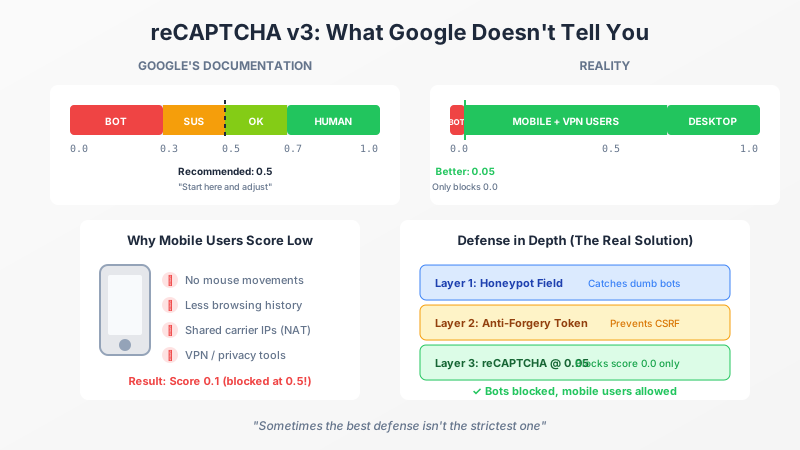
In my previous post on reCAPTCHA v3, I recommended a 0.5 threshold. Google suggests this as a starting point. The documentation shows a nice clean scale:
| Score | Meaning |
|---|---|
| 0.0 - 0.3 | Almost certainly a bot |
| 0.3 - 0.5 | Suspicious |
| 0.5 - 0.7 | Probably human |
| 0.7 - 1.0 | Almost certainly human |
Looks reasonable, right? Set your threshold at 0.5, block the bots, done.
Except real-world data doesn't match Google's nice clean scale.
Why Mobile Users Score Low
reCAPTCHA v3 is invisible. No checkboxes, no image puzzles. Instead, it watches user behavior and builds a trust score based on:
- Browsing history - How much does Google know about this user?
- Mouse movements - Does the cursor move like a human?
- Interaction patterns - Scrolling, typing, clicking behavior
- Device fingerprinting - Browser, screen size, installed fonts
- IP reputation - Has this IP been associated with spam?
Here's the problem: mobile users fail most of these signals.
No Mouse Movements
Touch interactions don't generate mouse events. reCAPTCHA gets less behavioral data from mobile users because there's literally no mouse to track.
Less Browsing History
Mobile browsers are often more private by default. Safari's Intelligent Tracking Prevention, Firefox's Enhanced Tracking Protection, and Chrome's privacy changes all reduce the data Google can use to build trust.
Shared IPs (Carrier NAT)
Mobile carriers use NAT to share IP addresses among thousands of users. If any of those users have been flagged for suspicious activity, the entire IP pool's reputation suffers. Your legitimate user inherits the sins of strangers on the same cell tower.
VPNs and Privacy Tools
Privacy-conscious users (like, say, readers of a tech blog) often use VPNs. From Google's perspective, VPN exit nodes look suspicious because they're shared by many users, some of whom are definitely bots.
The Score Distribution Reality
After lowering my threshold and watching the logs, here's what I actually saw:
| Score Range | Who's Getting These |
|---|---|
| 0.9 - 1.0 | Desktop Chrome users, logged into Google |
| 0.7 - 0.9 | Desktop users, various browsers |
| 0.3 - 0.7 | Mobile users, privacy browsers |
| 0.1 - 0.3 | Mobile users on VPNs, privacy-focused users |
| 0.0 | Actual bots |
My wife, on her iPhone with a VPN, scored 0.1. Not because she's a bot. Because she's privacy-conscious on a mobile device.
A 0.5 threshold was blocking real humans.
The Fix: Lower Your Threshold (Way Lower)
I ended up setting my threshold to 0.05.
Yes, really. Here's why that's not crazy:
Actual Bots Score 0.0
In my logs, every confirmed bot submission (caught by the honeypot or other signals) scored exactly 0.0. Not 0.1. Not 0.2. Zero.
Bots don't browse the web like humans. They don't have browsing history. They don't move mice. They make direct HTTP requests. Google knows this and scores them accordingly.
Defense in Depth
reCAPTCHA isn't my only protection:
- Honeypot field - Hidden field that bots fill out. Catches dumb bots instantly.
- Anti-forgery token - Prevents CSRF attacks.
- reCAPTCHA at 0.05 - Catches sophisticated bots that score 0.0.
The honeypot catches bots that blindly fill all fields. reCAPTCHA catches bots that are smarter but still behave non-humanly. Together, they provide solid protection without blocking legitimate mobile users.
The Math
With a 0.05 threshold:
- Scores 0.0 - 0.04: Blocked (actual bots)
- Scores 0.05 - 1.0: Allowed (everyone else, including mobile users)
I'm essentially using reCAPTCHA as a "definitely a bot" detector rather than a "probably human" detector. And that's fine, because that's what it's actually good at.
Updating the Code
The fix was simple. In my settings:
public class RecaptchaSettings
{
    public string SiteKey { get; set; } = string.Empty;
    public string SecretKey { get; set; } = string.Empty;

    /// <summary>
    /// Minimum score to consider valid. Default is 0.05.
    /// Mobile users often score 0.1-0.3 due to less browsing history,
    /// VPNs, and carrier NAT. Combined with honeypot, 0.05 only blocks
    /// confirmed bots (who score 0.0) while allowing legitimate users.
    /// </summary>
    public float MinimumScore { get; set; } = 0.05f;
}
That comment is doing a lot of work. Future me (or future team members) will want to know why the threshold is so low. "Mobile users score badly" is the TL;DR.
What About the Logs?
I still log all reCAPTCHA scores, even for successful submissions. This gives me data to:
- Identify score distribution patterns
- Catch any bots that slip through (they'll score 0.0)
- Adjust the threshold if needed
_logger.LogInformation(
    "reCAPTCHA validation: Score={Score}, Action={Action}, Success={Success}",
    result.Score, result.Action, result.Success);
If you're seeing a lot of 0.0 scores in successful submissions, something's wrong. If you're only seeing 0.1+ scores, you're probably fine.
Google's Recommendation Problem
Google's documentation says to start at 0.5 and adjust based on your data. That's fine advice, but they bury the lead: mobile users score dramatically lower than desktop users.
This isn't a bug. It's a fundamental limitation of how reCAPTCHA v3 works. Less data means lower confidence, which means lower scores. Mobile and privacy-focused users will always score lower.
If you're running a consumer-facing site, you need to account for this. A 0.5 threshold might work for a desktop-only enterprise application. For a public website with mobile visitors? You'll block real users.
The Alternative: reCAPTCHA v2
If low thresholds make you nervous, consider reCAPTCHA v2 (the "I'm not a robot" checkbox) as a fallback. You can implement a hybrid approach:
- Try v3 first
- If score is below 0.3 but above 0.0, show a v2 challenge
- If score is 0.0, reject outright
This adds friction for edge cases while keeping the smooth experience for most users. I haven't implemented this (the 0.05 threshold works fine for my volume), but it's an option if you're seeing issues.
Key Takeaways
0.5 is too high for mobile users. Many legitimate users score 0.1-0.3.
Actual bots score 0.0. If you're catching those, you're catching the real threats.
Use defense in depth. Honeypot + reCAPTCHA + anti-forgery tokens together are stronger than any single solution.
Log your scores. Real data beats assumptions. Watch what scores your actual users get.
Document your threshold. Future developers (including yourself) will wonder why it's set so low.
The Happy Ending
My wife can now submit the contact form from her phone. The bots are still blocked. And I learned that Google's recommendations need real-world validation.
Sometimes the best defense isn't the strictest one - it's the one that actually works for your users.
This post is part of a series on reCAPTCHA v3. See also: Implementing reCAPTCHA v3 in ASP.NET Core for the complete implementation with honeypot fields and server-side validation.
The contact form on this site uses the approach described here.


