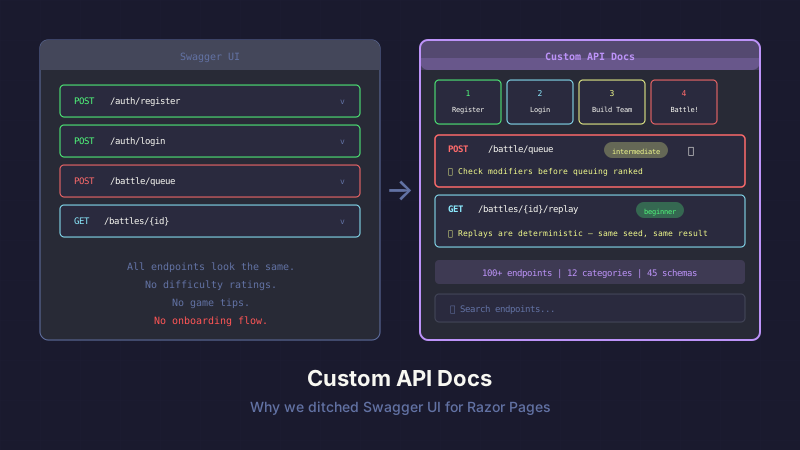
Swagger UI is great for CRUD APIs. You get auto-generated docs, a try-it-out button, and schema visualization — all from your OpenAPI spec with zero custom code.
For API Combat — a game with 100+ endpoints, difficulty ratings, game tips, and an onboarding flow — we needed something Swagger UI was never designed to do. So we built our own docs renderer using Razor Pages and the same OpenAPI spec Swagger would consume.
What Swagger UI Doesn't Do
Swagger UI treats every endpoint the same. POST /auth/register and POST /battle/queue get identical treatment: a collapsible panel, a description, a request body schema, and a "Try it out" button.
But for a game, not all endpoints are equal:
- Beginner endpoints (register, login, get profile) should be highlighted for new players
- Advanced endpoints (Lua scripting, batch operations) should be clearly marked as Premium+
- Game tips ("Check active modifiers before queuing a ranked match") should appear inline
- Prerequisites ("You need a team with at least 3 units before queuing") should be visible
- The onboarding flow (6 API calls to your first battle) needs a visual quick-start guide
Swagger UI has no concept of difficulty levels, game advice, or guided flows. It's a spec renderer, not a developer experience tool.
Custom OpenAPI Extensions
Instead of abandoning the OpenAPI spec, we extended it. Custom attributes on controller methods inject game-specific metadata into the spec:
[HttpPost("battle/queue")]
[ApiDifficulty("intermediate")]
[ApiGameTip("Check active modifiers before queuing — they change every Monday")]
[ApiGameTip("Your strategy must reference units that are in your team's roster")]
[ApiPrerequisite("Team with 3-5 units assigned")]
[ApiCategoryMeta("swords", "#ef4444", Order = 4)]
public async Task<IActionResult> QueueBattle([FromBody] QueueRequest request)
These attributes are processed by a custom IOperationFilter:
public class GameMetadataOperationFilter : IOperationFilter
{
    public void Apply(OpenApiOperation operation, OperationFilterContext context)
    {
        var methodInfo = context.MethodInfo;

        // Difficulty
        var difficulty = methodInfo.GetCustomAttribute<ApiDifficultyAttribute>();
        if (difficulty != null)
            operation.Extensions["x-game-difficulty"] =
                new OpenApiString(difficulty.Level);

        // Game tips
        var tips = methodInfo.GetCustomAttributes<ApiGameTipAttribute>().ToList();
        if (tips.Any())
            operation.Extensions["x-game-tips"] =
                new OpenApiArray(tips.Select(t =>
                    new OpenApiString(t.Tip)).Cast<IOpenApiAny>().ToList());

        // Prerequisites
        var prereqs = methodInfo.GetCustomAttributes<ApiPrerequisiteAttribute>().ToList();
        if (prereqs.Any())
            operation.Extensions["x-game-prerequisites"] =
                new OpenApiArray(prereqs.Select(p =>
                    new OpenApiString(p.Requirement)).Cast<IOpenApiAny>().ToList());

        // Category metadata (icon, color, order)
        var category = methodInfo.DeclaringType?
            .GetCustomAttribute<ApiCategoryMetaAttribute>();
        if (category != null)
        {
            operation.Extensions["x-icon"] = new OpenApiString(category.Icon);
            operation.Extensions["x-color"] = new OpenApiString(category.Color);
            operation.Extensions["x-order"] = new OpenApiInteger(category.Order);
        }
    }
}
The OpenAPI spec now contains standard API documentation plus game-specific metadata. The spec is still valid — custom x- extensions are explicitly allowed by the spec. Swagger UI ignores them. Our custom renderer uses them.
The Renderer
The docs page loads the OpenAPI spec at startup and transforms it into view models:
public class ApiDocsModel : PageModel
{
    private readonly IOpenApiService _openApiService;

    public List<TagGroup> TagGroups { get; set; } = [];
    public int EndpointCount { get; set; }
    public int SchemaCount { get; set; }

    public async Task OnGetAsync()
    {
        var spec = await _openApiService.GetSpecAsync();

        TagGroups = spec.Tags
            .Select(tag => new TagGroup
            {
                Name = tag.Name,
                Description = tag.Description,
                Icon = tag.Extensions.TryGetValue("x-icon", out var icon)
                    ? ((OpenApiString)icon).Value : "code",
                Color = tag.Extensions.TryGetValue("x-color", out var color)
                    ? ((OpenApiString)color).Value : "#6366f1",
                Endpoints = GetEndpointsForTag(spec, tag.Name)
            })
            .OrderBy(g => g.Order)
            .ToList();

        EndpointCount = TagGroups.Sum(g => g.Endpoints.Count);
        SchemaCount = spec.Components.Schemas.Count;
    }
}
Each endpoint is rendered via a Razor partial:
<!-- _Endpoint.cshtml -->
<details class="endpoint-details" id="@Model.OperationId">
    <summary class="endpoint-summary">
        <span class="http-method [email protected]()">
            @Model.Method
        </span>
        <span class="endpoint-path">@Model.Path</span>

        @if (Model.Difficulty != null)
        {
            <span class="difficulty-badge [email protected]">
                @Model.Difficulty
            </span>
        }

        @if (Model.RequiresAuth)
        {
            <span class="auth-badge" title="Requires authentication">🔒</span>
        }
    </summary>

    <div class="endpoint-body">
        <p class="endpoint-description">@Model.Description</p>

        @if (Model.GameTips.Any())
        {
            <div class="game-tips">
                @foreach (var tip in Model.GameTips)
                {
                    <div class="game-tip">💡 @tip</div>
                }
            </div>
        }

        @if (Model.Prerequisites.Any())
        {
            <div class="prerequisites">
                <strong>Prerequisites:</strong>
                <ul>
                    @foreach (var prereq in Model.Prerequisites)
                    {
                        <li>@prereq</li>
                    }
                </ul>
            </div>
        }

        @await Html.PartialAsync("_RequestBody", Model.RequestBody)
        @await Html.PartialAsync("_Responses", Model.Responses)
    </div>
</details>
Everything uses native <details>/<summary> elements for expand/collapse. Zero JavaScript required for the core interaction. The page works without JS, works on mobile, and is accessible by default.
The Quick-Start Cards
The top of the docs page has a visual onboarding flow — six cards showing the path from registration to first battle:
<div class="quickstart-grid">
    <a href="#register" class="quickstart-card">
        <span class="step-number">1</span>
        <span class="step-icon">📝</span>
        <span class="step-title">Register</span>
        <span class="step-method">POST /auth/register</span>
    </a>
    <a href="#login" class="quickstart-card">
        <span class="step-number">2</span>
        <span class="step-icon">🔑</span>
        <span class="step-title">Login</span>
        <span class="step-method">POST /auth/login</span>
    </a>
    <!-- ... cards 3-6 ... -->
</div>
Each card links to the corresponding endpoint's <details> element via anchor. Click "Queue Battle" and the page scrolls to that endpoint with full documentation expanded. It's a guided tour that lives inside the reference docs.
Sticky TOC with Scroll Tracking
The sidebar has a table of contents that highlights the current section as you scroll:
const observer = new IntersectionObserver((entries) => {
    entries.forEach(entry => {
        const link = document.querySelector(
            `.toc-link[href="#${entry.target.id}"]`);
        if (entry.isIntersecting) {
            document.querySelectorAll('.toc-link').forEach(l =>
                l.classList.remove('active'));
            link?.classList.add('active');
        }
    });
}, { rootMargin: '-20% 0px -80% 0px' });

document.querySelectorAll('.tag-group').forEach(group =>
    observer.observe(group));
IntersectionObserver with a custom rootMargin that triggers when a section enters the top 20% of the viewport. Clean, performant, and no scroll event listeners.
Live Search and Filter
A search input filters endpoints in real time:
searchInput.addEventListener('input', (e) => {
    const query = e.target.value.toLowerCase();
    document.querySelectorAll('.endpoint-details').forEach(endpoint => {
        const text = endpoint.textContent.toLowerCase();
        const path = endpoint.querySelector('.endpoint-path')?.textContent.toLowerCase();
        endpoint.style.display = (text.includes(query) || path?.includes(query))
            ? '' : 'none';
    });
});
Searching "battle" shows only battle-related endpoints. Searching "premium" shows only premium-gated endpoints. Since game tips and prerequisites are in the DOM, they're searchable too — searching "modifier" finds the battle queue endpoint because its game tip mentions modifiers.
Stats Bar
The header displays live stats computed from the spec:
<div class="stats-bar">
    <span>📊 @Model.EndpointCount endpoints</span>
    <span>📁 @Model.TagGroups.Count categories</span>
    <span>📋 @Model.SchemaCount schemas</span>
</div>
It's a small touch, but it communicates the scope of the API at a glance. "100+ endpoints across 12 categories" tells a new player this is a substantial game, not a toy project.
Why Not Just Customize Swagger UI?
Swagger UI is extensible through plugins and CSS overrides. You could theoretically add game tips, difficulty badges, and quick-start cards through the plugin system.
But Swagger UI is a React application. Customizing it means writing React plugins, building a custom bundle, and maintaining compatibility with Swagger UI version updates. Our docs page is a Razor Page — the same technology as the rest of the site. Same styling, same layout, same deploy pipeline. No separate build step, no npm dependencies, no React.
The OpenAPI spec is the shared contract. Swagger UI reads it. Our custom renderer reads it. Both produce valid documentation from the same source of truth. We just render it differently.
Takeaway
Your OpenAPI spec is a data source, not just a Swagger UI config file. Treat it that way.
Custom x- extensions let you embed domain-specific metadata — difficulty levels, tips, prerequisites, category icons — right alongside the standard API documentation. A custom renderer picks up that metadata and builds the developer experience your users need.
Swagger UI is the right tool for internal APIs, admin dashboards, and standard CRUD services. For developer-facing products where the API is the product, invest in docs that match the experience.
This post is part of a series about building API Combat. See also: HATEOAS-Lite: Making a REST API Actually Discoverable for the runtime complement to these docs, and Adding Syntax Highlighting to a Blog (The Easy Way) for another approach to rendering code in web pages.


