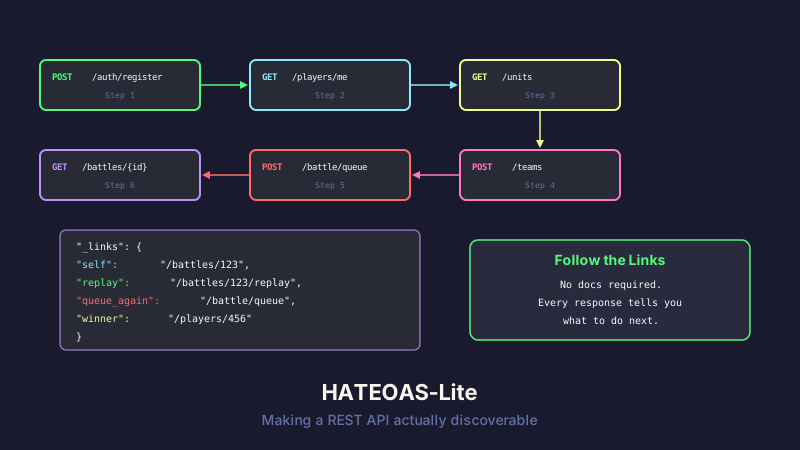
Every API response in API Combat includes a _links object that tells you what to do next. Not because the REST purists say we should. Because it makes the game playable without reading the docs.
The Problem With Static URLs
Most APIs work like this: you read the documentation, memorize the endpoints, hardcode the URLs, and hope they don't change.
# Player knows these URLs because they read the docs
GET /api/v1/players/me
GET /api/v1/teams
POST /api/v1/battle/queue
GET /api/v1/battles/{id}
GET /api/v1/battles/{id}/replay
This works. But for a game — especially one where the API is the game — it creates friction. A new player registers, gets a JWT token, and then... what? They have to switch to the docs, find the next endpoint, copy the URL, switch back to their client, paste it in. The flow is broken.
The Solution: _links
Every API response includes a _links dictionary with named relations:
{
  "id": "battle-123",
  "status": "completed",
  "winner": "player-456",
  "turns": 18,
  "duration": "00:01:42",
  "_links": {
    "self": { "href": "/api/v1/battles/battle-123", "method": "GET" },
    "replay": { "href": "/api/v1/battles/battle-123/replay", "method": "GET" },
    "queue_again": { "href": "/api/v1/battle/queue", "method": "POST" },
    "winner_profile": { "href": "/api/v1/players/player-456", "method": "GET" }
  }
}
After a battle, the response tells you: here's the replay, here's how to queue another fight, here's the winner's profile. No docs required. Follow the links.
The ApiLink Model
The link model is intentionally minimal:
public class ApiLink
{
    [JsonPropertyName("href")]
    public string Href { get; set; }

    [JsonPropertyName("method")]
    public string Method { get; set; }

    [JsonPropertyName("title")]
    [JsonIgnore(Condition = JsonIgnoreCondition.WhenWritingNull)]
    public string? Title { get; set; }

    public ApiLink(string href, string method, string? title = null)
    {
        Href = href;
        Method = method;
        Title = title;
    }
}
Three fields: where to go, how to get there, and optionally what it is. The Title is suppressed from JSON when null — most links are self-explanatory from their relation name, so titles would just add noise.
The Links Factory
A static factory class keeps link generation consistent:
public static class Links
{
    public static ApiLink Get(string href, string? title = null) =>
        new(href, "GET", title);

    public static ApiLink Post(string href, string? title = null) =>
        new(href, "POST", title);

    public static ApiLink Put(string href, string? title = null) =>
        new(href, "PUT", title);

    public static ApiLink Delete(string href, string? title = null) =>
        new(href, "DELETE", title);

    // Domain-specific helpers
    public static ApiLink BattleSelf(string battleId) =>
        Get($"/api/v1/battles/{battleId}");

    public static ApiLink BattleReplay(string battleId) =>
        Get($"/api/v1/battles/{battleId}/replay");

    public static ApiLink PlayerProfile(string playerId) =>
        Get($"/api/v1/players/{playerId}");

    public static ApiLink QueueBattle() =>
        Post("/api/v1/battle/queue");

    public static ApiLink TeamRoster(string teamId) =>
        Get($"/api/v1/teams/{teamId}/roster");
}
Controllers use these helpers instead of constructing URLs manually:
[HttpGet("battles/{id}")]
public async Task<IActionResult> GetBattle(string id)
{
    var battle = await _battleService.GetBattleAsync(id);
    if (battle == null) return NotFound();

    var response = new
    {
        battle.Id,
        battle.Status,
        battle.Winner,
        battle.Turns,
        battle.Duration,
        _links = new Dictionary<string, ApiLink>
        {
            ["self"] = Links.BattleSelf(id),
            ["replay"] = Links.BattleReplay(id),
            ["queue_again"] = Links.QueueBattle()
        }
    };

    // Conditional links — only include if relevant
    if (battle.Winner != null)
        response._links["winner_profile"] = Links.PlayerProfile(battle.Winner);

    return Ok(response);
}
Conditional Links
Not every link makes sense in every context. A battle that's still in progress doesn't have a replay. A player who isn't in a guild doesn't get guild links. The _links dictionary is built per-response with only the relevant options:
var links = new Dictionary<string, ApiLink>
{
    ["self"] = Links.PlayerProfile(player.Id.ToString()),
    ["teams"] = Links.Get($"/api/v1/players/{player.Id}/teams"),
    ["battles"] = Links.Get($"/api/v1/players/{player.Id}/battles")
};

if (player.GuildId != null)
{
    links["guild"] = Links.Get($"/api/v1/guilds/{player.GuildId}");
    links["guild_members"] = Links.Get($"/api/v1/guilds/{player.GuildId}/members");
}

if (player.CurrentTier >= SubscriptionTier.Premium)
{
    links["analytics"] = Links.Get($"/api/v1/players/{player.Id}/analytics");
    links["simulations"] = Links.Post("/api/v1/battle/simulate");
}
Premium-only endpoints only appear in the _links when the player has the right tier. Free players don't see simulation links cluttering their response — they see an upgrade path when they're ready.
The Follow-the-Chain Philosophy
The most powerful pattern is chaining. A brand new player can discover the entire API by following links:
POST /api/v1/auth/register
  → _links.profile: GET /api/v1/players/me
    → _links.available_units: GET /api/v1/units
      → _links.create_team: POST /api/v1/teams
        → _links.add_unit: POST /api/v1/teams/{id}/roster
          → _links.queue_battle: POST /api/v1/battle/queue
            → _links.battle_result: GET /api/v1/battles/{id}
              → _links.replay: GET /api/v1/battles/{id}/replay
              → _links.queue_again: POST /api/v1/battle/queue
Registration returns a link to the profile. The profile links to available units. Units link to team creation. Teams link to battle queuing. Battles link to results and replays. The entire onboarding flow is discoverable from one endpoint.
This is documented in the API docs as the "6 API calls to first battle" quick-start path. But even without reading the docs, a curious developer could just... follow the links.
Why Dictionary Instead of Array
Some HATEOAS implementations use an array:
"_links": [
  { "rel": "self", "href": "/api/v1/battles/123", "method": "GET" },
  { "rel": "replay", "href": "/api/v1/battles/123/replay", "method": "GET" }
]
We use a dictionary:
"_links": {
  "self": { "href": "/api/v1/battles/123", "method": "GET" },
  "replay": { "href": "/api/v1/battles/123/replay", "method": "GET" }
}
The reason: named properties are greppable. If a player's client code accesses response._links.replay.href, they can search their codebase for "replay" and find every place they use that relation. With an array, they'd need to filter by rel === "replay" — more code, harder to search.
Dictionary keys are also self-documenting. A developer skimming JSON output immediately sees the available actions without parsing an array.
What We Skip
Full HATEOAS (Hypermedia As The Engine Of Application State) includes things we don't implement:
Media type negotiation. We don't use application/hal+json or application/vnd.api+json. Our responses are plain application/json with a _links property. Clients don't need to understand a hypermedia format — they just read a dictionary.
Templated URIs. RFC 6570 URI templates (/players/{id}) would make the API more generic, but our players are developers building specific clients. Concrete URLs are more useful than abstract templates.
Self-describing schemas. Full HATEOAS links each relation to a schema that describes the expected request/response format. We skip this because the API docs already serve that purpose, and embedding schemas in every response would bloat payloads.
We implement just enough hypermedia to make the API navigable. Not enough to be academically pure. The goal is developer experience, not spec compliance.
The Developer Experience Payoff
New players regularly tell us they explored the API by following _links before reading the docs. That's the goal. If your API is intuitive enough to navigate by following links, your documentation becomes a reference instead of a prerequisite.
The links also act as a versioning buffer. If we rename an endpoint, the _links in previous responses still point to the right place. Clients that follow links instead of hardcoding URLs get free migration support.
Takeaway
HATEOAS doesn't have to be an academic exercise. A simple _links dictionary with named relations, conditional inclusion, and a consistent factory pattern makes your API dramatically more usable — especially for developer-facing products where exploration is part of the experience.
Skip the media types. Skip the templated URIs. Skip the self-describing schemas. Just add links that tell the client what to do next. That's 80% of the value for 5% of the complexity.
This post is part of a series about building API Combat. See also: Your First API Combat Battle to follow the link chain in practice, and Custom API Docs: Why We Ditched Swagger UI for the documentation that complements these discoverable endpoints.


