I used to dread version bumps. Every release meant remembering to update the version in three different .csproj files, creating a git tag, and hoping I didn't fat-finger 0.9.1 as 0.91. Then I'd forget whether we were on .12 or .13 and have to dig through git history. It was tedious, error-prone, and felt like exactly the kind of thing a computer should handle.
Turns out, it can. With MinVer and GitHub Actions, I never manually set a version number again.
What Is Semantic Versioning?
Before diving into automation, let's understand what we're automating.
Semantic Versioning (SemVer) uses a three-part number: MAJOR.MINOR.PATCH
v2.4.7
│ │ │
│ │ └── PATCH: Bug fixes, no API changes
│ └──── MINOR: New features, backward compatible
└────── MAJOR: Breaking changes
Think of it like a restaurant menu:
| Change Type | Menu Analogy | Version Bump |
|---|---|---|
| PATCH | Fixed typo in "Ceasar" salad | 1.0.0 → 1.0.1 |
| MINOR | Added new dessert section | 1.0.1 → 1.1.0 |
| MAJOR | Completely redesigned menu, removed old items | 1.1.0 → 2.0.0 |
The key insight: version numbers communicate intent to your users. A patch bump says "safe to update." A major bump says "read the changelog first."
Pre-Release Identifiers
Real software doesn't jump straight from "in development" to "production." There's a messy middle where things are testable but not ready. SemVer handles this with pre-release identifiers:
1.2.0-alpha     ← Very early, might break
1.2.0-alpha.3   ← Third alpha iteration
1.2.0-beta      ← Feature complete, testing
1.2.0-beta.2    ← Second beta, fixing issues
1.2.0-rc.1      ← Release candidate, almost there
1.2.0           ← Production release
The .3 after alpha is called the "height" — how many iterations since the last tagged release. More on this later.
The Manual Versioning Problem
Here's what my old workflow looked like:
- Finish feature, ready to release
- Open
MyApp.Web.csproj, change<Version>0.8.2</Version>to0.8.3 - Open
MyApp.Maui.csproj, do the same - Open
MyApp.Api.csproj, do the same - Commit: "Bump version to 0.8.3"
- Run:
git tag v0.8.3 - Push tag:
git push origin v0.8.3 - Realize I forgot to update
AssemblyVersion - Repeat
This is the software equivalent of manually tracking your bank balance instead of letting the bank do it. Error-prone, tedious, and completely unnecessary.
Enter MinVer: Version from Git Tags
MinVer flips the model. Instead of:
Code change → Update version in file → Commit → Tag
It becomes:
Code change → Commit → Tag (when releasing)
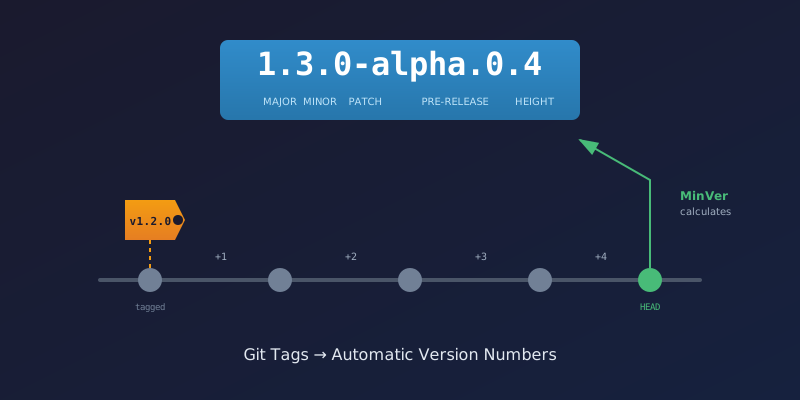
The version IS the git tag. MinVer reads your git history and calculates the version automatically at build time.
How MinVer Calculates Version
Imagine your git history as a highway with mile markers (tags):
                                    ← You are here
                                         │
    v0.9.0                v0.9.1-alpha   │
       │                      │          │
───────●──────────────────────●──────────●──────────●──────────●
       │                      │          │          │          │
    commit               commit      commit     commit     commit
    "Initial"           "Add login" "Fix bug" "Add sync" "Refactor"
When you build at the current commit, MinVer looks backward:
- Find the nearest tag —
v0.9.1-alpha(2 commits ago) - Count commits since tag — 2
- Calculate version —
0.9.2-alpha.0.2
The .2 at the end is the height: "two commits since the last tagged release."
Why Increment the Patch?
You might wonder: if the last tag was v0.9.1-alpha, why does MinVer calculate 0.9.2-alpha.0.2 instead of 0.9.1-alpha.2?
Because those commits after the tag represent new work that will eventually become a new version. MinVer assumes you're working toward the next patch release. When you're ready, you'll tag v0.9.2 (or whatever's appropriate).
Setting Up MinVer
The setup is surprisingly simple. One file at the solution root:
Directory.Build.props
<Project>
  <PropertyGroup>
    <MinVerDefaultPreReleaseIdentifiers>alpha.0</MinVerDefaultPreReleaseIdentifiers>
    <MinVerTagPrefix>v</MinVerTagPrefix>
  </PropertyGroup>

  <ItemGroup>
    <PackageReference Include="MinVer" Version="7.0.0" PrivateAssets="All" />
  </ItemGroup>
</Project>
That's it. Every project in your solution now inherits automatic versioning.
| Setting | Purpose |
|---|---|
MinVerDefaultPreReleaseIdentifiers |
What to call untagged commits (alpha.0) |
MinVerTagPrefix |
Tags start with v (e.g., v1.2.3) |
Now when you build:
dotnet build
# MinVer: Using { Commit: abc123, Tag: 'v0.9.1-alpha', Version: 0.9.1-alpha, Height: 3 }
# MinVer: Calculated version 0.9.2-alpha.0.3
The version appears in your assembly automatically. No file edits. No remembering.
Build Pipeline vs. Release Pipeline
Here's where it gets interesting for CI/CD. I kept confusing these concepts until I thought of them as different jobs at a factory:
Build Pipeline = The assembly line worker
- Runs on every push and PR
- Builds the code, runs tests
- Checks if things work
- Doesn't ship anything
Release Pipeline = The shipping department
- Runs only when you're ready to ship
- Creates the version tag
- Deploys to staging or production
- Makes it official
The Factory Analogy
Imagine a car factory:
┌──────────────────────────────────────────────────────────────────┐
│                        CAR FACTORY                               │
│                                                                  │
│  ┌─────────────────────┐    ┌─────────────────────────────────┐ │
│  │   Assembly Line     │    │      Shipping Department        │ │
│  │   (Build Pipeline)  │    │      (Release Pipeline)         │ │
│  │                     │    │                                 │ │
│  │  • Welds frame      │    │  • Stamps VIN number            │ │
│  │  • Installs engine  │    │  • Creates title paperwork      │ │
│  │  • Runs safety test │    │  • Loads on truck               │ │
│  │  • Flags defects    │    │  • Ships to dealer              │ │
│  │                     │    │                                 │ │
│  │  Runs: Every car    │    │  Runs: Only finished cars       │ │
│  │  Output: "It works" │    │  Output: "Car #12345 shipped"   │ │
│  └─────────────────────┘    └─────────────────────────────────┘ │
└──────────────────────────────────────────────────────────────────┘
The assembly line doesn't assign VIN numbers to every test drive. That would be chaos. It only runs quality checks. The shipping department assigns the official identifier when the car is actually leaving the factory.
Same with software versioning:
| Pipeline | When It Runs | What It Does with Version |
|---|---|---|
| Build (CI) | Every push/PR | Uses MinVer's calculated version (e.g., 0.9.2-alpha.0.3) |
| Release Staging | Manual or merge to staging | Creates v0.9.2-beta tag, deploys |
| Release Production | Manual dispatch | Creates v0.9.2 tag, deploys, creates GitHub Release |
How the Release Pipelines Work
Staging Release
When you trigger the staging pipeline (push to staging branch or manual dispatch):
- name: Calculate version and create tag
  run: |
    # Get current MinVer version
    MINVER_VERSION=$(minver -t v -d alpha)
    # Output: 0.9.2-alpha.0.3

    # Extract base version (strip pre-release)
    BASE_VERSION=$(echo $MINVER_VERSION | sed 's/-.*//')
    # Output: 0.9.2

    # Create beta tag
    git tag -a "v${BASE_VERSION}-beta" -m "Staging release"
    git push origin "v${BASE_VERSION}-beta"
The staging environment now runs v0.9.2-beta. Anyone building after this sees:
MinVer: Using { Tag: 'v0.9.2-beta', Height: 0 }
MinVer: Calculated version 0.9.2-beta
Production Release
Production is similar but creates a clean release tag:
- name: Calculate version and create tag
  run: |
    MINVER_VERSION=$(minver -t v -d alpha)
    BASE_VERSION=$(echo $MINVER_VERSION | sed 's/-.*//')

    # Bump based on user input (patch/minor/major)
    case "${{ inputs.bump_type }}" in
      patch) NEW_VERSION="$BASE_VERSION" ;;  # Already incremented by MinVer
      minor) NEW_VERSION="$(increment_minor $BASE_VERSION)" ;;
      major) NEW_VERSION="$(increment_major $BASE_VERSION)" ;;
    esac

    git tag -a "v${NEW_VERSION}" -m "Production release"
    git push origin "v${NEW_VERSION}"
Now you have v0.9.2 in production, and MinVer in development calculates 0.9.3-alpha.0.1 for the next commit.
The Full Picture
Here's a timeline showing how version numbers flow:
Day 1: Tag v0.9.1-alpha (release to staging)
       ↓
Day 2: Commit "Fix login bug"
       MinVer: 0.9.2-alpha.0.1
       ↓
Day 3: Commit "Add password reset"
       MinVer: 0.9.2-alpha.0.2
       ↓
Day 4: Commit "Update styles"
       MinVer: 0.9.2-alpha.0.3
       ↓
Day 5: Ready for staging → Run staging pipeline
       Pipeline creates tag: v0.9.2-beta
       MinVer: 0.9.2-beta
       ↓
Day 6: Commit "Fix staging bug"
       MinVer: 0.9.3-alpha.0.1
       ↓
Day 7: Ready for production → Run production pipeline
       Pipeline creates tag: v0.9.2
       MinVer: 0.9.2 (on that commit)
       ↓
Day 8: Next commit
       MinVer: 0.9.3-alpha.0.1
Notice how:
- Developers never manually set versions
- Each commit has a unique version (the height changes)
- Release pipelines create the official tags
- The cycle continues automatically
MAUI Android: A Special Case
Mobile apps have additional version requirements. Android needs:
ApplicationDisplayVersion— What users see: "0.9.2"ApplicationVersion— Integer build number: 47
The display version comes from MinVer. The build number needs to always increase (Google Play rejects lower numbers).
I solved this with a target that derives from MinVer:
<Target Name="SetApplicationDisplayVersion" AfterTargets="MinVer">
  <PropertyGroup>
    <ApplicationDisplayVersion>$(MinVerMajor).$(MinVerMinor).$(MinVerPatch)</ApplicationDisplayVersion>
  </PropertyGroup>
</Target>
For the build number, the CI pipeline calculates it from commit count:
BUILD_NUMBER=$(git rev-list --count HEAD)
dotnet build -p:ApplicationVersion=$BUILD_NUMBER
Commit count always increases, so build number always increases. Problem solved.
What I Gained
| Before | After |
|---|---|
| Manual version edits in 3 files | Zero manual edits |
| Forget to create git tag | Tags created by CI |
| Version mismatch between projects | All projects share version |
| "What version are we on?" | minver tells you instantly |
| Release requires checklist | Push button, walk away |
The real win is mental. I don't think about versions anymore. I commit code. When it's ready to ship, I trigger a release pipeline. The version number is a consequence of the git history, not something I manage.
Key Takeaways
- SemVer communicates intent — MAJOR.MINOR.PATCH tells users what changed
- MinVer derives version from tags — No files to edit, no numbers to remember
- Build pipelines verify — They use calculated versions but don't create tags
- Release pipelines officiate — They create the tags that become the source of truth
- Height tracks progress — Commits since last tag show iteration count
The tools exist. The patterns are proven. There's no reason to manually manage version numbers in 2026.
This setup took about an hour to implement and immediately paid off when I didn't have to remember whether we were on 0.9.1 or 0.9.2 during my next release.
Further Reading
- Semantic Versioning 2.0.0 — The official spec
- MinVer GitHub — The tool that makes this possible
- GitVersion — More complex alternative with branch-based versioning
Related Posts
- CI/CD Version Verification — How to verify those MinVer versions actually deployed
- Tracer Bullet Development: Prove Your Pipeline First — How I validated this CI/CD architecture
- Environment-Specific EF Core Migrations — Another pattern for environment-aware builds