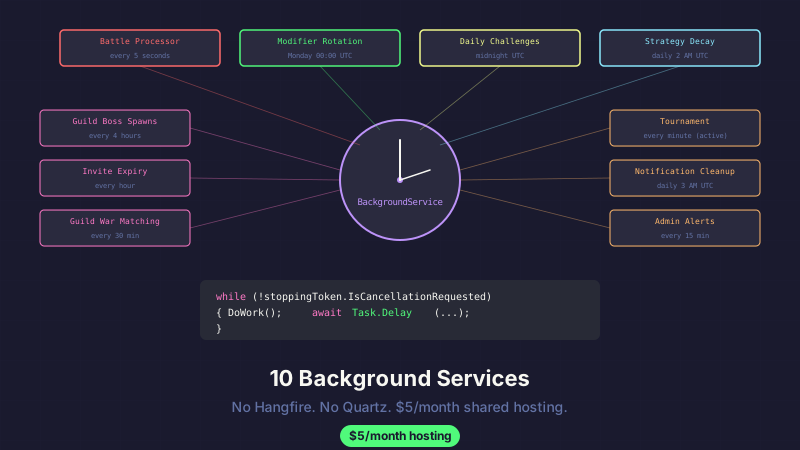
API Combat runs 10 background services on a $5/month shared hosting plan. No Hangfire. No Quartz.NET. No Azure Functions. Just ASP.NET Core's built-in BackgroundService base class and Task.Delay.
Here's the full tour.
The Service Roster
Every one of these runs as a hosted service registered in Program.cs:
builder.Services.AddHostedService<BattleProcessorJob>();
builder.Services.AddHostedService<WeeklyModifierRotationJob>();
builder.Services.AddHostedService<DailyChallengeGenerationJob>();
builder.Services.AddHostedService<StrategyDecayJob>();
builder.Services.AddHostedService<GuildBossSpawnJob>();
builder.Services.AddHostedService<InviteExpiryJob>();
builder.Services.AddHostedService<GuildWarMatchingJob>();
builder.Services.AddHostedService<TournamentProcessingJob>();
builder.Services.AddHostedService<NotificationCleanupJob>();
builder.Services.AddHostedService<AdminAlertJob>();
Ten lines. That's the entire job infrastructure. Each service inherits from BackgroundService and overrides ExecuteAsync. They all share the same pattern.
The Pattern
Every background service follows the same structure:
public class SomeJob : BackgroundService
{
    private readonly IServiceProvider _serviceProvider;
    private readonly ILogger<SomeJob> _logger;

    public SomeJob(IServiceProvider serviceProvider, ILogger<SomeJob> logger)
    {
        _serviceProvider = serviceProvider;
        _logger = logger;
    }

    protected override async Task ExecuteAsync(CancellationToken stoppingToken)
    {
        while (!stoppingToken.IsCancellationRequested)
        {
            try
            {
                using var scope = _serviceProvider.CreateScope();
                var db = scope.ServiceProvider.GetRequiredService<AppDbContext>();

                await DoWork(db, stoppingToken);
            }
            catch (Exception ex)
            {
                _logger.LogError(ex, "Error in SomeJob");
            }

            await Task.Delay(TimeSpan.FromMinutes(5), stoppingToken);
        }
    }
}
Three things to notice:
Scoped service resolution. BackgroundService is registered as a singleton, but DbContext is scoped. You can't inject a scoped service into a singleton — the DI container will throw. So each loop iteration creates a new scope, resolves a fresh DbContext, and disposes it at the end of the using block. This is the correct pattern, and if you skip it, you'll get stale data and ObjectDisposedException at 3 AM.
Individual try/catch. If the job fails, it logs the error and waits for the next cycle. It doesn't crash the application, doesn't kill other background services, and doesn't require manual intervention to restart. The next Task.Delay fires, the loop continues, and the job tries again.
Cancellation token threading. Every await passes the stoppingToken. When the app shuts down (deploy, app pool recycle, host reboot), the token fires, Task.Delay throws OperationCanceledException, and the service exits gracefully. No orphaned work, no data corruption.
Job-by-Job Breakdown
1. Battle Processor (5-second poll)
The most active job. When players queue battles, they go into a Pending state. The processor picks them up:
protected override async Task ExecuteAsync(CancellationToken stoppingToken)
{
    while (!stoppingToken.IsCancellationRequested)
    {
        using var scope = _serviceProvider.CreateScope();
        var battleService = scope.ServiceProvider.GetRequiredService<IBattleService>();

        var processed = await battleService.ProcessPendingBattlesAsync();
        if (processed > 0)
            _logger.LogInformation("Processed {Count} battles", processed);

        await Task.Delay(TimeSpan.FromSeconds(5), stoppingToken);
    }
}
Five-second poll. At our current scale (hundreds of battles per day), this means a player waits at most 5 seconds for their battle to resolve. Good enough. If we hit thousands per day, I'd switch to a Channel<T> producer-consumer where the queue endpoint writes directly to the channel and the processor reads immediately — zero polling delay. But that's a future optimization for a future problem.
2. Weekly Modifier Rotation (smart scheduling)
This one doesn't poll. It calculates the exact delay to next Monday 00:00 UTC:
protected override async Task ExecuteAsync(CancellationToken stoppingToken)
{
    while (!stoppingToken.IsCancellationRequested)
    {
        var now = DateTime.UtcNow;
        var daysUntilMonday = ((int)DayOfWeek.Monday - (int)now.DayOfWeek + 7) % 7;
        if (daysUntilMonday == 0 && now.Hour >= 0 && now.Minute > 0)
            daysUntilMonday = 7; // Already past midnight Monday, wait for next week

        var nextMonday = now.Date.AddDays(daysUntilMonday);
        var delay = nextMonday - now;

        _logger.LogInformation("Next modifier rotation in {Delay}", delay);
        await Task.Delay(delay, stoppingToken);

        using var scope = _serviceProvider.CreateScope();
        var modifierService = scope.ServiceProvider.GetRequiredService<IModifierService>();
        await modifierService.RotateWeeklyModifiersAsync();
    }
}
Why calculate the delay instead of polling every hour? Because shared hosting has limited resources. A job that sleeps for 6 days uses exactly zero CPU. A job that wakes up every hour to check "is it Monday yet?" uses a tiny but nonzero amount — and when you have 10 jobs, those tiny amounts add up.
3. Daily Challenge Generation (midnight UTC)
Same pattern as the modifier rotation — calculate delay to next midnight:
var now = DateTime.UtcNow;
var tomorrow = now.Date.AddDays(1);
var delay = tomorrow - now;

await Task.Delay(delay, stoppingToken);
await GenerateDailyChallenges(scope);
Generates 3 challenges per active player (active = played within the last 7 days). No point generating challenges for dormant accounts — saves DB writes and avoids the "you missed 47 challenges" guilt trip when someone returns.
4. Strategy Decay (daily at 2 AM)
Strategies on the marketplace lose 5% effectiveness per week, floored at 50%. This runs daily at 2 AM UTC:
await modifierService.ApplyStrategyDecayAsync();
// EffectivenessMultiplier = Max(0.5, 1.0 - (ageInWeeks * 0.05))
Why decay? Without it, the first person to publish a dominant strategy wins the marketplace forever. Decay creates an incentive for continuous innovation — last week's best strategy is this week's "still good but not optimal" strategy.
5. Guild Boss Spawns (every 4 hours)
Checks if any guilds need a new boss encounter spawned based on their activity level.
6. Invite Expiry (every hour)
Cleans up expired guild invites and friend requests. Simple WHERE ExpiresAt < DateTime.UtcNow delete query.
7. Guild War Matching (every 30 minutes)
Looks for guilds that have declared war and matches them based on member count and average rating. This is a lightweight matchmaking pass — not real-time, just periodic.
8. Tournament Processing (every minute during active tournaments)
Advances tournament brackets when matches complete. Only runs frequently when a tournament is active — otherwise sleeps for an hour between checks.
9. Notification Cleanup (daily at 3 AM)
Deletes read notifications older than 30 days. Keeps the Notifications table from growing unbounded.
10. Admin Alert Job (every 15 minutes)
The most interesting one. Monitors system health:
private async Task CheckSystemHealth(AppDbContext db)
{
    // Queue health: battles stuck in Pending for > 30 minutes
    var stuckBattles = await db.Battles
        .CountAsync(b => b.Status == BattleStatus.Pending
            && b.QueuedAt < DateTime.UtcNow.AddMinutes(-30));

    if (stuckBattles > 10)
    {
        await CreateAlertIfNotExists(db,
            AlertCategory.QueueHealth,
            $"{stuckBattles} battles stuck in queue for >30 minutes");
    }

    // Growth milestone: unusual signup rate
    var signupsToday = await db.Players
        .CountAsync(p => p.CreatedAt >= DateTime.UtcNow.Date);

    if (signupsToday > 100)
    {
        await CreateAlertIfNotExists(db,
            AlertCategory.GrowthMilestone,
            $"{signupsToday} signups today - new daily record?");
    }
}
The CreateAlertIfNotExists part is key — it checks for unacknowledged alerts in the same category before creating a new one. Without deduplication, you'd get a new "stuck battles" alert every 15 minutes, flooding the admin dashboard.
The App Pool Recycle Problem
Shared hosting (SmarterASP.NET, GoDaddy, etc.) recycles app pools. Sometimes on a schedule, sometimes when memory thresholds are hit, sometimes seemingly at random.
When the app pool recycles, ASP.NET Core fires IHostApplicationLifetime.ApplicationStopping. All background services receive the cancellation token, Task.Delay throws, and the services exit their loops.
When the app pool starts back up (on the next request or scheduled warm-up), all 10 services restart from scratch. The smart-scheduled jobs (modifier rotation, daily challenges) recalculate their next run time. The polling jobs (battle processor, admin alerts) just start polling again.
The important thing: no job stores "I last ran at 2:00 AM" in memory. If the app pool recycles at 2:01 AM, the daily challenge job recalculates and sees "next midnight is 22 hours away." It doesn't re-run at 2:01 AM and double-generate challenges. The delay calculation is always based on wall clock time, not relative to "last execution."
What We'd Change
The 5-second poll on battle processing. A Channel<T> producer-consumer would eliminate the polling delay entirely. The queue endpoint writes to the channel, the processor reads immediately. Zero latency, zero wasted polls. I haven't done this yet because 5 seconds is perfectly acceptable for our player count.
Shared state between jobs. Each job creates its own scope and DB context. If two jobs query the same data, they each hit the database. A lightweight in-memory cache (or just IMemoryCache) could reduce redundant reads. Not a problem at our scale, but it would matter at 10x.
Health check endpoint. Right now, the only way to know if jobs are running is to check the logs. A /health endpoint that reports each job's last execution time and status would be better — especially for monitoring on shared hosting where you can't SSH in and check processes.
Takeaway
ASP.NET Core's BackgroundService base class is production-ready for more scenarios than people give it credit for. If your jobs are:
- Running in the same process as your web app
- Not requiring distributed coordination
- Tolerant of 5-60 second delays
- Self-correcting on failure (retry on next cycle)
...then BackgroundService + Task.Delay is the right amount of complexity. You don't need Hangfire's dashboard. You don't need Quartz's cron expression parser. You need a while loop and a delay.
Ten background services. One process. $5/month hosting. Sometimes boring infrastructure is the best infrastructure.
This post is part of a series about building API Combat. See also: One Battle, Ten Service Calls for the post-battle processing cascade, and Deploying ASP.NET Core to Shared Hosting for the hosting constraints that shaped this architecture.


