When a battle finishes in API Combat, the engine returns a result: who won, who lost, what happened on each turn. That's the easy part.
The hard part is everything that happens after.
The Post-Battle Cascade
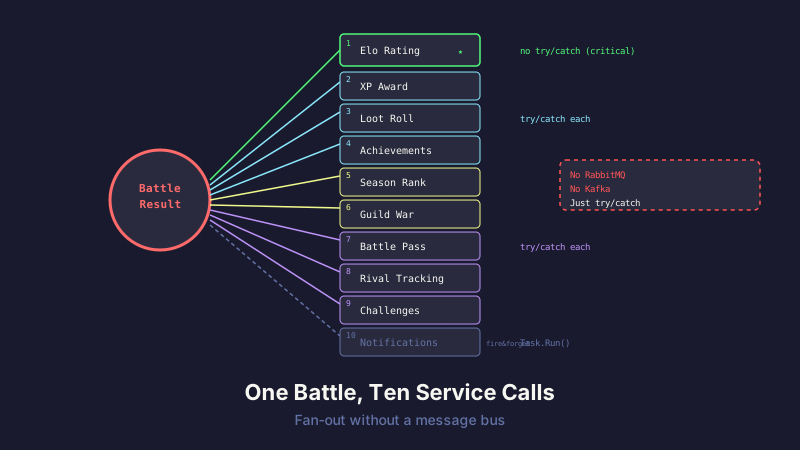
A single completed battle triggers all of this:
- Elo rating update — calculate new ratings for both players
- XP award — winner gets more, loser still gets some
- Loot roll — chance to earn in-game currency
- Achievement check — "Win 10 battles," "First flawless victory," etc.
- Season rank update — adjust seasonal tier and check for promotion/demotion
- Guild war progress — if this was a guild war battle, update the war score
- Battle pass advancement — tick the progress bar
- Rival tracking — update head-to-head records
- Daily challenge progress — check if any active challenges were completed
- Notifications — tell both players what happened
Ten service calls, all triggered by one event. No RabbitMQ. No Kafka. No Azure Service Bus. Just a method that calls other methods, wrapped in try/catch blocks.
The Orchestrated Approach
Here's what the actual post-battle processing looks like:
public async Task UpdateRatingsAndRewards(Battle battle, BattleResult result)
{
    // 1. Elo first — this is the source of truth
    await _ratingService.UpdateRatingsAsync(battle, result);

    // 2-4. Progression systems — independent but should all succeed
    try { await _progressionService.AwardXpAsync(battle, result); }
    catch (Exception ex) { _logger.LogError(ex, "XP award failed for battle {Id}", battle.Id); }

    try { await _lootService.RollLootAsync(battle, result); }
    catch (Exception ex) { _logger.LogError(ex, "Loot roll failed for battle {Id}", battle.Id); }

    try { await _achievementService.CheckBattleAchievementsAsync(battle, result); }
    catch (Exception ex) { _logger.LogError(ex, "Achievement check failed for battle {Id}", battle.Id); }

    // 5. Season tracking
    try { await _seasonService.UpdateSeasonRankAsync(battle, result); }
    catch (Exception ex) { _logger.LogError(ex, "Season update failed for battle {Id}", battle.Id); }

    // 6. Guild war (conditional)
    if (battle.IsGuildWar)
    {
        try { await _guildWarService.UpdateWarScoreAsync(battle, result); }
        catch (Exception ex) { _logger.LogError(ex, "Guild war update failed for battle {Id}", battle.Id); }
    }

    // 7-9. Engagement systems
    try { await _battlePassService.AdvanceProgressAsync(battle, result); }
    catch (Exception ex) { _logger.LogError(ex, "Battle pass update failed for battle {Id}", battle.Id); }

    try { await _rivalService.UpdateRivalRecordAsync(battle, result); }
    catch (Exception ex) { _logger.LogError(ex, "Rival tracking failed for battle {Id}", battle.Id); }

    try { await _challengeService.CheckChallengeProgressAsync(battle, result); }
    catch (Exception ex) { _logger.LogError(ex, "Challenge check failed for battle {Id}", battle.Id); }

    // 10. Notifications last — non-critical
    _ = Task.Run(async () =>
    {
        try { await _notificationService.SendBattleResultAsync(battle, result); }
        catch (Exception ex) { _logger.LogError(ex, "Notification failed for battle {Id}", battle.Id); }
    });
}
It's not elegant. It's not clever. It's a list of things that need to happen, in order, with each one isolated so a failure doesn't cascade.
Why This Order Matters
The ordering isn't arbitrary:
Elo first. Rating is the single most important piece of game state. If everything else fails — loot, XP, achievements, notifications — the battle result still counts. The player's rating still moves. The leaderboard still reflects reality. That's why the Elo update is the only call that's not wrapped in its own try/catch. If Elo fails, the entire method throws — and the battle gets retried.
Progression systems next. XP, loot, and achievements are important for player engagement but not for game integrity. If the loot roll fails, the player misses some gold. That's annoying, not game-breaking. Log it, fix it later, move on.
Engagement systems in the middle. Battle pass, rivals, challenges — these are "nice to have" systems that drive retention. A missed battle pass tick is invisible to the player until they check the progress screen.
Notifications dead last. If everything works but the notification fails, the player still got their rewards. They just don't know about it yet. They'll see the updated rating on their next API call. Fire-and-forget with Task.Run because we genuinely don't care if it takes an extra second — or fails entirely.
The Try/Catch Pattern
Yes, I know. Ten try/catch blocks in a row looks like someone who's never heard of exception handling best practices. But consider the alternative:
Option A: Let exceptions propagate. A broken loot roll kills the entire post-battle pipeline. The player's Elo updates but their XP doesn't. Their achievement isn't checked. Their notification doesn't send. And because the method threw, whoever called it might retry — updating Elo again.
Option B: Transaction everything. Wrap all ten operations in a distributed transaction. Now you need two-phase commit across multiple database tables. One slow query holds a lock on the Players table while Notifications tries to send an email. Your battle processing throughput drops to single digits.
Option C: What we actually do. Isolate each operation. Log failures. Process the rest. Fix broken data in the background. This is the pragmatic choice for a system that processes hundreds of battles a day, not thousands per second.
Fire-and-Forget for Non-Critical Work
The notification call uses a pattern you'll see in a lot of ASP.NET Core applications:
_ = Task.Run(async () =>
{
    try { await _notificationService.SendBattleResultAsync(battle, result); }
    catch (Exception ex) { _logger.LogError(ex, "Notification failed for battle {Id}", battle.Id); }
});
The _ = discard tells the compiler "I know this returns a Task and I'm intentionally not awaiting it." The notification runs on a thread pool thread, completely decoupled from the battle processing pipeline.
This is fine for notifications. It would NOT be fine for Elo updates or loot rolls — anything where data loss matters needs to be awaited and error-handled properly.
The Debugging Advantage
People ask why I didn't use an event-driven architecture. Publish a BattleCompleted event, let subscribers handle the rest. It's cleaner, more decoupled, more "architecturally correct."
Here's why: I can set a breakpoint on line 7 and see exactly what happened on lines 1 through 6.
With an event bus, a failed achievement check means:
- Open the message broker dashboard
- Find the failed message
- Figure out which subscriber threw
- Check if the message was requeued or dead-lettered
- Maybe check if other subscribers processed it successfully
- Correlate with the original battle by tracing through correlation IDs
With the orchestrated approach:
- Set a breakpoint in
UpdateRatingsAndRewards - Step through
- See the exception in the try/catch
- Fix it
When you're a solo developer on a side project, debuggability beats architectural purity every time.
Where This Breaks Down
I'm not pretending this scales to enterprise. Here's where you'd want a message bus:
Throughput. If you're processing 10,000 battles per second, sequential service calls are a bottleneck. An event bus lets subscribers process in parallel across multiple workers.
Cross-service boundaries. If your rating service and loot service are separate deployments (microservices), you need a communication mechanism. HTTP calls between services work but add latency and failure modes. A message bus gives you retry, dead-letter, and backpressure for free.
Ordering guarantees. Our ordering is implicit (code order). At scale, you might need explicit ordering guarantees that a message bus can provide — "process Elo before XP, always."
Auditability. Event sourcing gives you a complete log of everything that happened and why. Our approach logs errors but doesn't maintain a full event history.
For API Combat running on shared hosting processing a few hundred battles a day? The orchestrated approach is simpler to write, simpler to debug, and simpler to deploy. I'll introduce infrastructure complexity when the scale demands it — not before.
Takeaway
You don't need a message bus until you need a message bus.
Ten sequential service calls with individual error isolation is a completely valid architecture for small-to-medium applications. It's debuggable, testable, and deployable as a single process. The "right" architecture is the one that solves your actual problems, not the one that looks best on a system design whiteboard.
If your post-action cascade is under 20 operations, runs on a single server, and processes hundreds of events per day — consider just writing a method that calls other methods. It's boring. It works.
This post is part of a series about building API Combat. See also: Building a Turn-Based Battle Engine in 400 Lines for the engine that produces these results, and Introducing API Combat for the game overview.


