EF Core migrations are great for schema changes, but they don't natively support environment-specific seed data. I wanted demo users and sample work orders in dev and staging, but definitely not in production. The typical workaround is conditional C# code in migrations, but that gets messy fast.
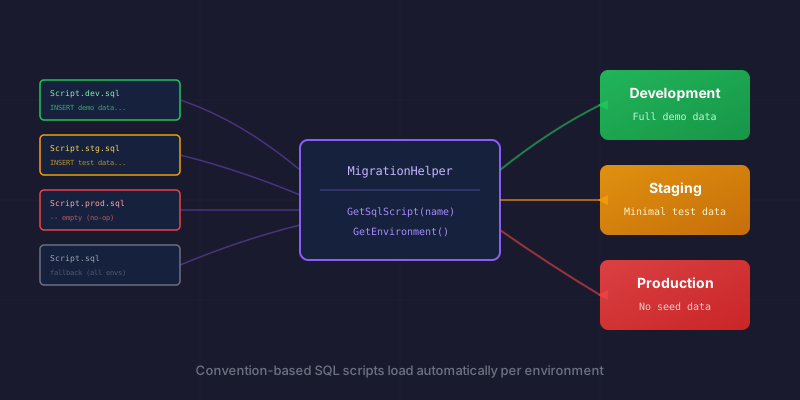
Here's the pattern I landed on: convention-based SQL scripts that load automatically based on the current environment.
The Problem
Standard EF Core migrations run the same code everywhere. But real applications need:
- Environment-specific seed data - Demo data in dev/staging, nothing in production
- SQL-based migrations - Sometimes raw SQL is cleaner than C# for complex data inserts
- Proper rollback support - Each seed script needs a corresponding cleanup script
You could wrap everything in if (Environment.IsDevelopment()) checks, but that scatters environment logic throughout your migrations and makes them harder to review.
The Solution: Convention-Based SQL Scripts
Instead of embedding environment logic in C#, I created a helper that loads SQL scripts based on a naming convention.
File Structure
src/MyApp.Data/
├── Migrations/
│   ├── Scripts/
│   │   ├── SeedRoles.sql                    # Generic (all environments)
│   │   ├── SeedRoles.rollback.sql
│   │   ├── SeedDemoData.dev.sql             # Dev only
│   │   ├── SeedDemoData.dev.rollback.sql
│   │   ├── SeedDemoData.stg.sql             # Staging only
│   │   ├── SeedDemoData.stg.rollback.sql
│   │   └── SeedDemoData.prod.sql            # Production (empty/no-op)
│   ├── 20260120004038_SeedDemoData.cs
│   └── ...
├── Helpers/
│   └── MigrationHelper.cs
└── DesignTimeDbContextFactory.cs
Naming Convention
| Pattern | Description |
|---|---|
ScriptName.sql |
Generic script, runs in all environments |
ScriptName.{env}.sql |
Environment-specific, takes priority over generic |
ScriptName.rollback.sql |
Rollback for generic script |
ScriptName.{env}.rollback.sql |
Rollback for environment-specific script |
Environment codes: dev, stg, prod
The helper tries the environment-specific file first, then falls back to generic. This means you can have a detailed SeedDemoData.dev.sql with tons of test data, a minimal SeedDemoData.stg.sql for staging, and an empty SeedDemoData.prod.sql that's essentially a no-op.
The MigrationHelper
public static class MigrationHelper
{
    public static string? Environment { get; set; }

    public static string GetEnvironment()
    {
        if (!string.IsNullOrEmpty(Environment))
            return Environment;

        var migrationEnv = System.Environment.GetEnvironmentVariable("MIGRATION_ENV");
        if (!string.IsNullOrEmpty(migrationEnv))
            return migrationEnv;

        var aspNetEnv = System.Environment.GetEnvironmentVariable("ASPNETCORE_ENVIRONMENT");
        return aspNetEnv?.ToLowerInvariant() switch
        {
            "development" => "dev",
            "staging" => "stg",
            "production" => "prod",
            _ => "dev"
        };
    }

    public static string GetSqlScript(string scriptName, bool isRollback = false)
    {
        var env = GetEnvironment();
        var scriptsPath = GetScriptsPath();

        var candidates = new[]
        {
            Path.Combine(scriptsPath, $"{scriptName}.{env}{(isRollback ? ".rollback" : "")}.sql"),
            Path.Combine(scriptsPath, $"{scriptName}{(isRollback ? ".rollback" : "")}.sql")
        };

        foreach (var path in candidates)
        {
            if (File.Exists(path))
            {
                Console.WriteLine($"[Migration] Loading: {Path.GetFileName(path)}");
                return File.ReadAllText(path);
            }
        }

        throw new FileNotFoundException(
            $"SQL script not found for '{scriptName}' (env: {env}). " +
            $"Searched: {string.Join(", ", candidates.Select(Path.GetFileName))}");
    }

    private static string GetScriptsPath()
    {
        var assembly = typeof(MigrationHelper).Assembly;
        var assemblyDir = Path.GetDirectoryName(assembly.Location)!;

        var scriptsPath = Path.Combine(assemblyDir, "Scripts");
        if (Directory.Exists(scriptsPath))
            return scriptsPath;

        var projectDir = Path.GetFullPath(Path.Combine(assemblyDir, "..", "..", "..", ".."));
        scriptsPath = Path.Combine(projectDir, "Migrations", "Scripts");
        if (Directory.Exists(scriptsPath))
            return scriptsPath;

        throw new DirectoryNotFoundException("Could not locate Migrations/Scripts folder");
    }
}
The environment resolution has a priority chain: explicit property (for testing) → MIGRATION_ENV variable → ASPNETCORE_ENVIRONMENT → default to dev.
Using It in Migrations
Create a base class for SQL-based migrations:
public abstract class SqlMigration : Migration
{
    protected abstract string ScriptName { get; }

    protected override void Up(MigrationBuilder migrationBuilder)
    {
        var sql = MigrationHelper.GetSqlScript(ScriptName);
        migrationBuilder.Sql(sql);
    }

    protected override void Down(MigrationBuilder migrationBuilder)
    {
        var sql = MigrationHelper.GetSqlScript(ScriptName, isRollback: true);
        migrationBuilder.Sql(sql);
    }
}
Then your actual migrations are trivial:
public partial class SeedDemoData : SqlMigration
{
    protected override string ScriptName => "SeedDemoData";
}
All the environment logic lives in the helper and the file naming. The migration itself is just a one-liner pointing to the right script.
The SQL Scripts
SeedDemoData.dev.sql - full demo data for development:
INSERT INTO Users (Id, Name, Email, Role, IsActive, CreatedAt)
VALUES
    (NEWID(), 'Demo Admin', '[email protected]', 'Admin', 1, GETUTCDATE()),
    (NEWID(), 'Demo User', '[email protected]', 'User', 1, GETUTCDATE());

INSERT INTO Projects (Id, Name, Status, CreatedAt)
VALUES
    (NEWID(), 'Sample Project', 'Active', GETUTCDATE());
SeedDemoData.prod.sql - intentionally empty:
-- No demo data in production
-- This file exists to satisfy the naming convention
SeedDemoData.dev.rollback.sql - clean up in reverse order:
DELETE FROM Projects WHERE Name = 'Sample Project';
DELETE FROM Users WHERE Email IN ('[email protected]', '[email protected]');
Don't Forget the .csproj
Scripts need to be copied to the output directory:
<ItemGroup>
  <None Update="Migrations\Scripts\*.sql">
    <CopyToOutputDirectory>PreserveNewest</CopyToOutputDirectory>
  </None>
</ItemGroup>
Without this, your scripts exist in source but vanish at runtime.
Running Migrations Per Environment
# Development (default)
dotnet ef database update --startup-project ../MyApp.Api

# Staging
$env:ASPNETCORE_ENVIRONMENT = "Staging"
dotnet ef database update --startup-project ../MyApp.Api

# Production
$env:ASPNETCORE_ENVIRONMENT = "Production"
dotnet ef database update --startup-project ../MyApp.Api
The --startup-project matters in multi-project solutions. Your DbContext lives in the Data project, but your connection strings live in the API project's appsettings.json. EF Core needs both.
Testing Your Migrations
For CI/CD, I run a "revert and reapply" test:
# Revert all migrations
dotnet ef database update 0 --startup-project ../MyApp.Api

# Reapply everything
dotnet ef database update --startup-project ../MyApp.Api
This catches:
- Missing rollback scripts
- Scripts that reference entities in the wrong order
- Typos that only surface during rollback
Why This Works
- Clean separation - SQL handles data, C# handles schema
- Environment awareness - No conditional logic in migration files
- Reviewable - SQL scripts can be diffed and reviewed independently
- Debuggable - Console output shows exactly which script ran
- Flexible - Generic scripts for things that don't vary, specific scripts for things that do
The pattern adds some upfront structure, but it pays off the first time you need different seed data per environment without tangling your migrations in if statements.
Running into issues with dotnet ef not finding your scripts? Check that the .csproj CopyToOutputDirectory is set and that your GetScriptsPath() logic handles both design-time and runtime scenarios.