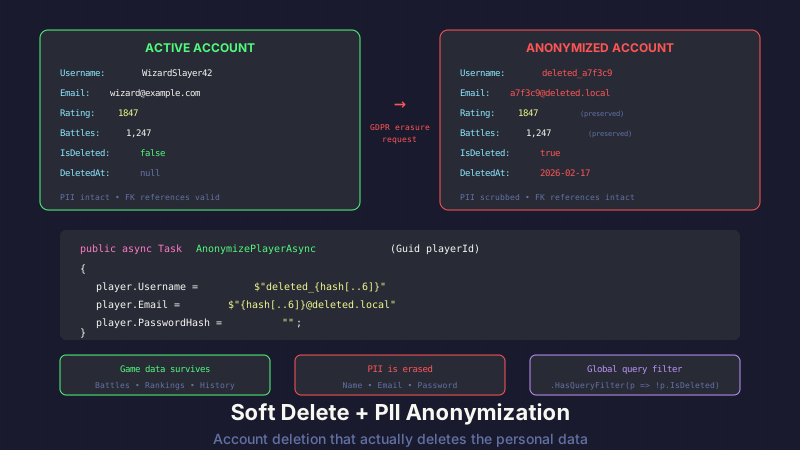
GDPR says users can request erasure. Most apps flip IsDeleted and call it a day. The user's email, username, and password hash sit in the database forever, "deleted" only in the sense that a boolean says so.
API Combat does both: soft delete for referential integrity, then anonymize every piece of personally identifiable information. The account is gone. The game history survives.
Why Not Hard Delete?
The obvious approach is DELETE FROM Players WHERE Id = @id. Done. Account erased. GDPR satisfied.
Except nothing is that simple when foreign keys are involved.
A player in API Combat has:
- Battle history (hundreds or thousands of records)
- Guild membership history
- Leaderboard snapshots
- Strategy marketplace transactions
- Tournament brackets
If you hard delete the player row, you have two choices: cascade delete everything, or violate foreign key constraints. Cascade delete means erasing the battle history of every opponent they ever fought. One player deletes their account, and suddenly 600 battles vanish from the records of players who never asked for anything to be deleted.
That's not acceptable.
Soft delete keeps the player row. The Id still satisfies foreign keys. Battle history stays intact. Leaderboard snapshots remain valid. The player's opponents keep their records.
But soft delete alone isn't GDPR-compliant. Flipping IsDeleted = true while leaving the email, username, and password hash in the database doesn't constitute erasure. The personal data is still there. It's just hidden behind a flag.
The Two Fields
Every entity that supports deletion gets two columns:
public class Player
{
    public Guid Id { get; set; }
    public string Username { get; set; } = string.Empty;
    public string Email { get; set; } = string.Empty;
    public string PasswordHash { get; set; } = string.Empty;
    public string? RefreshToken { get; set; }
    public DateTime? RefreshTokenExpiry { get; set; }

    // Soft delete
    public bool IsDeleted { get; set; }
    public DateTime? DeletedAt { get; set; }
}
IsDeleted is the filter. DeletedAt is the audit trail — when the deletion happened, useful for compliance documentation and debugging.
The Anonymization Step
After marking the player as deleted, we scrub every PII field:
public async Task DeleteAccountAsync(Guid playerId)
{
    var player = await _context.Players.FindAsync(playerId)
        ?? throw new NotFoundException("Player not found");

    var anonymizedId = Guid.NewGuid().ToString("N");

    // Anonymize PII
    player.Username = $"deleted-{anonymizedId}";
    player.Email = $"deleted-{anonymizedId}@removed";
    player.PasswordHash = string.Empty;

    // Clear all tokens
    player.RefreshToken = null;
    player.RefreshTokenExpiry = null;

    // Soft delete
    player.IsDeleted = true;
    player.DeletedAt = DateTime.UtcNow;

    await _context.SaveChangesAsync();
}
After this runs, the player row still exists. The Id still satisfies foreign keys. But there's no personal data left:
- Username becomes
deleted-7a3f9b2c4d1e8f6a0b5c3d7e9f1a2b4c— unique, non-identifiable, won't collide with another deleted account - Email becomes
deleted-7a3f9b2c4d1e8f6a0b5c3d7e9f1a2b4c@removed— satisfies any email format validation without being a real address - PasswordHash is cleared entirely — no point anonymizing a hash, just remove it
- Tokens are nulled — no lingering sessions
The GUID in the username and email uses the N format (no hyphens, 32 hex characters) to keep it compact. Each deleted account gets a fresh GUID, so there's no correlation between the anonymized identifier and the original account.
The Email Timing Problem
Here's a subtle bug I caught during testing. The full deletion flow is:
- Verify password
- Soft delete + anonymize
- Sign out all sessions
- Send confirmation email
Steps 2 and 4 conflict. You can't send a confirmation email to an address you just anonymized. By the time the email service runs, the player's email is deleted-{guid}@removed.
The fix is ordering. Send the email before anonymizing:
public async Task<DeleteAccountResult> DeleteAccountAsync(
    Guid playerId, string passwordConfirmation)
{
    var player = await _context.Players.FindAsync(playerId)
        ?? throw new NotFoundException("Player not found");

    // Step 1: Verify password
    var passwordValid = _passwordHasher.VerifyHashedPassword(
        player, player.PasswordHash, passwordConfirmation);

    if (passwordValid == PasswordVerificationResult.Failed)
        return DeleteAccountResult.InvalidPassword;

    // Step 2: Capture email BEFORE anonymizing
    var email = player.Email;
    var username = player.Username;

    // Step 3: Anonymize PII
    var anonymizedId = Guid.NewGuid().ToString("N");
    player.Username = $"deleted-{anonymizedId}";
    player.Email = $"deleted-{anonymizedId}@removed";
    player.PasswordHash = string.Empty;
    player.RefreshToken = null;
    player.RefreshTokenExpiry = null;

    // Step 4: Soft delete
    player.IsDeleted = true;
    player.DeletedAt = DateTime.UtcNow;

    await _context.SaveChangesAsync();

    // Step 5: Sign out (invalidate all sessions)
    await _sessionService.InvalidateAllSessionsAsync(playerId);

    // Step 6: Send confirmation to the CAPTURED email
    await _emailService.SendAccountDeletedConfirmationAsync(email, username);

    return DeleteAccountResult.Success;
}
The local variables email and username hold the original values. By the time SendAccountDeletedConfirmationAsync runs, the database already has the anonymized data. But the email goes to the right inbox.
This ordering matters. If the process crashes between step 4 and step 6, the account is still deleted — the user just doesn't get a confirmation email. That's acceptable. The reverse — sending confirmation but failing to delete — would be worse. The user thinks their data is gone when it isn't.
The Login Guard
Deleted accounts should be invisible. But "invisible" means more than hiding them from the UI. It means the login endpoint can't leak information about whether an account existed.
public async Task<LoginResult> LoginAsync(string email, string password)
{
    var player = await _context.Players
        .FirstOrDefaultAsync(p => p.Email == email);

    // Same error for: not found, deleted, or wrong password
    if (player is null || player.IsDeleted)
        return LoginResult.Fail("Invalid email or password.");

    var result = _passwordHasher.VerifyHashedPassword(
        player, player.PasswordHash, password);

    if (result == PasswordVerificationResult.Failed)
        return LoginResult.Fail("Invalid email or password.");

    return LoginResult.Success(GenerateToken(player));
}
Three failure cases. One error message. Whether the email doesn't exist, the account was deleted, or the password is wrong, the response is identical: "Invalid email or password."
This prevents account enumeration. An attacker can't probe the API to discover which email addresses have (or had) accounts. The IsDeleted check uses the same error path as a nonexistent account.
In practice, the IsDeleted check here is a belt-and-suspenders measure. Since we anonymize the email to deleted-{guid}@removed, no one would be logging in with that address anyway. But explicit is better than implicit. If anonymization ever has a bug, the IsDeleted guard still protects the endpoint.
Global Query Filters
Checking !IsDeleted on every query is tedious and error-prone. Miss it once and deleted players show up on the leaderboard. EF Core's global query filters handle this automatically:
protected override void OnModelCreating(ModelBuilder modelBuilder)
{
    modelBuilder.Entity<Player>()
        .HasQueryFilter(p => !p.IsDeleted);
}
Now every LINQ query against the Players table automatically appends WHERE IsDeleted = 0. The leaderboard query doesn't need to filter. The search endpoint doesn't need to filter. The admin analytics don't need to filter. It happens at the ORM level.
// This automatically excludes deleted players
var topPlayers = await _context.Players
    .OrderByDescending(p => p.RankPoints)
    .Take(100)
    .ToListAsync();
The generated SQL includes the IsDeleted filter whether you think about it or not.
For the rare cases where you do need to see deleted records — admin tools, compliance audits, debugging — you bypass the filter explicitly:
// Admin endpoint: include deleted players for audit purposes
var allPlayers = await _context.Players
    .IgnoreQueryFilters()
    .Where(p => p.IsDeleted)
    .Select(p => new DeletedAccountAuditDto
    {
        Id = p.Id,
        DeletedAt = p.DeletedAt,
        // No PII fields — they're anonymized anyway
    })
    .ToListAsync();
IgnoreQueryFilters() is the escape hatch. Use it deliberately, not by default.
Leaderboards and Public Queries
Global query filters catch most cases, but some queries deserve explicit attention. Leaderboard calculations, public player searches, and game statistics should never include deleted accounts — not just because of the filter, but as a design decision.
public async Task<LeaderboardResponse> GetLeaderboardAsync(int page, int pageSize)
{
    var players = await _context.Players
        .Where(p => !p.IsDeleted)  // Explicit even though filter exists
        .OrderByDescending(p => p.RankPoints)
        .Skip((page - 1) * pageSize)
        .Take(pageSize)
        .Select(p => new LeaderboardEntry
        {
            Rank = 0, // Calculated after
            Username = p.Username,
            RankPoints = p.RankPoints,
            WinRate = p.TotalBattles > 0
                ? (double)p.Wins / p.TotalBattles * 100
                : 0
        })
        .ToListAsync();

    return new LeaderboardResponse { Entries = players };
}
Yes, the explicit !p.IsDeleted is redundant with the global filter. I keep it anyway. If someone ever removes the global filter during a refactor, or if the query runs in a context where filters are bypassed, the explicit check still protects the public-facing endpoint.
Admin analytics queries also filter deleted accounts by default — you don't want deleted players inflating active user counts or skewing battle statistics. If an admin specifically wants "including deleted accounts," that's a separate endpoint with a separate authorization check.
Testing Deleted Accounts
The testing strategy has one goal: ensure deleted players are invisible everywhere a real player would appear.
[Fact]
public async Task DeletedPlayer_DoesNotAppearOnLeaderboard()
{
    // Arrange
    var player = await CreateTestPlayer(rankPoints: 9999);
    await _accountService.DeleteAccountAsync(
        player.Id, TestPassword);

    // Act
    var leaderboard = await _leaderboardService
        .GetLeaderboardAsync(page: 1, pageSize: 100);

    // Assert
    leaderboard.Entries
        .Should().NotContain(e => e.Username == player.Username);
}

[Fact]
public async Task DeletedPlayer_CannotLogin()
{
    // Arrange
    var player = await CreateTestPlayer();
    await _accountService.DeleteAccountAsync(
        player.Id, TestPassword);

    // Act
    var result = await _authService.LoginAsync(
        player.Email, TestPassword);

    // Assert
    result.IsSuccess.Should().BeFalse();
}

[Fact]
public async Task DeletedPlayer_PiiIsAnonymized()
{
    // Arrange
    var player = await CreateTestPlayer();
    var originalEmail = player.Email;
    var originalUsername = player.Username;

    // Act
    await _accountService.DeleteAccountAsync(
        player.Id, TestPassword);

    // Assert — must bypass global filter to see the record
    var deleted = await _context.Players
        .IgnoreQueryFilters()
        .FirstAsync(p => p.Id == player.Id);

    deleted.Email.Should().NotBe(originalEmail);
    deleted.Username.Should().NotBe(originalUsername);
    deleted.PasswordHash.Should().BeEmpty();
    deleted.RefreshToken.Should().BeNull();
    deleted.IsDeleted.Should().BeTrue();
    deleted.DeletedAt.Should().NotBeNull();
}

[Fact]
public async Task DeletedPlayer_BattleHistoryPreserved()
{
    // Arrange
    var player = await CreateTestPlayer();
    var opponent = await CreateTestPlayer();
    var battle = await CreateTestBattle(player.Id, opponent.Id);

    // Act
    await _accountService.DeleteAccountAsync(
        player.Id, TestPassword);

    // Assert — battle still exists
    var savedBattle = await _context.Battles.FindAsync(battle.Id);
    savedBattle.Should().NotBeNull();
}
The last test is the reason soft delete exists. The battle record survives. The opponent's history is intact. The deleted player's participation is recorded as deleted-{guid} — you can see someone fought that battle, but not who.
The Compliance Checklist
Here's what happens when a player hits "Delete My Account":
- Player enters password to confirm
- Password verification against stored hash
- Capture email/username to local variables
- Anonymize: username, email, password hash, tokens
- Set
IsDeleted = trueandDeletedAt = DateTime.UtcNow - Save to database
- Invalidate all active sessions
- Send confirmation email to the captured address
- Redirect to signed-out homepage
After this process:
- No PII exists in the database for this player
- No active sessions exist
- Foreign key relationships are intact
- Battle history is preserved
- Leaderboards are automatically updated (global filter)
- Login attempts return the same generic error as a nonexistent account
- The player has email confirmation of deletion
That's erasure. Not "we flipped a boolean." Actual erasure of personal data with preservation of game integrity.
This post is part of a series about building API Combat. See also: Introducing API Combat for the game overview, and GDPR Cookie Consent: The Essential-Only Approach for the cookie compliance side of privacy.


