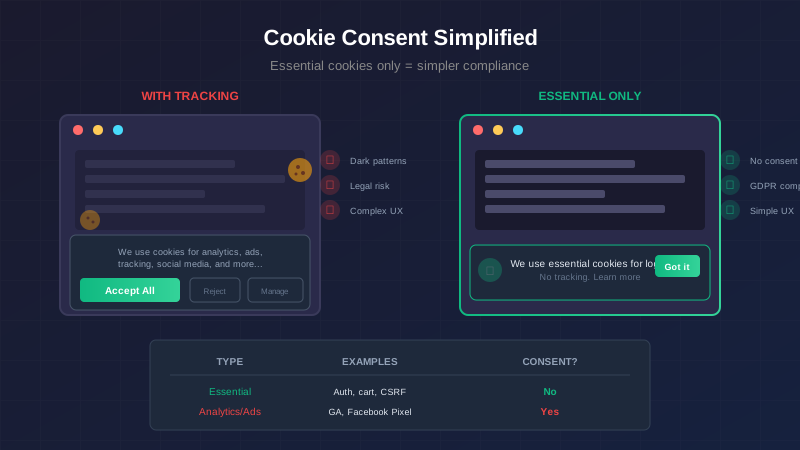
I just added a cookie consent banner to Lake Country Spanish. It took about an hour. No third-party libraries, no consent management platforms, no dark patterns trying to trick users into accepting tracking.
Why was it so simple? Because the site only uses essential cookies.
The Cookie Landscape
GDPR (and similar laws like CCPA) require websites to get informed consent before storing non-essential cookies on users' devices. The key word is "non-essential."
Cookies fall into a few categories:
| Category | Examples | Consent Required? |
|---|---|---|
| Strictly Necessary | Authentication, shopping carts, CSRF tokens | No |
| Functional | Language preferences, user settings | Sometimes |
| Analytics | Google Analytics, Mixpanel | Yes |
| Advertising | Ad tracking, retargeting pixels | Yes |
If you're running Google Analytics, Facebook Pixel, or any ad network, you need the full consent theater: accept/reject buttons, granular preferences, the ability to withdraw consent. It's a legal requirement, and it's why most cookie banners are so aggressive.
But if you're only using strictly necessary cookies? You don't need consent. You just need to inform users.
What Counts as "Strictly Necessary"?
The GDPR defines strictly necessary cookies as those that are essential for the website to function. Without them, the service the user requested can't be provided.
Examples that qualify:
- Authentication cookies (keeping you logged in)
- Shopping cart cookies (remembering what you're buying)
- Load balancing cookies (routing you to the same server)
- CSRF tokens (security protection)
- Cookie consent preference itself (remembering you dismissed the banner)
Examples that don't qualify:
- Analytics (you can run a website without tracking visitors)
- Advertising (you can run a website without ads)
- Social media widgets (you can run a website without share buttons)
- A/B testing (you can run a website without experiments)
The test is simple: can the website function without this cookie? If yes, it's not strictly necessary.
The Lake Country Spanish Approach
The site uses ASP.NET Core Identity for authentication. That means one cookie: .AspNetCore.Identity.Application. It stores your session after login—nothing else.
No analytics. No tracking pixels. No advertising. No "functional" cookies that remember preferences across sessions.
With that profile, the compliance approach is straightforward:
- Inform users that cookies are used
- Explain what they're for (authentication)
- Link to the privacy policy for full details
- Let them acknowledge and dismiss the banner
Notice what's missing: accept/reject choices. You can't reject strictly necessary cookies—they're required for the site to work. Giving users a fake choice would be more deceptive than just being honest about it.
The Implementation
Here's the cookie consent banner:
<!-- _CookieConsent.cshtml -->
<div id="cookie-consent" class="cookie-consent" style="display: none;">
    <div class="cookie-consent-content">
        <p>
            This site uses essential cookies for authentication.
            No tracking or advertising cookies are used.
            <a href="/Privacy">Learn more</a>
        </p>
        <button id="cookie-accept" class="btn-primary">Got it</button>
    </div>
</div>
And the JavaScript:
document.addEventListener('DOMContentLoaded', function() {
    const consent = document.getElementById('cookie-consent');
    const acceptBtn = document.getElementById('cookie-accept');

    // Check if user has already acknowledged
    if (!localStorage.getItem('cookieConsent')) {
        consent.style.display = 'flex';
    }

    acceptBtn.addEventListener('click', function() {
        localStorage.setItem('cookieConsent', 'acknowledged');
        consent.style.display = 'none';
    });
});
That's it. No cookie consent library. No third-party scripts. No management platform.
The localStorage Trick
Notice we're storing the acknowledgment in localStorage, not a cookie. This is intentional.
Using a cookie to remember cookie consent is... ironic at best, legally questionable at worst. If you need consent before setting cookies, setting a cookie to remember that consent creates a chicken-and-egg problem.
localStorage sidesteps this entirely:
- It's not a cookie, so cookie consent rules don't apply to it
- It persists across browser sessions
- It's simple to read and write
- It doesn't get sent to the server on every request
The downside? It doesn't sync across devices. If someone acknowledges cookies on their phone, they'll see the banner again on their laptop. For a simple "got it" acknowledgment, this is fine. For complex consent preferences, you'd want server-side storage.
The Privacy Policy
The cookie banner is the tip of the iceberg. The real work is the privacy policy that explains:
- What data you collect (account info, payment details, learning progress)
- What cookies you use (name, purpose, duration)
- Who you share data with (payment processor, email service)
- User rights (access, correct, delete their data)
- How to contact you with privacy questions
Here's the cookie section from Lake Country Spanish's privacy policy:
## Cookies

We use one essential cookie:

| Cookie Name | Purpose | Duration |
|------------|---------|----------|
| .AspNetCore.Identity.Application | Maintains your login session | Session (cleared when browser closes) |

This cookie is strictly necessary for the website to function.
It is not used for tracking or advertising purposes.

We do not use:
- Analytics cookies
- Advertising cookies
- Third-party tracking cookies
This level of specificity matters. "We use cookies" is not GDPR-compliant. "We use this specific cookie for this specific purpose" is.
What If You Need Analytics?
If you want to understand how people use your site (a reasonable goal), you have options that don't require cookie consent:
Privacy-focused analytics:
- Plausible - No cookies, GDPR-compliant by design
- Fathom - Similar approach
- Simple Analytics - Same idea
These tools use techniques that don't require cookies or personal data storage. They can tell you page views, referrers, and general usage patterns without tracking individuals.
Server-side analytics: Your web server already logs every request. Tools like GoAccess can turn those logs into useful analytics without any client-side tracking.
The nuclear option: Don't track anything. Ship your site, talk to your users directly, watch what features they ask for. This worked for decades before Google Analytics existed.
The Dark Pattern Trap
A word of caution: the goal of cookie consent should be informed users, not maximum data collection.
Dark patterns in cookie banners include:
- Making "Accept All" prominent and "Reject" hidden
- Pre-checking all consent boxes
- Making it harder to reject than accept
- Claiming legitimate interest for things that need consent
- "Cookie walls" that block content until you accept
These patterns are increasingly being challenged by regulators. France's CNIL has issued significant fines for exactly these practices. The UK's ICO has published guidance specifically calling out dark patterns.
The cleanest approach? Don't collect data you don't need, and you won't need consent you can't honestly obtain.
The Checklist
If you're implementing cookie consent for an essential-only site:
- Audit your actual cookie usage (browser DevTools → Application → Cookies)
- Verify each cookie is strictly necessary
- Create a simple banner that informs (not tricks)
- Store acknowledgment in localStorage, not a cookie
- Write a privacy policy that lists specific cookies
- Link the banner to the privacy policy
- Include contact information for privacy questions
- Test that the banner only shows once per browser
The Takeaway
GDPR cookie compliance has a reputation for being complicated. And it can be—if you're running a surveillance capitalism operation with dozens of tracking scripts.
But for a straightforward web application that only uses authentication cookies? It's an afternoon's work:
- Don't track users unnecessarily
- Tell them what cookies you do use
- Explain why those cookies exist
- Let them acknowledge and move on
The best cookie consent UX is one that's so simple, users barely notice it. And the easiest way to achieve that is to not need complex consent in the first place.
Stop tracking people, and the compliance problem solves itself.
This post was written after implementing cookie consent for Lake Country Spanish. The approach described here is not legal advice—consult with a lawyer if you have specific compliance questions for your jurisdiction.
For the other side of GDPR — handling account deletion requests with soft delete and PII anonymization — see Soft Delete + PII Anonymization.


