Part 2 of the SMS AI series. Read Part 1: Texting My Own AI first.
I built an SMS-to-LLM integration. Text a question, get an AI-powered answer. 40 lines of code.
But there was a problem: the AI only knew what it was trained on. Ask it about your company's refund policy? It would hallucinate something plausible but wrong.
Now it answers questions using your actual documentation.
Here's how I added RAG (Retrieval Augmented Generation), vector search, conversation memory, and production-grade resilience—turning a weekend POC into something I'd actually deploy for clients.
The Problem With "Just" an LLM
The Part 1 version had a fundamental limitation:
User: "What's your refund policy?"
AI: "Typically, refunds are processed within 30 days..." [HALLUCINATED]
The AI doesn't know your refund policy. It's guessing based on what "refund policies" generally look like. Confidently wrong.
For a consulting tool, that's useless. Clients need answers from their documentation, not generic guesses.
The Solution: RAG
RAG stands for Retrieval Augmented Generation. The concept is simple:
- Retrieval: Search your documents for relevant information
- Augmentation: Inject that information into the prompt
- Generation: AI answers using the provided context
Instead of asking "What's the refund policy?", we ask:
Based on these documents:
---
[Relevant sections from your actual policy docs]
---

User question: What's the refund policy?

Answer:
Now the AI has context. It's not guessing—it's reading and summarizing.
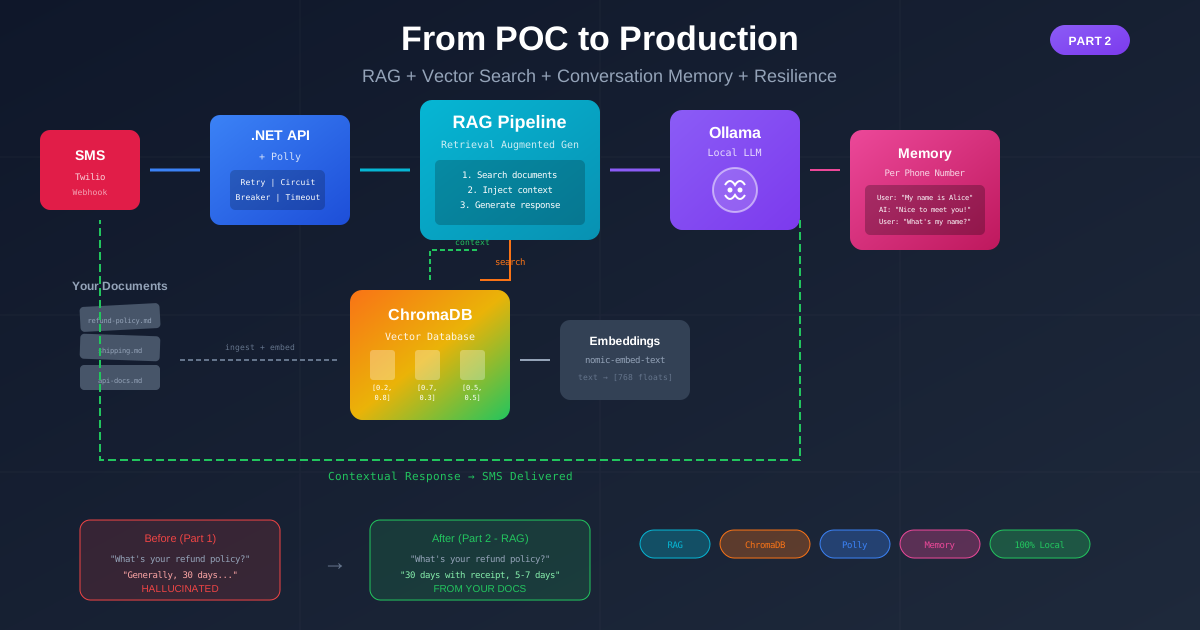
The Architecture (Upgraded)
Part 1 looked like this:
SMS → Twilio → .NET API → Ollama → Response
Part 2 adds several components:
SMS → Twilio → .NET API (with Polly) → RAG Pipeline
                    ↓                      ↓
              Conversation Memory    ChromaDB (vector search)
                                          ↓
                                    Ollama (embeddings + LLM)
Let me break down each new piece.
Vector Search with ChromaDB
Why Vector Search?
Traditional search finds exact matches. "Refund policy" matches "refund policy."
But what if someone asks "How do I get my money back?" That's the same question—but keyword search won't find your refund policy document.
Vector search understands meaning. It converts text into numbers (embeddings) where similar meanings have similar numbers. "Refund policy" and "get my money back" end up close together mathematically.
Setting Up ChromaDB
ChromaDB is a vector database that runs locally. Perfect for the "privacy-first" pitch.
I added a docker-compose.yml:
version: '3.8'

services:
  chroma:
    image: chromadb/chroma:latest
    container_name: sms-ai-chroma
    ports:
      - "8000:8000"
    volumes:
      - chroma-data:/chroma/chroma
    environment:
      - IS_PERSISTENT=TRUE

volumes:
  chroma-data:
Start it with docker-compose up -d. Vector database running locally in seconds.
Generating Embeddings
Here's the clever part: Ollama can generate embeddings too. No external API needed.
ollama pull nomic-embed-text
Now I have an embedding model running alongside my LLM. Same infrastructure, same privacy guarantees.
The service call:
public async Task<float[]> GetEmbeddingAsync(string text)
{
    var request = new { model = "nomic-embed-text", prompt = text };

    var response = await _httpClient.PostAsJsonAsync(
        "http://localhost:11434/api/embeddings", request);

    var result = await response.Content
        .ReadFromJsonAsync<EmbeddingResponse>();

    return result.embedding; // Array of ~768 floats
}
That array of numbers is the meaning of the text, encoded mathematically.
The Search Flow
When a user asks a question:
- Generate embedding for their question
- Search ChromaDB for documents with similar embeddings
- Return the top 3 most relevant chunks
- Inject into prompt
public async Task<IReadOnlyList<DocumentChunk>> SearchAsync(string query)
{
    var queryEmbedding = await _ollamaService.GetEmbeddingAsync(query);

    var request = new {
        query_embeddings = new[] { queryEmbedding },
        n_results = 3,
        include = new[] { "documents", "metadatas", "distances" }
    };

    var response = await _httpClient.PostAsJsonAsync(
        $"{_chromaUrl}/api/v1/collections/{_collectionId}/query",
        request);

    // Parse and return results...
}
Conversation Memory
Part 1 had no memory. Every message was independent.
User: "My name is Alice"
AI: "Nice to meet you, Alice!"

User: "What's my name?"
AI: "I don't know your name." [FAIL]
Now I track conversation history per phone number:
public class ConversationService
{
    private readonly ConcurrentDictionary<string, ConversationHistory> _conversations = new();

    public void AddMessage(string phoneNumber, string role, string content)
    {
        var history = _conversations.GetOrAdd(phoneNumber, _ => new ConversationHistory());

        // Check for session timeout (30 min)
        if (history.LastActivity.AddMinutes(30) < DateTime.UtcNow)
        {
            history.Messages.Clear(); // Start fresh
        }

        history.Messages.Add(new Message(role, content));
        history.LastActivity = DateTime.UtcNow;

        // Keep only last 10 exchanges
        while (history.Messages.Count > 20)
            history.Messages.RemoveAt(0);
    }

    public string GetConversationContext(string phoneNumber)
    {
        // Return formatted history for prompt injection
    }
}
Now conversations flow naturally:
User: "My name is Alice"
AI: "Nice to meet you, Alice!"

User: "What's my name?"
AI: "Your name is Alice!"
The 30-minute timeout means conversations expire naturally—no one wants context from yesterday bleeding into today's questions.
Resilience with Polly
The Part 1 code had a problem: if Ollama was slow or temporarily unavailable, the whole thing failed.
For production, I added Polly policies:
// Retry with exponential backoff
var retryPolicy = HttpPolicyExtensions
    .HandleTransientHttpError()
    .WaitAndRetryAsync(3, attempt => TimeSpan.FromSeconds(Math.Pow(2, attempt)));

// Circuit breaker - stop hammering a failing service
var circuitBreaker = HttpPolicyExtensions
    .HandleTransientHttpError()
    .CircuitBreakerAsync(5, TimeSpan.FromSeconds(30));

// Timeout - don't wait forever
var timeout = Policy.TimeoutAsync<HttpResponseMessage>(TimeSpan.FromSeconds(60));

// Register with HttpClientFactory
builder.Services.AddHttpClient<IOllamaService, OllamaService>()
    .AddPolicyHandler(retryPolicy)
    .AddPolicyHandler(circuitBreaker)
    .AddPolicyHandler(timeout);
Now when Ollama hiccups:
- Retry: Automatically tries again with backoff
- Circuit Breaker: Stops trying if it keeps failing (prevents cascade)
- Timeout: Never waits forever
The user gets a friendly error instead of a hung request.
The RAG Pipeline
Here's how it all comes together in the RagService:
public async Task<string> ProcessMessageAsync(string phoneNumber, string message)
{
    // Handle commands
    if (message.ToLower() is "reset" or "clear")
    {
        _conversationService.ClearConversation(phoneNumber);
        return "Conversation cleared. How can I help you?";
    }

    // Add to conversation history
    _conversationService.AddMessage(phoneNumber, "User", message);

    // Build prompt with RAG context
    var prompt = await BuildPromptAsync(phoneNumber, message);

    // Generate response
    var response = await _ollamaService.GenerateAsync(prompt, SystemPrompt);

    // Trim for SMS (max 320 chars)
    response = TrimForSms(response);

    // Save to history
    _conversationService.AddMessage(phoneNumber, "Assistant", response);

    return response;
}

private async Task<string> BuildPromptAsync(string phoneNumber, string message)
{
    var builder = new StringBuilder();

    // Search for relevant documents
    var relevantDocs = await _vectorSearchService.SearchAsync(message);

    if (relevantDocs.Any())
    {
        builder.AppendLine("Relevant documentation:");
        builder.AppendLine("---");
        foreach (var doc in relevantDocs)
        {
            builder.AppendLine($"[Source: {doc.Source}]");
            builder.AppendLine(doc.Content);
        }
        builder.AppendLine("---\n");
    }

    // Add conversation context
    var history = _conversationService.GetConversationContext(phoneNumber);
    if (!string.IsNullOrEmpty(history))
    {
        builder.AppendLine("Previous conversation:");
        builder.AppendLine(history);
    }

    builder.AppendLine($"User: {message}");
    builder.AppendLine("Assistant:");

    return builder.ToString();
}
Seeding Documents
For demos, I added a /seed endpoint that loads sample documents:
app.MapPost("/seed", async (IVectorSearchService vectorSearch) =>
{
    var sampleDocs = new[]
    {
        new DocumentChunk("doc-1",
            "Our refund policy allows returns within 30 days of purchase...",
            "refund-policy.md"),
        new DocumentChunk("doc-2",
            "Standard shipping takes 5-7 business days...",
            "shipping-policy.md"),
        // ... more documents
    };

    await vectorSearch.AddDocumentsAsync(sampleDocs);

    return Results.Ok(new { message = "Seeded successfully" });
});
For production, you'd build a proper document ingestion pipeline—reading from files, chunking intelligently, updating incrementally.
The Results
Before (Part 1):
User: "What's your refund policy?"
AI: "Generally, most companies offer 30-day refunds..." [GENERIC HALLUCINATION]
After (Part 2):
User: "What's your refund policy?"
AI: "Returns accepted within 30 days with receipt. Refunds processed in 5-7 business days to original payment method."
The AI is now reading from actual documentation. It cites what it knows. It admits when it doesn't have information instead of guessing.
Why This Matters for Consulting
This architecture solves real problems:
For Internal Knowledge Bases
"How do we handle refunds?" → Instant answer from your policy docs "What's our deployment process?" → Step-by-step from your runbooks "Where's the design spec for X?" → Found and summarized
For Customer Support
Field teams text questions, get answers from equipment manuals. After-hours inquiries get instant responses from your FAQ. Tier 1 support augmented with AI that knows your products.
For Client Projects
Train on their codebase. Text "How does the auth flow work?" and get an answer that references their actual implementation.
The Privacy Pitch
Everything runs locally:
- Ollama (LLM + embeddings) → Your machine
- ChromaDB (vector database) → Your machine
- .NET API → Your machine
- Only Twilio (SMS routing) is external
Client data never touches OpenAI, Anthropic, or any cloud AI provider. For regulated industries or privacy-conscious clients, this is the entire selling point.
What's Next
The code is open source: github.com/LearnedGeek/SmsAiAssistant
I'm exploring workshop formats where teams can build this hands-on. If that sounds interesting, reach out.
Technical Summary
| Component | Technology | Purpose |
|---|---|---|
| SMS Gateway | Twilio | Receive/send messages |
| API | .NET 10 Minimal API | Webhook endpoint |
| LLM | Ollama + llama3.2 | Generate responses |
| Embeddings | Ollama + nomic-embed-text | Semantic understanding |
| Vector DB | ChromaDB | Document search |
| Resilience | Polly | Retry, circuit breaker, timeout |
| Memory | In-memory Dictionary | Conversation context |
Key Takeaways
- RAG transforms generic AI into useful AI - Context is everything
- Vector search understands meaning, not just keywords - "Get my money back" finds refund policies
- Local infrastructure = privacy pitch - Huge selling point for enterprise
- Polly makes production code resilient - Don't deploy without it
- Conversation memory makes interactions natural - Users expect context
The POC proved the concept. This proves it's production-ready.
Part 1: Texting My Own AI: Building an SMS Interface to a Custom LLM in an Hour
Related: Running AI On Your Own Computer covers getting started with Ollama and local LLMs.


