I teach database programming at a technical college. Every week, students push code to GitHub Classroom repositories. Every week, I need to answer the same questions: Did they finish? Did it compile? Did anyone leave me a desperate // is this right??? comment at 2 AM that I should probably address?
For the first semester, my workflow looked like this:
- Open GitHub organization
- Click into student repo #1
- Check Actions tab (green check? red X?)
- Skim their code for obvious issues
- Repeat 29 more times
- Forget where I was
- Start over
- Question my life choices
This is not sustainable. This is not even sane.
So I built a dashboard. And then I made it smarter. And now I feel like a proper supervillain monitoring my lair—except instead of world domination, I'm tracking who forgot to remove their TODO comments.
The Problem: Information Scattered Like Student Focus During Week 14
Student submissions live in multiple places:
- GitHub — the code itself, plus Actions build status
- SonarCloud — code quality metrics (maintainability, bugs, code smells)
- The actual files — TODOs they didn't complete, questions buried in comments
Checking all three sources for 30 students across multiple assignments? That's a full afternoon gone. And I still might miss the student who wrote // I don't understand this part, can we go over this? on line 47.
That comment is the whole point of teaching. And I was missing it because I was drowning in tabs.
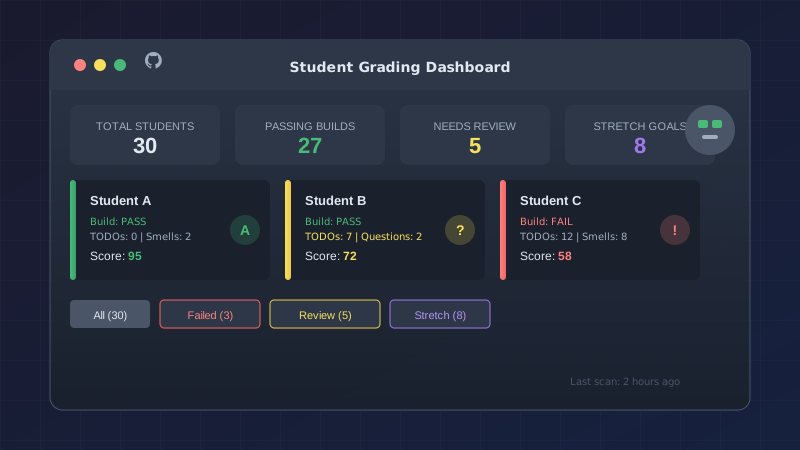
The Solution: One Dashboard to Rule Them All
I wanted a single page that would show me:
- Build status at a glance (green/red indicators)
- SonarCloud metrics (maintainability rating, code smells)
- TODO count (are they actually done?)
- Student comments flagged for review
- Stretch goal completion
- An estimated score to help me triage
And I wanted it updated automatically—not just when I remembered to run a script at 11 PM the night before grades are due.
Part 1: GitHub Actions Does the Heavy Lifting
The secret sauce is a GitHub Actions workflow that runs every 6 hours (and on-demand when I'm impatient). Here's the schedule:
on:
  schedule:
    - cron: '0 */6 * * *'
  workflow_dispatch:
    inputs:
      force_full_scan:
        description: 'Force full scan of all repos'
        type: boolean
        default: false
That type: boolean renders as a checkbox in the GitHub UI. I didn't know that was possible until I tried it. Small delights for small minds. (My mind. I'm talking about my mind.)
The Incremental Update Trick
Here's the thing about running analysis on 30+ repos every 6 hours: it's slow and wasteful if only 2 students pushed new code.
So the workflow tracks when it last ran:
LAST_RUN_FILE="dashboard/data/.last_run"
if [ -f "$LAST_RUN_FILE" ]; then
  LAST_RUN_TIME=$(cat "$LAST_RUN_FILE")
fi
For each repo, it compares the pushed_at timestamp from GitHub's API. No changes since last run? Skip the expensive analysis. New commits? Clone it and dig in.
This drops a full scan from several minutes to seconds on quiet days. On busy days (read: the night before the deadline), it earns its keep.
Scanning for the Good Stuff
When a repo needs analysis, the workflow clones it and scans every .cs file for things I care about:
TODOs they forgot about:
if echo "$line" | grep -qE 'TODO:|FIXME|HACK:'; then
  todo_count=$((todo_count + 1))
fi
A high TODO count usually means "I ran out of time" or "I forgot to clean up." Either way, it's worth a look.
Questions hiding in comments:
COMMENT_PATTERNS='\?\s*$|is this|should I|not sure|confused|help|question:'
That pattern catches gems like // is this the right approach? — exactly the kind of thing I want to address before slapping a grade on it. These are teaching moments disguised as code comments.
Stretch goal implementations:
if grep -q "CsvHelper" "$cs_file"; then
  has_stretch="true"
fi
Students who went beyond the requirements deserve recognition. Now I can filter for them with one click and celebrate their initiative.
Part 2: SonarCloud Integration
SonarCloud gives me static analysis for free on public repos. Each student repo runs its own SonarCloud workflow on push, then my dashboard workflow pulls the metrics via API:
curl -s -u "${SONAR_TOKEN}:" \
  "https://sonarcloud.io/api/measures/component?component=${sonar_key}&metricKeys=bugs,code_smells,sqale_rating"
The sqale_rating comes back as a number (1.0–5.0), which I map to letter grades:
case "$sqale" in
  "1.0") maintainability="A" ;;
  "2.0") maintainability="B" ;;
  "3.0") maintainability="C" ;;
  "4.0") maintainability="D" ;;
  "5.0") maintainability="E" ;;
esac
Now I can see at a glance: this student has an A in maintainability but 16 code smells. That's a conversation starter, not a failing grade. "Your code works and it's well-structured—let's talk about why you have six unused variables."
Part 3: The Dashboard Itself
The frontend is deliberately simple: Bootstrap, vanilla JavaScript, static JSON files. No build process. No npm install. Just HTML that GitHub Pages serves for free.
I've spent enough time in dependency hell. This dashboard will outlive npm trends.
Filtering That Actually Helps
The dashboard supports multiple filter dimensions:
- Status filters: All / Failed Builds / Needs Review / Stretch Goals
- Date range: 7 days / 14 days / 30 days / custom
- Assignment selector: Switch between assignments instantly
The "Needs Review" filter is the killer feature for grading day. It surfaces students who:
- Have more than 5 TODOs remaining
- Left questions in their code comments
- Have poor maintainability scores
These are the submissions that need human attention. Everyone else? Quick spot-check and move on.
Expandable Details
Each student card shows summary metrics, but clicking "Details" reveals:
- Exact TODO locations (
Program.cs:82) - Full text of flagged comments
- SonarCloud deep metrics (bugs, vulnerabilities, duplication %)
- Auto-generated grading notes
I can review a student's submission without ever leaving the dashboard or opening VS Code.
Part 4: The Student History View
Halfway through building this, I realized I also needed a cross-assignment view. How is Student X doing across all their submissions this semester? Are they improving? Struggling? Having a rough week 6 like the rest of us?
The Student History page aggregates data across assignments:
- Average score trend (with up/down indicators)
- Build pass rate visualization
- Stretch goal count over time
- Timeline of all submissions
This is invaluable for advising conversations: "I notice your build success rate dropped after week 4—what happened? Let's figure it out." That's more productive than "You got a C."
The Scoring Algorithm
The estimated score isn't meant to replace judgment—it's meant to triage. Here's the logic:
let score = 100;

// Build failure is a big deal
if (build_status === "failure") score -= 30;

// TODOs suggest incomplete work
if (todo_count > 5) {
  score -= 20;
  needs_review = true;
} else if (todo_count > 0) {
  score -= todo_count * 3;
}

// Poor maintainability needs attention
if (maintainability === "D" || maintainability === "E") {
  score -= 10;
}

// Student questions = review needed
if (comment_count > 0) needs_review = true;
A score of 85 doesn't mean "B"—it means "probably fine, verify quickly." A score of 65 means "dig deeper before assigning a grade."
The robot doesn't grade. The robot tells me where to look.
What I'd Do Differently
Start with the workflow, not the UI. I built a pretty dashboard first, then realized I had no good way to populate it automatically. Classic programmer move: "I'll make it look nice before it works." The data pipeline should come first; the visualization is just a view.
Track more history. I'm keeping 100 snapshots, but I wish I'd started storing per-commit data from day one. Seeing a student's progress within a single assignment would be valuable for understanding their process.
Add notifications. Right now I have to remember to check the dashboard. A Discord webhook when a student submission crosses certain thresholds ("new failing build" or "student left question") would close the loop. Maybe next semester.
Was It Worth It?
Grading used to take me 3–4 hours per assignment. Now it takes under an hour, and I catch issues I would have missed entirely.
More importantly: I can see patterns. Which students are struggling early? Who's coasting? Who deserves recognition for going above and beyond?
The dashboard doesn't grade for me. It shows me where to look. It surfaces the students who need help and the students who deserve celebration.
And on a good week, when all the builds pass and the TODOs are done and two students implemented the stretch goal?
I get to spend that extra time actually teaching.
Which, now that I think about it, is the whole point.
If you're curious about the implementation, the dashboard runs on GitHub Pages with GitHub Actions doing the analysis. The patterns here would work for any GitHub Classroom setup—or really any scenario where you're monitoring multiple repos for consistent metrics.