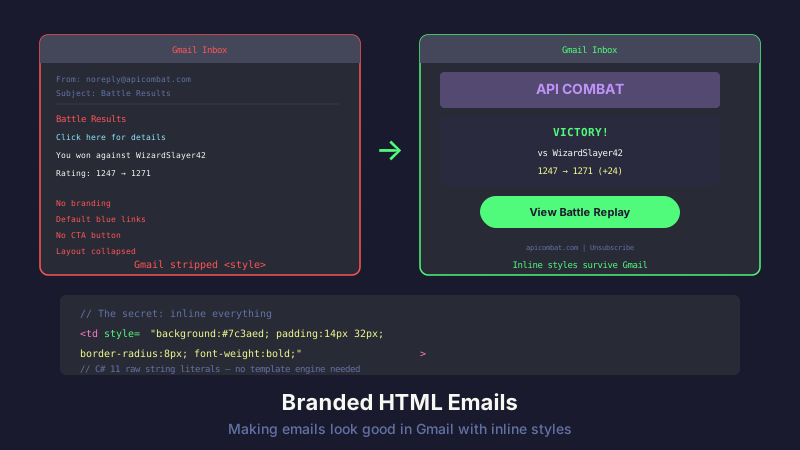
Gmail strips your <style> tags and overrides your link colors. Here's how we build branded HTML emails for API Combat that survive every client.
The Problem: Email Clients Hate You
I spent a solid afternoon building a beautiful email template. Custom fonts, CSS variables, a responsive layout with flexbox. It looked perfect in my browser's preview.
Then I sent it to Gmail.
Gmail stripped the entire <style> block. Every link turned default blue. The layout collapsed. My carefully designed CTA button looked like a hyperlink from 2003.
If you've ever built HTML emails, you know this feeling. Email clients are where modern CSS goes to die.
The Architecture: No Template Engine Required
API Combat sends transactional emails for account verification, password resets, battle results, and weekly digest notifications. Every one needs consistent branding. My first instinct was to reach for Razor views or a template engine like Fluid or Scriban.
I didn't need any of that.
C# 11 raw string literals handle email templates beautifully. The core interface is simple:
public interface IEmailTemplateService
{
    string Render(string title, string bodyHtml, string preheader);
}
Every email in the system calls Render() with a title, the inner HTML content, and a preheader (that snippet Gmail shows next to the subject line). The service wraps it all in a branded shell.
Here's the implementation using raw string literals:
public string Render(string title, string bodyHtml, string preheader)
{
return $"""
<!DOCTYPE html>
<html lang="en">
<head>
<meta charset="utf-8" />
<meta name="viewport" content="width=device-width, initial-scale=1.0" />
<title>{HtmlEncoder.Default.Encode(title)}</title>
<style>
@media (prefers-color-scheme: dark) {{
.email-body {{ background-color: #1a1a2e !important; }}
.email-content {{ background-color: #16213e !important; }}
.email-text {{ color: #e0e0e0 !important; }}
}}
</style>
</head>
<body style="margin:0; padding:0; background-color:#f4f4f4;">
<!-- Preheader text (hidden but shown in inbox preview) -->
<div style="display:none; max-height:0; overflow:hidden;">
{HtmlEncoder.Default.Encode(preheader)}
</div>
<table role="presentation" width="100%" cellpadding="0"
cellspacing="0" class="email-body"
style="background-color:#f4f4f4;">
<tr>
<td align="center" style="padding:20px 0;">
<table role="presentation" width="600" cellpadding="0"
cellspacing="0" class="email-content"
style="background-color:#ffffff; border-radius:8px;">
<!-- Header with logo -->
<tr>
<td style="padding:30px 40px 20px; text-align:center;
background-color:#0f0f23; border-radius:8px 8px 0 0;">
<img src="https://apicombat.com/img/logo.png"
alt="API Combat" width="180"
style="display:block; margin:0 auto;" />
</td>
</tr>
<!-- Body content -->
<tr>
<td class="email-text"
style="padding:30px 40px; color:#333333;
font-family:Arial, Helvetica, sans-serif;
font-size:16px; line-height:1.6;">
{bodyHtml}
</td>
</tr>
<!-- Footer -->
<tr>
<td style="padding:20px 40px 30px; text-align:center;
font-family:Arial, Helvetica, sans-serif;
font-size:12px; color:#999999;
border-top:1px solid #eeeeee;">
API Combat — The Developer's Game<br />
<a href="https://apicombat.com/account/preferences"
style="color:#999999;">Manage preferences</a>
</td>
</tr>
</table>
</td>
</tr>
</table>
</body>
</html>
""";
}
A few things to notice:
- Raw string literals (
$"""...""") let you write multi-line HTML with embedded expressions and no escaping nightmares. Curly braces in CSS need doubling ({{and}}), but that's it. - The preheader div is hidden with
display:nonebut email clients read it for inbox previews. This is how you control that snippet text next to your subject line. HtmlEncoder.Default.Encode()on the title and preheader. More on that in a moment.
No Razor views to maintain. No template engine dependency. Just a method that returns a string.
Tables: Yes, Still in 2026
Look at that markup. <table role="presentation"> everywhere. Nested tables for layout. Inline styles on every element.
I know. It hurts.
But email clients in 2026 still can't reliably render flexbox, grid, or even basic div-based layouts. Outlook uses Word's HTML renderer (yes, Microsoft Word). Gmail strips most CSS. Yahoo does its own thing entirely.
Tables are the only layout mechanism that works everywhere. This isn't a stylistic choice. It's survival.
The rules:
- Tables for structure,
<td>for spacing - Inline styles on everything because
<style>blocks get stripped role="presentation"on layout tables so screen readers don't announce "table, row 1 of 3, column 1 of 1" for your email wrapper- Fixed width (600px) for the content area because responsive email is a minefield
cellpadding="0" cellspacing="0"on every table because defaults vary across clients
The Gmail Color Hack
Here's the one that cost me an hour of debugging. I built a CTA button:
<!-- This looks great in your browser. Gmail will destroy it. -->
<a href="https://apicombat.com/verify?token=abc123"
   style="display:inline-block; padding:14px 32px;
          background-color:#e63946; color:#ffffff;
          text-decoration:none; border-radius:6px;
          font-family:Arial, sans-serif; font-weight:bold;">
    Verify Your Account
</a>
In Chrome, Firefox, and Apple Mail: white text on a red button. Beautiful.
In Gmail: blue text on a red button. Gmail overrides color on <a> tags with its default link blue. Your carefully chosen white text is gone.
The fix is almost insulting in its simplicity:
<!-- This survives Gmail. Note the !important. -->
<a href="https://apicombat.com/verify?token=abc123"
   style="display:inline-block; padding:14px 32px;
          background-color:#e63946; color:#ffffff !important;
          text-decoration:none; border-radius:6px;
          font-family:Arial, sans-serif; font-weight:bold;">
    Verify Your Account
</a>
color:#ffffff !important -- that's it. Gmail respects !important in inline styles even though it overrides normal inline color declarations. I don't know why. I don't want to know why. It works.
Every <a> tag in every email we send has !important on its color. It's ugly in the source. It's necessary for survival.
Dark Mode: Write It, Accept It'll Be Stripped
That @media (prefers-color-scheme: dark) block in the <style> tag? Gmail strips it. So does Outlook. The dark mode styles exist for Apple Mail and a handful of other clients that respect embedded stylesheets.
The rule: your light theme must work standalone. Dark mode is a progressive enhancement in email, not a requirement. If a client strips your <style> block (and Gmail will), every element falls back to its inline styles.
That's why the inline styles define the light theme completely. Dark mode lives in the <style> block for clients that support it. Everyone else gets light mode. And that's fine.
XSS in Email Is Real
When a user registers for API Combat, we send a welcome email that includes their username:
var bodyHtml = $"""
    <h2 style="color:#333; font-family:Arial, sans-serif;">
        Welcome, {HtmlEncoder.Default.Encode(username)}!
    </h2>
    <p style="color:#333; font-family:Arial, sans-serif; line-height:1.6;">
        Your account is ready. Verify your email to start battling.
    </p>
    """;
See that HtmlEncoder.Default.Encode(username)? That's not optional.
If someone registers with the username <script>alert('xss')</script>, that string goes directly into HTML we generate and send. Without encoding, you've just injected arbitrary HTML into an email that gets rendered in someone's browser-based email client.
Most email clients strip <script> tags, but not all strip everything. A crafted <img onerror="..."> or a CSS injection could still cause damage in some clients. Encode everything that comes from a user. Always. HtmlEncoder.Default.Encode() is your friend.
Sending with MailKit
We use MailKit for SMTP delivery. It's the gold standard for .NET email -- async, modern, and doesn't depend on the deprecated System.Net.Mail.SmtpClient.
public async Task SendEmailAsync(string to, string subject, string htmlBody)
{
    var message = new MimeMessage();
    message.From.Add(new MailboxAddress("API Combat", _settings.FromAddress));
    message.To.Add(MailboxAddress.Parse(to));
    message.Subject = subject;

    var bodyBuilder = new BodyBuilder
    {
        HtmlBody = htmlBody,
        TextBody = StripHtmlForPlainText(htmlBody)
    };
    message.Body = bodyBuilder.ToMessageBody();

    using var client = new SmtpClient();
    await client.ConnectAsync(
        _settings.SmtpHost,
        _settings.SmtpPort,     // 587
        SecureSocketOptions.StartTls
    );
    await client.AuthenticateAsync(
        _settings.SmtpUsername,
        _settings.SmtpPassword
    );
    await client.SendAsync(message);
    await client.DisconnectAsync(true);
}
A few things that bit me:
Port 587 with StartTls, not port 465 with SSL. Port 465 (implicit SSL) was deprecated, un-deprecated, and is technically valid again, but 587 with STARTTLS is what most providers expect. Our SMTP host requires it.
FromAddress must match the authenticated account. If you authenticate as [email protected] but try to send from [email protected], most SMTP servers will reject it. The From address and the authenticated user need to align. I covered the DNS authentication side of this in Email Authentication: SmarterASP + Cloudflare DNS -- SPF, DKIM, and DMARC all verify that your sending server is authorized for your domain.
Always include a plain-text body. StripHtmlForPlainText() is a simple utility that strips tags and decodes entities. Some email clients (and spam filters) penalize HTML-only emails. The BodyBuilder creates a proper multipart message with both versions.
Composing Specific Emails
With the template service in place, building individual emails is just string composition:
public string BuildVerificationEmail(string username, string verifyUrl)
{
    var safeUsername = HtmlEncoder.Default.Encode(username);
    var bodyHtml = $"""
        <h2 style="color:#333; font-family:Arial, sans-serif; margin:0 0 16px;">
            Welcome to API Combat, {safeUsername}!
        </h2>
        <p style="color:#555; font-family:Arial, sans-serif; line-height:1.6;">
            Your account is almost ready. Click the button below to verify
            your email and start battling.
        </p>
        <table role="presentation" cellpadding="0" cellspacing="0"
               style="margin:24px 0;">
            <tr>
                <td align="center" style="border-radius:6px;"
                    bgcolor="#e63946">
                    <a href="{verifyUrl}"
                       style="display:inline-block; padding:14px 32px;
                              color:#ffffff !important;
                              text-decoration:none; border-radius:6px;
                              font-family:Arial, sans-serif;
                              font-weight:bold; font-size:16px;">
                        Verify Your Account
                    </a>
                </td>
            </tr>
        </table>
        <p style="color:#999; font-family:Arial, sans-serif;
                  font-size:13px; line-height:1.5;">
            If the button doesn't work, copy and paste this link:<br />
            <a href="{verifyUrl}"
               style="color:#e63946 !important; word-break:break-all;">
                {verifyUrl}
            </a>
        </p>
        """;

    return _templateService.Render(
        "Verify Your Email",
        bodyHtml,
        $"{safeUsername}, verify your email to start playing API Combat"
    );
}
Notice the button is wrapped in a <table> with bgcolor on the <td>. That's the bulletproof button technique. Some email clients don't render background-color on <a> tags, but they all render bgcolor on table cells. The <a> tag fills the cell. The cell provides the background color. It works everywhere.
And yes, there's a plain-text fallback URL below the button. Because some email clients block images and strip HTML formatting entirely. That raw URL is the last line of defense.
What I'd Do Differently
If I were starting fresh, I'd consider MJML -- a markup language that compiles to email-safe HTML. You write clean, responsive-looking code and it generates the table-based nightmare for you. But for API Combat's needs (a handful of transactional email types with a shared shell), raw string literals are simple enough. The template service is under 100 lines.
I'd also invest in email preview testing earlier. Services like Litmus or Email on Acid render your email across dozens of clients so you can catch issues before your users do. I caught the Gmail color issue the hard way -- by sending test emails to myself and wondering why my buttons looked wrong.
The Cockroach of Web Development
Email HTML is the cockroach of web development. It survived the browser wars. It survived the rise of CSS Grid and flexbox. It survived responsive design, dark mode, and every modern standard we've built for the web.
While the rest of us moved to semantic markup and component architectures, email HTML just kept scuttling along with its inline styles, nested tables, and bgcolor attributes. It doesn't care about your design system. It doesn't care about your build tools. It has outlived every technology that was supposed to replace it.
And honestly? There's something almost admirable about that. Tables and inline styles will render an email exactly the same way in 2026 as they did in 2006. That's a kind of stability most web technologies can only dream about.
So if you're building transactional emails: embrace the cockroach. Inline your styles. Nest your tables. Slap !important on your link colors. It's not pretty in the source. But it's pretty in the inbox. And that's what matters.
This post is part of a series about building API Combat. See also: Introducing API Combat for the game overview, and Email Authentication: SmarterASP + Cloudflare DNS for the DNS setup that ensures your emails actually reach the inbox.