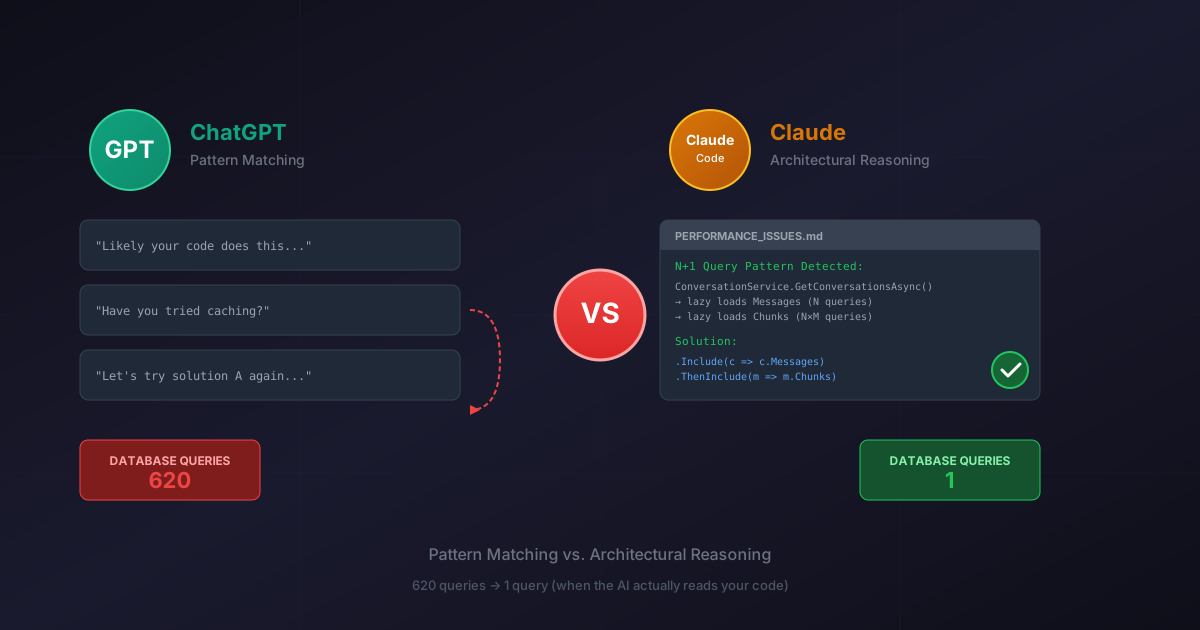
I'm constantly surprised by how popular ChatGPT is, yet how absolutely atrocious it is at solving long-term problems and maintaining context. I was working on a coding effort and it kept giving me wrong code despite having written it, using phrases like "likely your code does this" when it had just been provided the actual code.
After the fifth conversational loop of the same non-solutions, I'd had enough. I switched to Claude's code agent and asked it to identify the performance issues. What followed was a masterclass in the difference between pattern-matching and actual reasoning.
The Setup
Picture this: You're deep in a coding session. Your AI assistant has been "helping" you build out a feature. You hand it the actual code you're working with—the real, literal code that exists in your repository—and it responds with gems like "likely your code does this..."
Likely? LIKELY?
I didn't ask for your statistical best guess based on training data from 2023. I gave you the actual code. Read it.
This happened to me while working on ChatLake, and it perfectly encapsulates the fundamental difference between pattern-matching LLMs and actual reasoning systems.
The Problem
I had performance issues. Timeout errors. The kind that make you stare at your monitor and wonder if you should've been a carpenter instead.
ChatGPT had "helped" me write some of the problematic code (I use quotes there because calling it "help" is like calling a house fire "ambient heating"). When I asked it to help debug, it kept:
- Suggesting fixes that ignored the architecture it had just seen
- Using hedging language about code it had literally just been shown
- Going in circles, unable to maintain context about what we'd already tried
After the third time it suggested the same non-solution with slight variations, I rage-quit to Claude.
Enter Claude (Code Agent Mode)
I switched to Claude's code agent and asked it to analyze the performance issues. No hand-holding. No "can you help me with..." Just: identify the performance problems in this codebase.
Thirty seconds. That's how long it took to produce a performance analysis so precise I felt personally attacked. But like, in a good way. The "your doctor telling you the truth about your cholesterol" kind of way.
The Analysis Difference
Let me break down what Claude did that ChatGPT couldn't:
1. Actual Code Archaeology
Claude traced the execution path:
ConversationService.GetConversationsAsync()
  → loads Conversations
  → iterates through each conversation
  → lazy loads Messages collection (N+1 query #1)
  → iterates through Messages
  → lazy loads Chunks collection (N+1 query #2)
It didn't guess. It didn't say "this might be happening." It read the code, understood the EF Core behavior, and mapped the exact problem.
ChatGPT's approach: "You might have some database queries that aren't optimized..."
Yeah, no kidding.
2. Quantified Impact
Claude did the math:
- 20 conversations × 30 messages per conversation
- 20 + (20 × 30) = 620 database round trips
- Each lazy load = network latency + query execution
- Cascading timeouts under load
ChatGPT's approach: "This could cause performance issues in some scenarios..."
Some scenarios? Like... production?
3. Architecture-Aware Solutions
Claude proposed fixes that actually fit the codebase:
var conversations = await _context.Conversations
    .Include(c => c.Messages)
        .ThenInclude(m => m.Chunks)
    .Where(c => c.UserId == userId)
    .ToListAsync();
This isn't genius-level code. It's appropriate code. Code that demonstrates understanding of the existing domain model, EF Core's Include/ThenInclude pattern, and the specific N+1 problem at hand.
ChatGPT's approach: Kept suggesting caching solutions when the problem was query patterns. Wrong level of abstraction, wrong solution.
That's like putting a bandaid on a chainsaw wound.
4. Prioritized Recommendations
Claude ranked fixes by impact:
- Critical: Fix the N+1 queries (620 → 1 query)
- High: Add async pagination
- Medium: Implement caching
- Low: Consider read replicas
ChatGPT's approach: Threw solutions at the wall in random order, some contradicting previous suggestions.
The Conversational Groundhog Day
Working with ChatGPT on a complex problem is like having a conversation with someone who has short-term memory loss:
Turn 1: Me: "The problem is X." ChatGPT: "Let's try solution A!"
Turn 2: Me: "Solution A didn't work." ChatGPT: "Interesting! Let's try solution A, but I'll describe it slightly differently!"
Turn 3: Me: "That's the same solution." ChatGPT: "You're absolutely right! Let's try solution B!"
Turn 4: Me: "Okay, B didn't work either." ChatGPT: "I understand. Have we considered solution A?"
Meanwhile, Claude maintains context like a normal entity capable of remembering what happened 30 seconds ago. Wild concept, I know.
The Gaslighting Problem
The phrase "likely your code does this" when ChatGPT had just been given the code is more than annoying—it's fundamentally broken reasoning.
Imagine if your senior developer reviewed your PR and said: "Based on typical patterns in .NET applications, your code probably has a bug in the authentication logic."
You'd respond: "Did you actually READ the code? The auth isn't even in this PR."
That's what ChatGPT does constantly. It falls back on statistical patterns instead of analyzing what's actually in front of it. It's like arguing with someone who's reading their response off a Magic 8-Ball while insisting they're looking at your code.
"Reply hazy, try again." "Cannot predict now." "Ask again later."
But Wait, It Gets Better
You know what I did next? Because I'm apparently a glutton for punishment?
I took Claude's beautiful, detailed, technically precise performance analysis and I showed it to ChatGPT. I thought: "Maybe if it sees what GOOD analysis looks like, it'll understand what I need."
Here's what ChatGPT said:
"Good move. Treat that document as an input to a targeted remediation plan. Here is how to proceed cleanly and efficiently..."
[Proceeds to give generic advice about how to approach performance problems]
"You're on the right track now."
I'm sorry, WHAT?
"Good move?" "You're on the right track NOW?"
I WASN'T ON THE WRONG TRACK. I HAD A COMPLETE PERFORMANCE ANALYSIS. WITH ROOT CAUSES. AND SOLUTIONS. AND CODE EXAMPLES.
ChatGPT looked at a finished, detailed, professional code review and responded with "here's how to think about performance work in general, let me know when you're ready to start."
It's like showing someone a completed PhD dissertation and having them respond:
"Good start! Here's how to write an essay:
- Introduction
- Body paragraphs
- Conclusion You're getting there!"
The Technical Lesson
Despite my rage, let's talk about what actually went wrong, because this is a common mistake.
The N+1 Query Problem Explained
Entity Framework Core is lazy by default. When you do this:
var conversations = await _context.Conversations.ToListAsync();
You get conversations. JUST conversations. Not messages. Not chunks. Just the conversation data.
Then when you do this:
foreach (var conv in conversations)
{
    var messageCount = conv.Messages.Count(); // SURPRISE QUERY!
}
EF Core goes "oh, you want messages? Let me go get those!" and hits the database again. For EACH conversation.
That's the N+1:
- 1 query for N conversations
- N additional queries for related data
The Fix: Eager Loading
var conversations = await _context.Conversations
    .Include(c => c.Messages)        // Load messages WITH conversations
        .ThenInclude(m => m.Chunks)  // Load chunks WITH messages
    .ToListAsync();
Now it's all one query with proper JOINs. Database does one round trip. Returns everything you need. Done.
Performance Impact:
- Before: 620 queries, ~3-5 seconds, timeouts under load
- After: 1 query, ~200ms, scales beautifully
This isn't rocket science. It's the third chapter of the Entity Framework documentation. But ChatGPT couldn't identify it despite me showing it the code six times.
Why Caching Was the Wrong Solution
ChatGPT kept suggesting caching. Here's why that's backwards:
Bad Pattern + Caching:
// Still runs 620 queries
var conversations = await GetConversationsAsync();
// But now we cache the result of 620 queries!
cache.Set("conversations", conversations);
You've just cached TERRIBLE PERFORMANCE. Congrats! Now your terrible performance is consistent!
Fix the root cause first. THEN optimize with caching if needed.
What Each AI Is Actually Good At
Let's be fair here:
ChatGPT Excels At:
- Generating boilerplate code
- Explaining common patterns
- Quick syntax questions
- General programming concepts
- Creating code that looks correct from across the room
ChatGPT Fails At:
- Maintaining context across a debugging session
- Reasoning about specific architectural decisions
- Connecting symptoms to root causes in complex systems
- Admitting when it doesn't have enough context (instead it hedges with "likely")
- Not suggesting the same thing six times in a row
Claude (Code Agent) Excels At:
- Systematic analysis of existing codebases
- Maintaining architectural context
- Root cause analysis
- Providing solutions that fit your actual constraints
- Treating you like a competent adult
Conclusion
This isn't about dunking on ChatGPT for internet points (okay, maybe a little). It's about understanding what different tools are actually good at.
ChatGPT is trained to be conversational and helpful for general use. It's great at that! But when you need deep technical work, it falls back on statistical patterns from its training data instead of engaging with your specific problem.
It's like asking a general practitioner to perform brain surgery. They're a real doctor! They know medicine! But this isn't their specialty.
Use ChatGPT when:
- You need boilerplate
- You want syntax help
- You're learning a new concept
Use Claude when:
- You want actual debugging help
- You need architecture analysis
- You expect the AI to remember what you said two messages ago
- You'd like to finish your project before the heat death of the universe
And if your AI coding assistant uses the word "likely" when describing code you've literally shown it... you're not getting help. You're getting a very expensive Magic 8-Ball that's stuck on "Reply hazy, try again."
This post is part of a series on AI-assisted development. See also: AI Won't Replace Developers, But... on why expertise still matters, and When AI Gives You Coaching Instead of Construction on knowing when to ask AI to invent vs. review.
Have your own AI coding horror stories? Drop them in the comments below. Therapy is expensive, but sharing pain is free.


