The Problem
Last week I was wiring up an EventCallback in Blazor. The child component needed to tell the parent "hey, this task just changed." I copied the pattern from another component, it worked, and I moved on.
But I didn't understand it. Not really.
Every explanation I've read starts with "a delegate is a type-safe function pointer" and my brain immediately checks out. Function pointer? My eyes glaze over.
I can copy patterns. I can make things work. But I've never truly felt it click.
So let's try something different.
Forget Code. Let's Talk About Restaurants.
You walk into a restaurant. You sit down. You want food.
Here's what you don't do: walk into the kitchen, grab the chef by the shoulders, and say "MAKE ME A BURGER NOW."
Instead, you:
- Tell the waiter what you want
- Go back to your conversation
- The waiter comes back when your food is ready
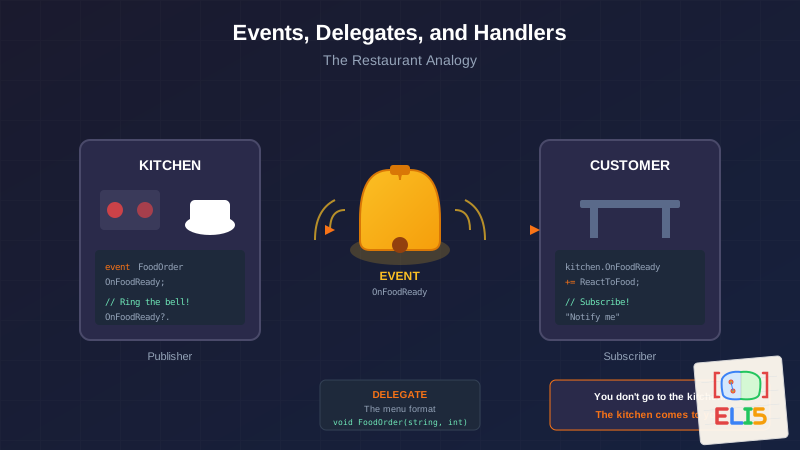
That's it. That's events and delegates. That's the whole thing.
You don't go to the kitchen. The kitchen comes to you when it's ready.
The Three Players
Let's name our players:
| Restaurant Term | C# Term | What It Does |
|---|---|---|
| The menu (what you CAN order) | Delegate | Defines the shape of a message |
| The bell the kitchen rings | Event | The signal that something happened |
| What you do when you hear the bell | Handler | Your response to that signal |
The Delegate: It's Just a Menu
Here's where most explanations fail. They say "a delegate is a type that represents a method signature."
Boring. Abstract. Useless.
Let's try again.
A delegate is a menu.
A menu doesn't contain food. It describes food. It says "a burger comes with a patty, bun, and toppings."
// This doesn't DO anything. It describes what a "food order" looks like.
public delegate void FoodOrder(string item, int quantity);
That's a delegate. It says: "Any message of type FoodOrder will include a string and an int."
It's not a method. It's not a function. It's a description of what methods must look like to participate in this conversation.
You can't eat a menu. But you can't order without one.
The Event: It's Just a Bell
The kitchen has a bell. When food is ready, they ring it.
The bell doesn't care who's listening. The bell doesn't care what you do when you hear it. The bell just... rings.
public class Kitchen
{
    // The bell. Anyone can listen for it.
    public event FoodOrder OnFoodReady;

    public void CookFood(string item, int quantity)
    {
        // ... cooking happens ...

        // Ring the bell!
        OnFoodReady?.Invoke(item, quantity);
    }
}
That ? is important. It means "if anyone is listening." If the restaurant is empty and no one subscribed to the bell, it just rings into silence. No crash. No error. Just silence.
The kitchen doesn't know or care who's listening. It just rings the bell.
The Handler: It's What YOU Do
You're sitting at your table. You hear the bell. What do you do?
That's your handler. It's YOUR method. It runs when the event fires.
public class Customer
{
    public void ReactToFoodReady(string item, int quantity)
    {
        Console.WriteLine($"Yay! My {quantity} {item}(s) are ready!");
    }
}
This method matches the delegate signature. String, int, returns void. It fits the menu description.
Putting It Together: Subscribe to the Bell
Here's the magic moment. You tell the kitchen: "Hey, when you ring that bell, call MY method."
var kitchen = new Kitchen();
var me = new Customer();

// Subscribe: "When OnFoodReady rings, call my ReactToFoodReady"
kitchen.OnFoodReady += me.ReactToFoodReady;

// Later, kitchen cooks and rings the bell
kitchen.CookFood("burger", 2);

// Output: "Yay! My 2 burger(s) are ready!"
That += is subscription. You're saying "add me to your notification list."
You don't poll the kitchen asking "is it ready yet?" The kitchen tells YOU.
The Aha Moment: Inversion of Control
Here's what finally clicked for me.
In normal code, I call methods directly:
// I call you
kitchen.CookFood("burger", 2);
string result = kitchen.GetStatus();
With events, it flips:
// You call me (when you're ready)
kitchen.OnFoodReady += me.ReactToFoodReady;
I don't ask "are you done?" I say "tell me when you're done."
That's it. That's the fundamental shift.
You stop pulling information. You start receiving notifications.
Why Does This Matter?
In the Blazor code I was just writing, I had this:
[Parameter] public EventCallback<TaskItem> OnStatusChanged { get; set; }
Before today, that was magic incantations. Now I see it:
EventCallback<TaskItem>= A bell that rings with TaskItem infoOnStatusChanged= The name of that bell- The parent component subscribes = "Call me when status changes"
When the child component does something:
await OnStatusChanged.InvokeAsync(Task);
It's ringing the bell. It's saying "HEY! Something changed! Here's what!"
The child doesn't know or care who's listening. It just rings.
The Pattern Everywhere
Once you see it, you see it everywhere:
- Button click: The button rings a bell when clicked. You handle it.
- File download: The downloader rings when complete. You handle it.
- Timer tick: The timer rings every interval. You handle it.
The publisher (kitchen) doesn't know the subscriber (you).
The subscriber doesn't know when things will happen.
They're connected only by the event - the bell.
Quick Reference
| Concept | Restaurant | Code |
|---|---|---|
| Delegate | The menu format | delegate void FoodOrder(string, int) |
| Event | The bell | event FoodOrder OnFoodReady |
| Handler | Your reaction | A method matching the delegate signature |
| Subscribe | "Notify me" | event += handler |
| Invoke | Ring the bell | event?.Invoke(...) |
The One Sentence Summary
Events let objects notify other objects that something happened, without knowing or caring who's listening.
Kitchen rings bell. Customer reacts. Neither knows the other's implementation details.
That's loose coupling. That's events. That's why we use them.
Bonus: EventCallback vs event in Blazor
In Blazor, you'll see EventCallback<T> instead of regular event. Why?
It's the same concept - still a bell - but EventCallback is optimized for Blazor's rendering system. When you invoke it, Blazor knows to re-render the component that's listening.
Think of it as a "smart bell" that also turns on the lights in your section of the restaurant so the waiter can find you.
// Regular C# event
public event Action<TaskItem> OnStatusChanged;

// Blazor's version - same idea, but UI-aware
[Parameter] public EventCallback<TaskItem> OnStatusChanged { get; set; }
Same bell. Same subscription model. Just smarter about UI updates.
This is part of the ELI5 series—technical concepts explained without the jargon. For more on Blazor component communication, see the code in context throughout this post. For another ELI5 deep dive, ELI5: Why Do Programs Forget to Clean Up After Themselves? covers memory leaks with the same no-jargon approach.
The key shift: stop thinking about "function pointers" and start thinking about bells and notifications. You're not calling methods—you're subscribing to announcements. Once that clicks, you'll see the pattern everywhere.


